Loading video...

Video Failed to Load

Go Home

🌟 Builder Spotlight: MagicMinute by Adarsh Singh Chauhan Email overload is universal. Every inbox fills faster than we can clear it. Adarsh built an agent that takes that weight off your shoulders. 📥 The pain You open Gmail. 43 unread messages. Half need a quick reply. The rest can...

12,189 views • 11 months ago •via X (Twitter)

0 Comments

No comments available

Comments from the original post will appear here

Related Videos

There are 8 billion people on earth. Soon there'll be 100 billion AI agents. Every one of them needs email. Six weeks ago I said the next wave of teams would run email through an agent instead of a dashboard. Today it ships. Nitrosend☄️ is launching Agentic Email Marketing: the email layer for the agent economy. What agents can do on Nitrosend right now: Sign themselves up. Point any agent at and it creates the account, connects your domain, sorts billing and sends its first email. No API key. No dashboard. No human required. Shipped, and users agents signing up with it daily. Get their own inboxes (beta, by request). Real addresses on the domain you own. Your agents receive, and send 1-1 email conversations with customers. A reply lands at 3am, your agent answers it. Anything that needs a human gets escalated to you. Ask us and we'll flick yours on. Next: Agentic Outreach (coming soon). Your agent studies your best customers, finds more like them, writes like a person, sends in sequence and works the replies. Then: set a goal and walk away. Goal-based agentic marketing is in development. "20% more activations this quarter" and Nitrosend plans, sends, measures and improves every week. Why we built this: Gmail is agent hostile and expensive per seat. Legacy email platforms assume a human sitting in a dashboard. agents needed an email layer of their own. They're already better at it than we are. They read everything, never miss a follow-up, and write personally at any scale. *94%* of actions on Nitrosend already happen inside an agent (Claude, Codex, ChatGPT, Cursor), not in our UI. Humans approve. Agents operate. This is our third email company. Six billion emails across the first two. We've been burned by every ugly part of email already, which is why the approval gates are built in exactly where you want them. Watch the launch, then send your agent to work: send it.

George Hartley ☄️

931,971 views • 24 days ago

New short course: Long-Term Agentic Memory with LangGraph. Learn to build an agent with long-term memory in this course developed in collaboration with taught by its Co-Founder and CEO, Harrison Chase! Personal assistance and productivity tasks have become important use cases for agents. An important feature of an AI assistant, such as a coding or calendar assistant, is its ability to keep improving over time from its experience. Agent memory is the key capability that enables this. To add memory to an agent, you must first figure out what to store and what to retrieve when it is time to use the information. Additionally, you’ll have to decide when to update the stored information. For example, you might update in each iteration loop of the agent or perform updates in the background, with a helper agent. In this course, you will learn a mental framework to build agents with long-term memory. You'll create a useful email assistant that can respond, ignore, and notify using writing, scheduling, and memory-management tools. You’ll develop your agent's memory by adding facts to its memory store, provide examples to learn the user's preferences, and optimize system prompts to evolve instructions based on previous responses. In detail, you’ll: - Learn how the three types of memory--semantic, episodic, and procedural–and the two update mechanisms–via hot path and in the background–apply to your agents. - Build an email agent with writing, scheduling, and availability tools, along with a router that triages incoming email and handles it accordingly by ignoring, responding, or notifying the user. - Add tools to your email agent that allow it to operate on semantic memory by learning facts about the user, storing them in a long-term memory store, and searching over them in future interactions. - Incorporate episodic memory, in the form of few-shot examples, in the triage step of your agents to help them learn and update user preferences. - Add procedural memory as system prompts, optimized with feedback to improve the instructions the agent follows. Learn how to approach memory in agents, and start building agents with long-term memory with LangGraph! Please sign up here:

Andrew Ng

131,850 views • 1 year ago

New short course: LLMs as Operating Systems: Agent Memory, created with Letta, and taught by its founders Charles Packer and Sarah Wooders. An LLM's input context window has limited space. Using a longer input context also costs more and results in slower processing. So, managing what's stored in this context window is important. In the innovative paper MemGPT: Towards LLMs as Operating Systems, its authors (which include the instructors) proposed using an LLM agent to manage this context window. Their system uses a large persistent memory that stores everything that could be included in the input context, and an agent decides what is actually included. Take the example of building a chatbot that needs to remember what's been said earlier in a conversation (perhaps over many days of interaction with a user). As the conversation's length grows, the memory management agent will move information from the input context to a persistent searchable database; summarize information to keep relevant facts in the input context; and restore relevant conversation elements from further back in time. This allows a chatbot to keep what's currently most relevant in its input context memory to generate the next response. When I read the original MemGPT paper, I thought it was an innovative technique for handling memory for LLMs. The open-source Letta framework, which we'll use in this course, makes MemGPT easy to implement. It adds memory to your LLM agents and gives them transparent long-term memory. In detail, you’ll learn: - How to build an agent that can edit its own limited input context memory, using tools and multi-step reasoning - What is a memory hierarchy (an idea from computer operating systems, which use a cache to speed up memory access), and how these ideas apply to managing the LLM input context (where the input context window is a "cache" storing the most relevant information; and an agent decides what to move in and out of this to/from a larger persistent storage system) - How to implement multi-agent collaboration by letting different agents share blocks of memory This course will give you a sophisticated understanding of memory management for LLMs, which is important for chatbots having long conversations, and for complex agentic workflows. Please sign up here!

Andrew Ng

200,950 views • 1 year ago

I asked Garry Tan how to use meta prompting to get better at AI: "My partners at YC Jared Friedman and Pete Koomen showed me how to do this. You can take almost anything that you do all the time and just drop it into a context window. And then say, “Here’s a bunch of inputs and outputs." And maybe you also add a bunch of notes. And then you tell it, “Write me a prompt that can act as an agent that takes this input and makes this output over here.” You can do this for almost any type of knowledge work. And you can even introspect. "What are things you notice that I did to convert this from the input to the output?”. And then you can just start using the prompt. Initially, it’s going to suck. Because it’s just not that smart yet. But what’s funny is now, I also use it to Iterate my writing. You can be very direct, "I would never say that", "Don’t say it like this", or "Oh, you used the long word there, use the short word". Just speak to it conversationally. And then when you're happy with the output, you can use that new output to make a new prompt. "Based on this conversation, give me a better initial prompt that incorporates all the things we talked about." And you can do this with literally everything. And in theory, there’s so much it applies to that people do day-to-day. You could use it for tweets. You could use it for editing podcasts. You can use it for pretty much everything. I have a folder of prompts that I use all the time. My YouTube prompt is on v27 or something. I'll go through this process with all the different max models. I'll use GPT 5.2 Pro. I’ll use Grok. I'll use Claude. Then, I’ll take all the outputs from all the models and put them into Claude and say "Here’s my prompt, here’s the output from four LLMs, including yourself. Rate each response and tell me what the pros and cons of each approach are." And I usually say "give it to me in numbered form". And then you can agree with one, disagree with two, tell it three is this or that. And then after that, you say given all of this, synthesize it."

The Peel

51,632 views • 5 months ago

Introducing the Clips chrome extension - the easiest way to send bug reports to agents with video, transcript, and browser debug info captured automatically. 100% free and open source. If you are like me and get tired of manually typing instructions to agents, attaching screenshots, pasting debug logs, and all of that, this might be your new favorite tool. With the Clips chrome extension, you can just click the Clips icon, hit record, and start talking. Visually demonstrate your issue, go through the flow, point out what’s broken. Clips will capture everything on your screen, plus network requests, browser logs, client errors, and all the details around them. And it redacts sensitive information. Then it gives you a link you can send to humans so they can play it and take a look. Or, more importantly, just give it to your agents by just pasting the URL to them. The link has special metadata for agents so just from the URL, the agent can pull all information from the clip automatically. No plugin or MCP server required. That means it can "see and hear" what’s in the video - read the transcript, grab snapshots at any timestamp, and inspect the logs and network requests that were shared with it. So whether you want to quickly demo an issue and send all that context to an agent, or get better bug reports from teammates, recording and sending Clips makes that super easy. Unlike expensive apps like Loom, this is all 100% free and open source. The framework that powers this, plus a bunch of other free applications, is open source too. You can just sign up and use it, or fork it and customize it to your needs. This, in my opinion, is the future of software. Rather than bloated SaaS that charges you a ton of money and still doesn’t even have the things you need, we get free open source canonical apps that you can fork and customize in any way you want. I'll link to all this stuff in the replies. If you try it, let me know your feedback.

Steve (Builder.io)

60,533 views • 1 month ago

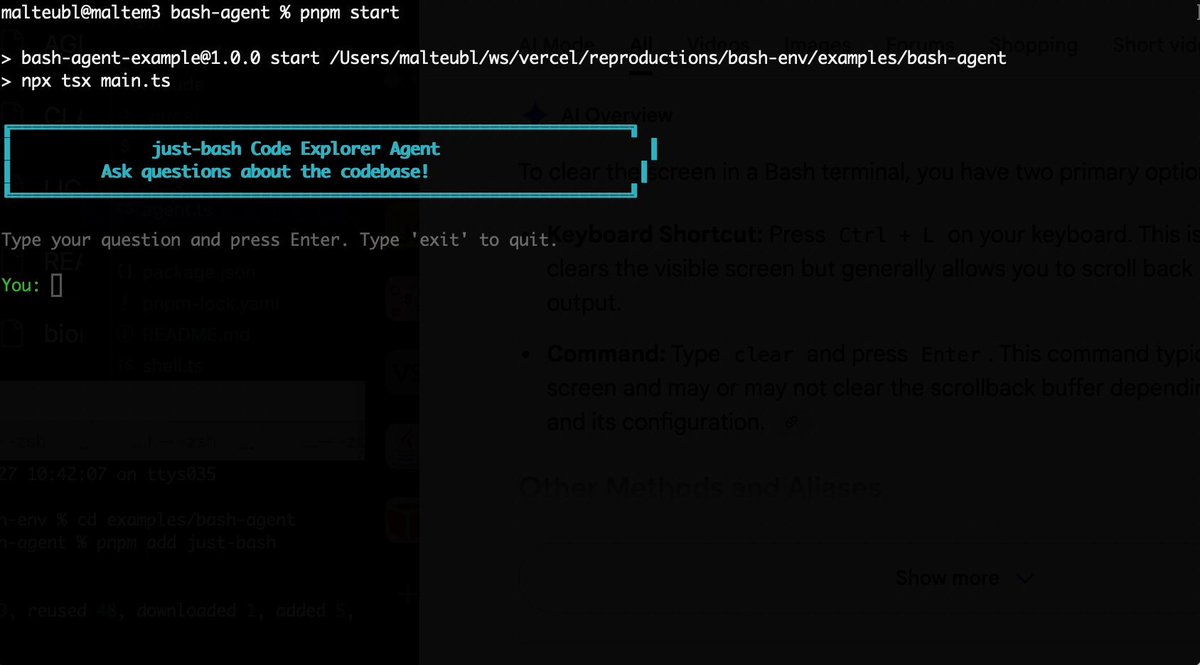
Bash is all you need! Which is why I'm introducing my holiday project: just-bash just-bash is a pretty complete implementation of bash in TypeScript designed to be used as a bash tool by AI agents. Because it turns out agents love exploring data via shell scripts, even beyond coding. It comes with grep, sed, awk and the 99th percentile features that an agent like Claude Code or Cursor would use. In fact, Claude Code can use it for secure bash execution. In the package - A bash-tool for AI SDK - A binary for use by yourself or your coding agents - An overlay filesystem to feed files to your agent securely - A Vercel Sandbox compatible API, so you can quickly upgrade to a real VM if you need to run binaries - An example AI agent that explores the just-bash code base using just-bash - I imported the Oils shell bash compatibility suite and just-bash passes a very good chunk What is interesting about this codebase: It was essentially entirely written by Opus 4.5. Coding agents love bash and they are good at reproducing it. They are also great at text-book recursive descent parsers and AST tweet-walk interpreters. That said, it is, like, a lot of code and I didn't read it all 😅. This is very much a hack, but it also seems to be _really_ useful. I haven't really found anything agents want to use that it doesn't support and it's fast and secure (caveats apply). It doesn't have write access to your computer and the filesystem is given a root that the agent cannot escape from. Find it at Related: Our recent blog post how we migrated our data analysis agent to bash tools and achieved incredible quality improvements The video shows the example agent investigating the just-bash code base

Malte Ubl

125,326 views • 7 months ago

This is insane. An AI agent can run every boring job in outbound. We spent the last 6 months building ours. Here are my 8 favorite agents to build: Replies get sorted before we open the inbox. Campaigns go live from one command. Weak inboxes pull themselves out before they hurt a domain. Here are the agents behind it: 1. Reply Agent Reads every reply and drafts the response. A human reviews, edits, and sends. 2. Mailbox Health Agent Watches inbox and domain health. It predicts when you need new mailboxes, then buys and warms them. 3. Campaign Optimizer Agent Checks every live campaign every 6 hours. If 500+ leads were emailed and replies are under 4%, it tests new copy, replaces inboxes replying under 1%, and shifts sending to better hours. 4. Lead Qualification Agent Scores each lead by company size, industry, and tech stack. It enriches the record, updates your CRM, and only loads qualified leads into campaigns. High-priority prospect? You get a Slack ping. 5. Meeting Booking Agent Finds meeting requests inside replies. It books the slot, writes prep notes using the lead's background, sends reminders, and logs the outcome. 6. Pipeline Progression Agent Tracks opens, clicks, and website visits. It moves the CRM stage, triggers the next sequence, and creates a task when a lead shows real intent. 7. Copywriting Agent Writes cold emails and follow-ups in the campaign's voice. 8. Analytics Agent Watches campaign metrics in real time and explains what to fix in plain language. We built ours with custom code. Smartlead's SmartAgents let you build agents like these from a plain-English prompt, inside the platform where your campaigns already run. If you repeat an outbound task more than twice a week, that is an agent you have not built yet. Which one would you build first?

Hosun Chung

156,050 views • 17 days ago

THIS GUY CONNECTED HIS AI AGENTS TO HIS OBSIDIAN AND BUILT A BRAIN THAT LEARNS ON ITS OWN. HERE'S HOW TO BUILD IT Obsidian is just markdown files sitting in a folder. That turns out to be the perfect memory for an AI agent, because an agent can read and write those files directly. He wired his agents into the vault so they pull context from it, do the work, and write what they learned back. The notes aren't the point. The loop is, and it gets sharper every cycle How to build it: 1. Point an agent at your vault. The fastest way, no plugins, no API keys: open a terminal and run npx obsidian-mcp /path/to/your/vault. That exposes your Obsidian folder to Claude as a tool it can read, search, and write to. Add it to your Claude Code or Cowork config and restart 2. Confirm it can see the brain. Ask it: "list the notes in my vault and summarize what's in them." If it reads them back, the connection is live. Now it starts every task with everything the vault already holds instead of from zero 3. Give each agent one job and a write-back rule. Tell it: "research this, then save what you found as a new note in /brain with links to related notes." One agent researches, one summarizes, one plans. Each writes its output back into the vault 4. Close the loop. Add one line to every agent's instructions: "read /brain before starting, write your result back when done." Now each task leaves the vault richer, and the next run reads that before it works. It compounds instead of resetting 5. You only steer. Review what the brain produces, point it at the next thing. The agents handle the reading, writing, and connecting The edge isn't better notes. It's a brain that feeds itself, so the work gets sharper every cycle instead of starting over Bookmark this

Yarchi

58,186 views • 2 months ago

AG-UI makes building agentic applications dramatically easier. Here's how it works. This is a model for a simple chatbot: User → LLM → Response But interactive agents that render UI, pause for approvals, and ask users for input need a much more complex model. When building these agents, a response from the LLM will include a series of state changes as the agent runs: • Agent started a task • Agent called a tool • Agent updated its state • Agent streams these tokens • Agent is waiting on a human • Agent is resuming the task The Agent-User Interaction Protocol (AG-UI) treats the LLM response as a stream of events rather than a text endpoint. In practice, here is what you get as an agent runs: 1. Lifecycle events so your UI knows where the agent is. 2. Text messages that stream tokens. 3. Tool calls so your UI can prefill a form with any required arguments. 4. State updates that keep your UI in sync with the agent. 5. Special events for human approvals, rich media, and custom needs. All of these events travel over standard transports (SSE, WebSockets, or plain HTTP) as JSON. As a result, you can build a frontend that stays in sync with the agent's progress without having to invent a custom process to make this happen. For example, building a human-in-the-loop workflow becomes an off-the-shelf component you can integrate rather than build from scratch. CopilotKit🪁 is the creator of AG-UI, and you can use it when building frontend applications pretty much anywhere: • React • Angular • Vue • React Native • Slack • Teams • Discord • WhatsApp • Telegram Here is the link for you to check it out: Thanks to the CopilotKit team for partnering with me on this post.

Santiago

17,438 views • 1 month ago

HERMES AGENT LEARNS FROM ITS OWN MISTAKES. UPDATES ITS MEMORY. CREATES ITS OWN SKILLS. NO CLOUD. EVERYTHING STORED LOCALLY. THIS IS HOW THE SELF-IMPROVING LOOP WORKS. most agents start from zero every session. Hermes carries forward what it learned. THREE MEMORY SYSTEMS: 1. PROCEDURAL MEMORY (how to act) stored in ~/.hermes/skills/ as SKILL.md files. when the agent repeats a complex workflow, it saves the procedure as a reusable skill. next time the same task comes up, it follows the skill instead of figuring it out again. you can also create skills explicitly: "create a skill called video-prep that captures how I format my video scripts. spoken english, define jargon inline, no em-dashes, close with a catchphrase." the agent writes the SKILL.md. available as a slash command from that moment. Hermes ships with 90+ skills. the number grows the longer you use it. 2. SEMANTIC MEMORY (durable facts about you) stored in ~/.hermes/memory/memory.md the agent scans conversations for facts worth remembering. preferences, habits, corrections, project details. real example from the video: agent tried to scrape a YouTube channel. URL was wrong. it failed. it updated memory.md with the correct URL pattern so it never makes the same mistake again. you can also save explicitly: "save to memory that my favorite testing framework is pytest" the agent updates memory.md immediately. this file loads into context on every session. the agent knows you better every week. 3. EPISODIC MEMORY (chat history) stored in ~/.hermes/state.db (local SQLite). every conversation. every tool call. every result. searchable with FTS5 full-text search. "search our past sessions. what was the first thing I ever said to you?" the agent queries state.db and finds it. over time, auxiliary models consolidate episodic memory into semantic memory. distilling recurring patterns into durable facts. THE SELF-IMPROVING LOOP: every agent run follows this cycle: → you send a prompt → working memory loads: SOUL.md + memory.md + relevant skills + chat history → agent calls tools (terminal, browser, delegate_task) → agent completes the task, replies to you → AFTER the reply: agent checks "did I learn something worth saving?" → if yes: updates memory.md or creates a new skill → next session starts smarter than the last this happens automatically. you don't ask the agent to learn. it decides what to remember on its own. WHAT MAKES THIS DIFFERENT FROM CLAUDE CODE: Claude Code has memory too. but Hermes stores everything locally. no cloud. your data never leaves your machine. Claude Code doesn't auto-create skills from experience. Hermes turns repeated workflows into reusable procedures. Claude Code memory is instruction-based. Hermes memory is conversational and self-updating. over months of usage, Hermes builds a knowledge base of your preferences, your projects, your mistakes, and the procedures that work for your specific workflow. the agent that remembers your birthday also remembers why your last deploy failed. NO EMBEDDINGS. PLAIN TEXT. Hermes does not use embeddings or RAG for memory. skill and memory search runs on plain text keyword matching. simpler. faster. no vector database to maintain. works entirely offline on your local machine. DELEGATE TO CLAUDE CODE: Hermes can spawn a sub-agent that runs Claude Code in headless mode: "spawn a sub-agent using Claude CLI to build a Python script that fetches the top 5 Hacker News stories to markdown." Hermes delegates. Claude Code writes the code. result returns to Hermes. Hermes runs the script and delivers the output. use Hermes for orchestration. use Claude Code for heavy coding. both tools. not competitors. WHAT HERMES DOES NOT HAVE: no built-in eval or LMOps system. no LangSmith, no LangFuse integration out of the box. trajectory export and logs exist but there is no automated quality tracking. if you need eval, build it yourself or connect external tools. the loop is self-improving. measuring how well it improves is on you. comment LOOP and I'll send you the configs that control how fast Hermes learns and what it remembers. memory limits, skill auto-creation triggers, and the auxiliary model that runs the learning. Replace your entire team with 8 hermes agents👇

YanXbt

22,720 views • 1 month ago