Video wird geladen...

Video konnte nicht geladen werden

Zur Startseite

Hell froze over: announcing FormKit for React. Secretly framework-agnostic since inception, today we’re open sourcing the most popular Vue form library…for React. Why is this a big deal? 1. Forms are still hard. We (the creators of FormKit) thought form libraries were no longer necessary, given the trajectory of...

11,549 Aufrufe • vor 3 Monaten •via X (Twitter)

0 Kommentare

Keine Kommentare verfügbar

Kommentare vom Original-Post werden hier angezeigt

Ähnliche Videos

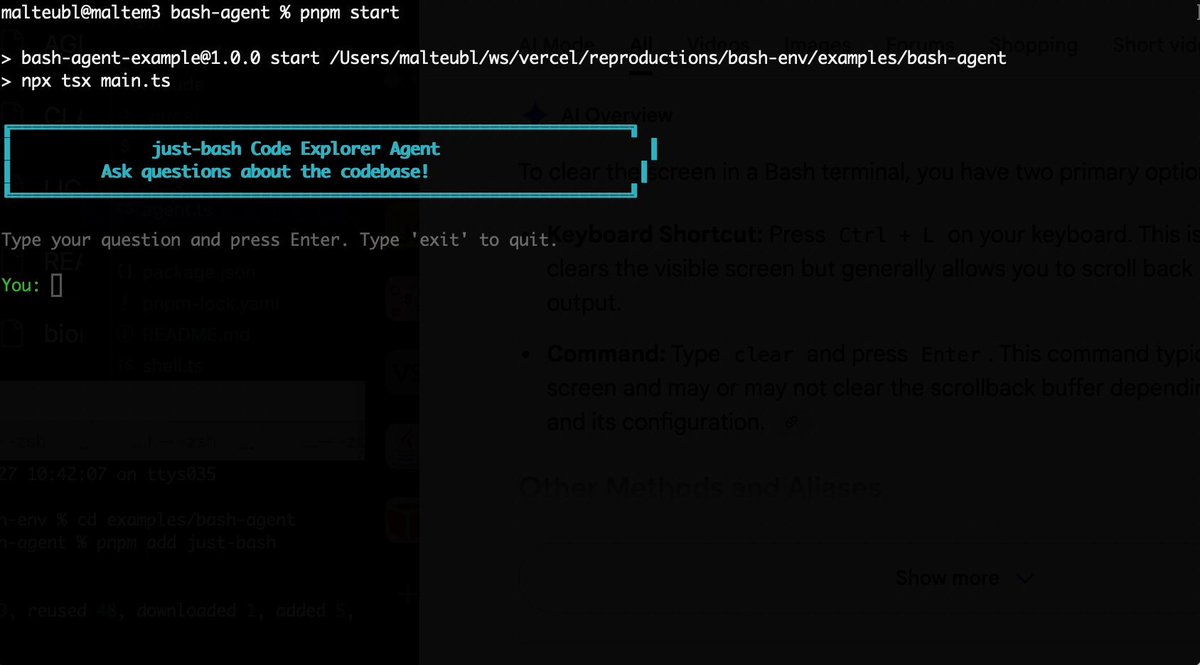
Bash is all you need! Which is why I'm introducing my holiday project: just-bash just-bash is a pretty complete implementation of bash in TypeScript designed to be used as a bash tool by AI agents. Because it turns out agents love exploring data via shell scripts, even beyond coding. It comes with grep, sed, awk and the 99th percentile features that an agent like Claude Code or Cursor would use. In fact, Claude Code can use it for secure bash execution. In the package - A bash-tool for AI SDK - A binary for use by yourself or your coding agents - An overlay filesystem to feed files to your agent securely - A Vercel Sandbox compatible API, so you can quickly upgrade to a real VM if you need to run binaries - An example AI agent that explores the just-bash code base using just-bash - I imported the Oils shell bash compatibility suite and just-bash passes a very good chunk What is interesting about this codebase: It was essentially entirely written by Opus 4.5. Coding agents love bash and they are good at reproducing it. They are also great at text-book recursive descent parsers and AST tweet-walk interpreters. That said, it is, like, a lot of code and I didn't read it all 😅. This is very much a hack, but it also seems to be _really_ useful. I haven't really found anything agents want to use that it doesn't support and it's fast and secure (caveats apply). It doesn't have write access to your computer and the filesystem is given a root that the agent cannot escape from. Find it at Related: Our recent blog post how we migrated our data analysis agent to bash tools and achieved incredible quality improvements The video shows the example agent investigating the just-bash code base

Malte Ubl

124,713 Aufrufe • vor 6 Monaten

✨New demo: what if vibe coding felt more visual? Brian Lovin Mary Rose Cook and I did a game jam using Notion as our "IDE": launching Cursor agents from a task board, and making a custom image for each task 😎 The demo shows 3 ideas for the future of agents: 1) Agents should collaborate across apps. Each app has its focus--Notion AI is good at drafting specs and organizing tasks; Cursor is good at coding. So let them specialize! Today we're launching a new integration where Notion AI can kick off Cursor Cloud Agents to do coding tasks. The Cursor API accepts natural language prompts, so I think of this as "cross-app sub-agents" -- it's kinda cute how it resembles humans hiring outside contractors 😊 BTW: the parallelism of cloud agents is incredibly freeing for creativity, but it also creates a new problem: sooo much work to keep track of! Which brings us to the next idea... 2) Agent orchestration is a data visualization problem. A powerful frame for designing agent UIs is to think of the chat transcripts as the "raw data" and ask: what visual projections might help people make sense of this data at scale? We need to engage our human GPUs -- our visual processing -- to understand what the computer GPUs are doing for us! One thing we can do is use AI to populate traditional UIs like progress bars and status updates. But there are also new possibilities now... For example: when you have a lot going on, it can be hard to identify tasks just by text titles. So we tried generating an AI image for each task -- turns out this helps a lot by giving it a unique visual identity! And of course, it also just makes it super fun to build with friends 😃 Speaking of friends... 3) The future of coding is collaborative. Sometimes it feels like IC engineers are being reduced to middle managers: shuffling information between the team's context and the coding agents that they individually manage. The solution: bring all the people and agents into one shared space, with shared context and visibility! In the video you can get a glimpse of how this feels. Mary, Brian and I record ourselves chatting about ideas, and then we use AI to turn that conversation into a list of tasks on a shared board. As the ideas get built in parallel, we can all monitor progress and review the work together, nothing is siloed. My main takeaway from this game jam was: damn, creativity with friends, at the speed of conversation, is incredibly fun. --- Our goal here is to let anyone use Notion as a fun and creative "software factory" to build software together with your team. Give the Cursor integration a shot and let us know what you think! (AI Image gen in Notion isn't GA yet, but coming soon and already out to some users) And let me know if you'd want a template or more detailed instructions on the setup we showed in this demo...

Geoffrey Litt

88,919 Aufrufe • vor 4 Monaten

I'm teaching a new course! AI Python for Beginners is a series of four short courses that teach anyone to code, regardless of current technical skill. We are offering these courses free for a limited time. Generative AI is transforming coding. This course teaches coding in a way that’s aligned with where the field is going, rather than where it has been: (1) AI as a Coding Companion. Experienced coders are using AI to help write snippets of code, debug code, and the like. We embrace this approach and describe best-practices for coding with a chatbot. Throughout the course, you'll have access to an AI chatbot that will be your own coding companion that can assist you every step of the way as you code. (2) Learning by Building AI Applications. You'll write code that interacts with large language models to quickly create fun applications to customize poems, write recipes, and manage a to-do list. This hands-on approach helps you see how writing code that calls on powerful AI models will make you more effective in your work and personal projects. With this approach, beginning programmers can learn to do useful things with code far faster than they could have even a year ago. Knowing a little bit of coding is increasingly helping people in job roles other than software engineers. For example, I've seen a marketing professional write code to download web pages and use generative AI to derive insights; a reporter write code to flag important stories; and an investor automate the initial drafts of contracts. With this course you’ll be equipped to automate repetitive tasks, analyze data more efficiently, and leverage AI to enhance your productivity. If you are already an experienced developer, please help me spread the word and encourage your non-developer friends to learn a little bit of coding. I hope you'll check out the first two short courses here!

Andrew Ng

1,224,403 Aufrufe • vor 1 Jahr

🚨 OpenAI just launched Codex, a brand-new autonomous coding agent that can build features and fix bugs on its own. We’ve been using it Every 📧 for a few days, and I’m impressed. I invited Alexander Embiricos (ben davies), a member of the product staff responsible for Codex, to demo Codex and talk about it live on a special edition of AI & I: What Codex is and how it works Codex is designed to be used by senior engineers—it performs coding tasks like adding features or fixing bugs autonomously. It's built to allow you to start many sessions at once, so you can have multiple agents working in parallel. Codex is built to have "taste" OpenAI trained Codex to have the taste of a senior software engineer. It knows how big codebases work, how to write a good PR, and uses clean, minimal code. Why an “abundance mindset” is best for interacting with agents Codex is designed to allow users to delegate many tasks at once without getting caught up in the details. This lets you point an abundance of agents at a specific task like a difficult bug—it’s worth it even if only one of them succeeds. How OpenAI is thinking about agents Codex is one piece of a unified super-assistant OpenAI wants to eventually build—an agent that helps users easily get things done by selecting the right tools for them behind the scenes. OpenAI’s vision for the future of programming In the future developers will probably spend less time writing routine code and more time guiding agents, reviewing their work, and making strategy decisions. Programming will become more social, letting teams easily delegate multiple tasks at once, allowing people to focus on ideas and collaboration instead of routine coding. Watch below!

Dan Shipper 📧

145,487 Aufrufe • vor 1 Jahr

AG-UI makes building agentic applications dramatically easier. Here's how it works. This is a model for a simple chatbot: User → LLM → Response But interactive agents that render UI, pause for approvals, and ask users for input need a much more complex model. When building these agents, a response from the LLM will include a series of state changes as the agent runs: • Agent started a task • Agent called a tool • Agent updated its state • Agent streams these tokens • Agent is waiting on a human • Agent is resuming the task The Agent-User Interaction Protocol (AG-UI) treats the LLM response as a stream of events rather than a text endpoint. In practice, here is what you get as an agent runs: 1. Lifecycle events so your UI knows where the agent is. 2. Text messages that stream tokens. 3. Tool calls so your UI can prefill a form with any required arguments. 4. State updates that keep your UI in sync with the agent. 5. Special events for human approvals, rich media, and custom needs. All of these events travel over standard transports (SSE, WebSockets, or plain HTTP) as JSON. As a result, you can build a frontend that stays in sync with the agent's progress without having to invent a custom process to make this happen. For example, building a human-in-the-loop workflow becomes an off-the-shelf component you can integrate rather than build from scratch. CopilotKit🪁 is the creator of AG-UI, and you can use it when building frontend applications pretty much anywhere: • React • Angular • Vue • React Native • Slack • Teams • Discord • WhatsApp • Telegram Here is the link for you to check it out: Thanks to the CopilotKit team for partnering with me on this post.

Santiago

17,438 Aufrufe • vor 21 Tagen

New short course: Vibe Coding 101 with Replit! Learn to build and host applications with an AI agent in this course, built in partnership with Replit ⠕ and taught by its President Michele Catasta and Head of Developer Relations . Coding agents are changing how we write code. "Vibe coding" refers to a growing practice where you might barely look at the generated code, and instead focus on the architecture and features of your application. However, contrary to popular belief, effectively coding this way isn't done by just prompting, accepting all recommendations, and hoping for the best. It requires structuring your work, refining your prompts, and having a systematic process that lead to a more efficient and effective workflow. I code frequently using LLMs, and asking an LLM to do everything in one shot usually does not work. I'll typically take a problem, partition it into manageable modules, spend time creating prompts to specify each module, and use the model to produce the code one module at a time, and test/debug each module before moving on. A process like this is making me and many other developers faster and more efficient. In this video-only course, you’ll learn how to use Replit’s cloud environment--with an integrated code editor, package manager, and deployment tools--to build and deploy web applications. Along the way, you’ll learn strategies for working effectively with agents and improve your development skills. In detail, you’ll: - Understand principles of agentic code development such as being precise, giving agents one task at a time, making prompts specific, keeping projects tidy, starting with fresh sessions for each new feature, and how to approach debugging. - Learn how to get started with Replit, and key skills for vibe coding: Thinking, using frameworks, checkpoints, debugging, and providing context. - Create a product requirement document (PRD) and wireframe for your agent to build a prototype of a website performance analyzer. - See how to use an agent to make your prototype more visually appealing, and deploy it application others to access . - Learn to build a head-to-head national park ranking app, from a sample dataset, with voting capabilities and persistent data storage, and refine further ask the assistant to recap and explain what it built to find room for improvement and reinforce your learning. By the end of this course, you’ll have a solid foundation in building with coding agents, and a process you can use to keep vibe coding effectively. Please sign up here:

Andrew Ng

752,508 Aufrufe • vor 1 Jahr

Introducing Open Source AI CRM, that runs on your OpenClaw. A few weeks ago, we launched Ironclaw (An Open Source OpenClaw CRM Framework) which now has around 1.4k stars. A lot of people confused us with NearAI’s Ironclaw, so we changed our name to DenchClaw. OpenClaw today feels a lot like early React: the primitive is incredibly powerful, but the patterns are still forming, and everyone is piecing together their own way to actually use it. What made React explode wasn’t just React itself, but the emergence of frameworks like Gatsby and Next.js that turned raw capability into something opinionated, repeatable, and easy to adopt. That is how I think about DenchClaw. We are not just building on top of OpenClaw; we are trying to make it one of the clearest, most practical, and most complete ways to use OpenClaw in the real world. We are an OpenClaw Framework, we are aiming to be the most correct way to use OpenClaw. We entered Y Combinator with Merse (AI Audio Comic), it was an app that I personally never used. Michael Seibel confronted us on it, and said, “if you aren’t the best user of your consumer app, then who is?”. I now use DenchClaw daily for everything I do, it also works as a coding agent like Cursor, DenchClaw built DenchClaw. I am addicted to DenchClaw now that I can ask it, “hey in the companies table only show me the ones who have more than 5 employees” and it updates it live than me having to manually add a filter. On Dench, everything sits in a file system, the table filters, views, column toggles, calendar/gantt views, etc, so OpenClaw can directly work with it using Dench’s CRM skill. The CRM is built on top of DuckDB, the smallest, most performant and at the same time also feature rich database we could find. It creates a new OpenClaw🦞 profile called “dench”, and opens a new OpenClaw Gateway… that means you can run all your usual openclaw commands by just prefixing every command with `openclaw --profile dench` . It will start your gateway on port 19001 range. You will be able to access the DenchClaw frontend at localhost:3100. Once you open it on Safari, just add it to your Dock to use it as a PWA. Think of it as Cursor for your Mac which is based on OpenClaw. DenchClaw has a file tree view for you to use it as an elevated finder tool to do anything on your mac. I use it to create slides, do LinkedIn outreach using MY browser. DenchClaw sees what you see, does what you do. It’s the everything app, that sits locally on your mac. All yours. Just ask it “hey import my notion”, “hey import everything from my hubspot”, and it will literally go into your browser, export all objects and documents and put it in its own workspace that you can use. P.S. It comes with Garry Tan's GStack built in.

Mark Rachapoom

19,411 Aufrufe • vor 3 Monaten

this video is the CLEAREST explanation of how claude skills + AI agents work and how to use them most people set up an AI agent and wonder why it keeps disappointing them. the context window is everything context is what the model assembles before it takes any action. think of it like everything the agent needs to read before it does anything. the quality of what goes in determines the quality of what comes out. the models are genuinely really good right now. claude and gpt are exceptional. the variable is almost always the context you give them. 1. agent.md files are mostly unnecessary every single line you put in an agent.md file gets added to every single conversation you have with your agent. a 1000 line file is around 7000 tokens burning on every run. the model already knows to use react. it can read your codebase. save the agent.md for proprietary information specific to your company that the model genuinely cannot know on its own. 2. skills are the actual unlock a skill.md file works differently. what loads into context is only the name and description, around 50 tokens. the full instructions only appear when the agent recognizes it needs that skill. so instead of 7000 tokens on every run you have 50. and the agent stays sharp because the context window stays lean. the closer you get to filling the context window the worse the agent performs, same way you perform worse when someone dumps 10 things on you at once. 3. here is how to actually build a skill the right way most people identify a workflow and immediately try to write the skill. what you want to do instead is run the workflow by hand with the agent first. walk it through every single step. tell it what to check, what good looks like, what bad looks like. correct it in real time. once you have had a full successful run from start to finish, tell the agent to review everything it just did and write the skill itself. it writes a better skill than you will because it has the full context of what actually worked in practice not in theory. 4. recursively building skills is how you go from frustrated to reliable when the skill breaks, and it will break, ask the agent exactly why it failed. it will tell you specifically what went wrong. fix it together in that same conversation. then tell it to update the skill file so that failure mode never happens again. ross mike did this five times with his youtube report generator. it now pulls from eight different data sources and runs flawlessly every single time without him touching it. 5. sub agents are something you earn not something you set up on day one start with one agent. build one workflow. turn it into one skill. once that works add another. ross mike has five sub agents now covering marketing, business, personal and more. it took months to get there and every single one exists because a workflow proved it deserved to exist. the people who set up 15 sub agents on day one and wonder why nothing works skipped all the steps that make the thing actually run. 6. your workflow is the thing the model cannot get anywhere else the model has been trained on everything. it knows more than you about most things. what it does not have is your specific process, your taste, your way of doing things. that is what skills capture. that is what makes your agent actually useful versus a generic one. downloading someone else's skill means downloading their context onto your setup and it will not work the way you want it to because it was never built around how you work. this is the clearest explanation of how agents actually work i have heard. Micky runs this stuff every single day and the results show it. full episode is now live on The Startup Ideas Podcast (SIP) 🧃 where you get your pods people charge for this sorta stuff i give away the sauce for free i just want you to win watch

GREG ISENBERG

192,483 Aufrufe • vor 3 Monaten