Video wird geladen...

Video konnte nicht geladen werden

Zur Startseite

Introducing Files SDK A unified storage SDK for object and blob backends. One small, honest API. Web-standards I/O. An escape hatch when you need the native client. → 18 providers - S3, R2, Vercel Blob, Google Drive, etc. → upload, download, head, delete, copy, list, url → Works everywhere...

246,689 Aufrufe • vor 2 Monaten •via X (Twitter)

0 Kommentare

Keine Kommentare verfügbar

Kommentare vom Original-Post werden hier angezeigt

Ähnliche Videos

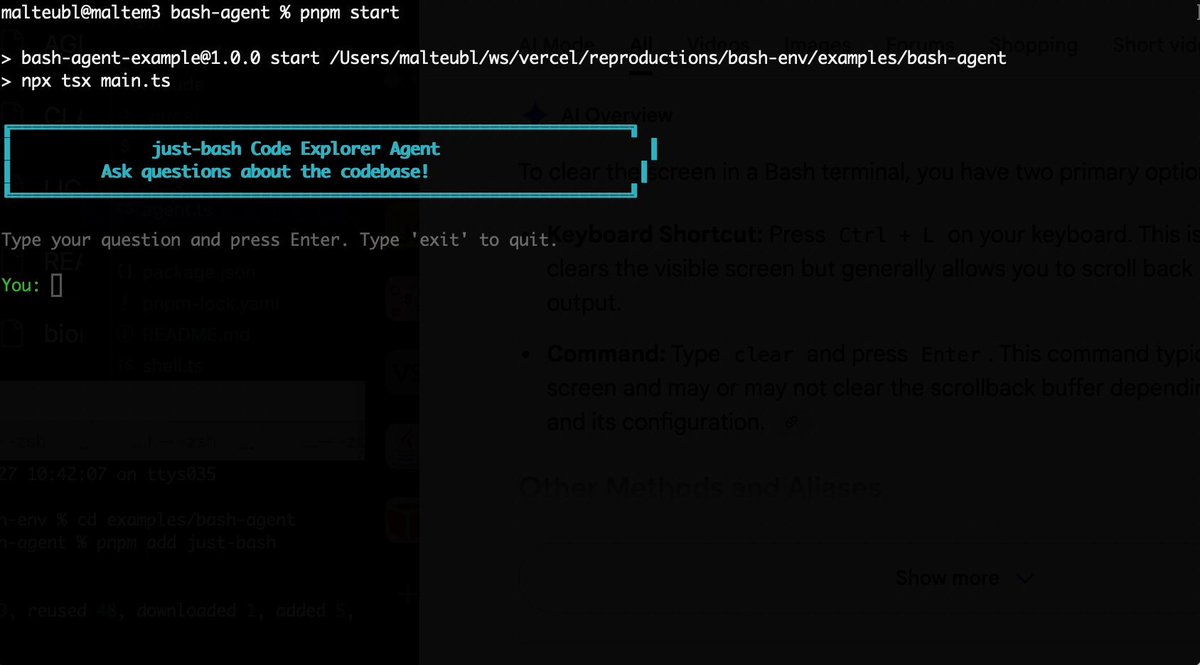
Bash is all you need! Which is why I'm introducing my holiday project: just-bash just-bash is a pretty complete implementation of bash in TypeScript designed to be used as a bash tool by AI agents. Because it turns out agents love exploring data via shell scripts, even beyond coding. It comes with grep, sed, awk and the 99th percentile features that an agent like Claude Code or Cursor would use. In fact, Claude Code can use it for secure bash execution. In the package - A bash-tool for AI SDK - A binary for use by yourself or your coding agents - An overlay filesystem to feed files to your agent securely - A Vercel Sandbox compatible API, so you can quickly upgrade to a real VM if you need to run binaries - An example AI agent that explores the just-bash code base using just-bash - I imported the Oils shell bash compatibility suite and just-bash passes a very good chunk What is interesting about this codebase: It was essentially entirely written by Opus 4.5. Coding agents love bash and they are good at reproducing it. They are also great at text-book recursive descent parsers and AST tweet-walk interpreters. That said, it is, like, a lot of code and I didn't read it all 😅. This is very much a hack, but it also seems to be _really_ useful. I haven't really found anything agents want to use that it doesn't support and it's fast and secure (caveats apply). It doesn't have write access to your computer and the filesystem is given a root that the agent cannot escape from. Find it at Related: Our recent blog post how we migrated our data analysis agent to bash tools and achieved incredible quality improvements The video shows the example agent investigating the just-bash code base

Malte Ubl

124,713 Aufrufe • vor 6 Monaten

I've been building a music player with Next.js for fun. Here's a quick demo of how it works (it's open source!) • Demo: • Code: If you want to learn more about how it's built, here's more details ↓ I'm using Postgres (with Drizzle) to store information about the songs and playlists. Audio and image files are stored in Vercel Blob (object storage), and the URLs are then referenced in the database. For the UI, I'm using shadcn/ui (so Tailwind CSS and Radix). This made it easy to copy/paste in some nice components, like the dropdown menus. I built the entire first version of the UI in v0 and then iterated from there, feeding it my Drizzle schema as a source in the project and having it scaffold some of the boilerplate for me: I added support for keyboard navigation (using arrow keys) or vim motions (j/k to go up/down, and h/l to go between playlists and tracks). Also, space to toggle the now playing song, and / to focus the search input. The search function has a nice utility to highlight the currently searched text on the page in yellow. Then, I was exploring how to pass metadata from my application to macOS or iOS. Turns out there's an API for that – MediaSession. Web apps can share metadata about what media is playing (title, artist, album artwork) and sync play/pause/seek with system media controls. Works across modern browsers — even integrates with iOS dynamic island and shows up on lock screens: I set up my app like a PWA – it has a manifest.json file, so it can be installed to my iOS home screen or added to my dock on macOS. On iOS, it then uses the full screen height `100dvh` (dynamic viewport) and has padding on the bottom for the safe area with the `env()` CSS function. Finally, I was able to use the Vercel AI SDK in a script to clean up the metadata on audio files I downloaded from YouTube. Bonus: I even was able to dogfood the React Compiler, which helped me fix a performance bug! That's all! It's fun to make personal software:

Lee Robinson

118,242 Aufrufe • vor 1 Jahr

I’ve been watching x402 since Coinbase 🛡️ launched it in May 2025. I did a quick research pass. Here’s the snapshot ↓ Early integrations: • CoinGecko: x402 pay-per-use access for agents (shared by Coinbase Developer Platform🛡️). • Vercel: x402 AI starter template (x402 + modern AI stack demo). • Firecrawl: x402-powered search endpoint (pay per request). • Concordium: x402 + native age verification for agent payments. • Multiversᕽ: “agentic payments” built around x402 support. • AltLayer: building an “x402 Suite” for value exchange between agents. • Solana claims x402 has processed 35M+ transactions and $10M+ volume since launch. TL;DR x402 turns HTTP 402 “Payment Required” into a payment flow. A server returns a price for a request. The client pays in stables like USDC. Then the server returns the result. → Coinbase launched x402 via Coinbase Developer Platform (May 6, 2025). → Coinbase + Cloudflare announced the x402 Foundation (Sep 23, 2025). → Cloudflare added x402 support into its Agents SDK + MCP servers. Why? - AI agents need a clean way to pay for tools. - Data, compute, APIs, services. - No accounts, cards, or subscription screens. x402 is trying to make pay-per-request feel normal. Use cases that already make sense → Paid APIs Pay per call instead of subscriptions. → AI tool calls Pay per query, per inference, per task. → Agent-to-agent payments Software paying software automatically. → Micropaywalls Pay for one endpoint, one action, one piece of content. If this takes off, stablecoins stop being a story. They become how apps and AI agents pay for things online.

Stacy Muur

12,199 Aufrufe • vor 5 Monaten

⚡️We are excited to announce that our new no-code Enterprise Platform is NOW available in private beta! As RAG apps advance from prototype to production we’ve been overwhelmed by requests for an enterprise grade solution to provide these applications with the data they need. Designed to make it easy to get your data #RAGready, our Platform can preprocess more than 25 file types and soon will be fully #multimodal, also able to ingest audio, video and image files. We ship with a baseline suite of source connectors, including Amazon Web Services S3, Microsoft Azure Blob Storage, OneDrive, SFTP, Databricks Delta Table, Google Drive, Salesforce, Elastic, OpenSearch, and Google Cloud storage with many more fast following. Platform transforms your documents into a standardized JSON schema, broken down into semantically coherent elements allowing you to reconstruct your document in the manner most useful to you. Want only the narrative text but not the headers and footers? This is entirely configurable through the UI. Additionally, we generate more than 30 types of metadata for each element to make it easy to curate the data being written downstream and to support metadata filtering during retrieval. Smart chunking and the ability to choose from a range of embedding models are in from launch, delivering a turnkey solution for chunk and embedding experimentation. As for destination connectors, we've got that covered too, with Amazon Web Services S3, Pinecone, Chroma , Weaviate AI Database, Google Cloud storage, MongoDB, Microsoft Azure cognitive search, PostgreSQL, Elastic, OpenSearch, and Databricks Delta Table. And of course, all of this can be scheduled to keep your data continuously hydrated. The private-beta is live today! Sign-up to get access and come build the future of LLM data foundations with us: 🚀 #ETLforLLMs #AI #DataPreprocessing #DataScience #DataTransformation #LLMs #ETL #ML #PreppingData #MachineLearning #RAG #Engineer #Unstructured #Unstructuredio #RetrievalAugmentedGeneration #multimodal #AIJobs

Unstructured

21,874 Aufrufe • vor 2 Jahren

Introducing Workshop: cloud + on-device agentic AI. And to celebrate, we're giving away $250k in Google Gemini AI credits. (details below). The future of AI work is neither cloud-based nor local. It's both. In Workshop Cloud, you can use agents powered by frontier models like Claude and/or open source models like Z.ai's GLM-5 to build internal tools, dashboards, and AI web apps. Or, breeze through tasks like managing your Google and Meta Ads. In Workshop Desktop, you can do all the same right on your computer, plus make desktop apps, mobile apps, and 3D creations. Our favorite part? You can power the full agent experience with local models like Qwen 3.5 family on your computer. Fully offline. 2026 is the year in which local models for agentic tasks will become viable for mainstream use. But the setup for tools like OpenClaw is like setting up Linux from scratch on your computer. Workshop Desktop is one-click to install on Windows, Mac, and Linux. It recommends which open source model you should use for your hardware and lets you download and run it right in the app. And its agent harness allows you to chat, create websites, build personal utilities, and analyze data. 100% offline. Or multitask with AI models in the cloud while running other agent threads locally. Start in Workshop Cloud when you want flexibility and speed. Download your project and continue in Workshop Desktop when you want local files, privacy, and/or better performance on large code bases. Publish from either. The agent tooling space is maturing and discerning users have come to expect a lot from their tools. We've packed Workshop with features to help you 10x your productivity. - Native support for skills - Autocompaction for seamless context management - Built-in AI for your apps - Dozens of connectors, like Google Drive, Big Query, and Supabase - dbt integration to ground your dashboards in your semantic layer - Native Github integration - Private app deployment - ... and more (+ we're shipping super fast) To access the free credit offer, RT this post and reply with "Workshop". Make sure you are following us so we can DM you the instructions to redeem. - First 100 to RT + comment get $500 in credits. - Everyone else gets up to $250 And thanks to our partners Modal, Google Gemini, and Z.ai!

Workshop AI

28,322 Aufrufe • vor 3 Monaten

In the future, you’ll be able to accomplish a goal by just giving Claude an outcome and a budget. That’s the direction Anthropic is building in with its new Managed Agents features, announced at this week’s Code with Claude developer event. The basic idea: Claude, wrapped in a computer in the cloud, that you can spin up, scale, and manage as needed. Anthropic is taking on the infrastructure that kills most agent products, and making sure that it scales to meet the needs of agents running 24/7. On this week’s AI & I from Every 📧, I talk with Angela Jiang (Angela Jiang), head of product for the Claude platform, and Katelyn Lesse (Katelyn Lesse), head of engineering for the Claude platform, about what Anthropic is building and what it takes to make agents reliable in production. We get into: - Why the "build a generic harness, hot-swap any model behind it" playbook is already outdated. Angela points to eval data on Memory where the same task across different harnesses performed drastically differently. - The infrastructure wall every team hits in production—and why Katelyn thinks “my sandbox died and took the agent with it” is the real reason internal agents don't ship. - Why Anthropic is so bullish on using file systems and skills within Claude, including Angela's argument that those early design choices can compound for years. This is a must-watch for anyone trying to take an agent past the demo and into production. Watch below! Timestamps: How the Claude platform evolved from API to agents: 00:01:48 The primitives that make up Claude Managed Agents: 00:04:09 Why the harness and the model are becoming a single unit: 00:10:37 The infrastructure wall that kills most agent projects in production: 00:18:49 Why team agents need a different shape than individual productivity tools: 00:24:49 How Anthropic's legal team uses an agent to review marketing copy: 00:26:36 Using multi-agent orchestration for advisor strategies, adversarial pairs, and swarms: 00:34:24 How to measure agent success with outcome and budget as the end state: 00:35:50 What the platform looks like a year from now, when Claude writes its own harness: 00:39:11

Dan Shipper 📧

66,339 Aufrufe • vor 2 Monaten

AI AGENTS 101 (58 minute free masterclass) send this to anyone who wants to understand ai agents, claude skills, md files, how to get the most out of AI etc in plain english: 1. chat vs agents - chat models answer questions in a back and forth while agents take a goal, figure out the steps, and deliver a result 2. agents don’t stop after one response. they keep running until the task is actually finishedno babysitting required 3. everything runs on a loop. they gather context, decide what to do, take an action, then repeat until done 4. the loop is the system. they look at files, tools, and the internet. decide the next step. execute and then feed that back into the next step. over and over until completion 5. the model is just one piece. gpt, claude, gemini are the reasoning layer. the key is model + loop + tools + context 6. mcp is how agents use tools. it connects things like browser, code, apis, and your internal software. once connected, the agent decides when to use them to get the job done 7. context beats prompt all day. you don't need to write perfect prompts. load your agent with context about your business, style, and goals and then simple instructions work 8. claude.md or agents.md is the onboarding doc it tells the agent who it is, how to behave, what it knows, and what tools it can use. this gets loaded every time before it starts 9. memory.md is how it improves. agents don’t remember by default. this file stores preferences, corrections, and patterns you tell the agent to update it, and it gets better over time 10. skills + harnesses make it usable. skills are reusable tasks like writing, research, analysis the harness is the environment like claude code or openclaw that runs everything. basiclaly, different interfaces, same system underneath this episode with remy on The Startup Ideas Podcast (SIP) 🧃 was one of the clearest ways of understanding a lot of the core concepts of ai agents could be the best beginners course for ai agents 58 mins. all free. no advertisers. i just want to see you build cool stuff. im rooting for you. send to a friend watch

GREG ISENBERG

375,365 Aufrufe • vor 4 Monaten

The number one question I get in the Claude Code / Cowork Community: "how do I share my Cowork skills with my team?" Here's the problem. You build a great skill. You zip it up. You drop it in Slack. Your teammate downloads it, uploads it, and maybe it works. Maybe they upload it wrong. Maybe you update the skill next week and nobody gets the new version. You're now maintaining skills through chat messages and hoping for the best. That doesn't scale. I just put out a video breaking down the three methods I've tested for sharing skills and plugins across a team. From dead simple to fully synced. Method 1: Shared drive (Google Drive, SharePoint, etc). You put your skill files in a shared folder. Teammates download and upload them into Cowork. It works, but updates are manual and there's no version control. Method 2: Built-in sharing on Team and Enterprise plans. You can share any skill directly with a colleague or publish it to your org directory. When you update the skill, everyone gets the update automatically. This is the easiest path if you're on a paid plan. The catch: there's no approval workflow for org-wide sharing, so set a clear owner. Method 3: GitHub repo. This is what I use. Your entire Cowork workspace -- skills, plugins, claude.md, folder structure, project files -- lives in a private repo. Teammates clone it. When you push an update, they pull it. Everyone stays in sync. You get version history, access control, and a single source of truth. The GitHub method sounds technical, but it's really just two steps: clone the repo, point Cowork at the folder. I walk through the whole thing in the video, including how to use .gitignore to keep personal files (like your morning briefing) out of the shared repo. This works for Cowork, Claude Code, and Open Codex. The infrastructure is the same. Full video linked below. If you've found a different approach that works for your team, I want to hear about it. Comment or reply and let's figure out the best practices together.

JJ Englert

16,176 Aufrufe • vor 3 Monaten

10 repos blowing up on GitHub this week that replace $1,500/month in AI tools 1. andrej-karpathy-skills → replaces paid Claude Code courses one CLAUDE.md file from Karpathy's LLM coding observations 48,965 stars. 7,939 stars TODAY 2. claude-mem → replaces paid context/memory tools auto-captures everything Claude does across sessions compresses with AI and injects into future sessions 59,373 stars. 1,907 stars today 3. voicebox → replaces ElevenLabs ($22/mo) open-source voice synthesis studio 18,963 stars. 887 stars today 4. open-agents → replaces paid agent platforms ($200/mo) open-source template for building cloud agents. by Vercel 3,105 stars. 735 stars today 5. cognee → replaces paid knowledge bases ($50/mo) AI agent memory engine in 6 lines of code 15,733 stars 6. magika → replaces paid file detection tools AI file content type detection. by Google 14,603 stars 7. GenericAgent → replaces paid agent infra ($100/mo) self-evolving agent. grows skill tree from 3.3K-line seed 6x less token consumption than standard agents 2,661 stars. 883 stars today 8. omi → replaces Rewind AI ($25/mo) AI that sees your screen + listens to conversations tells you what to do next 8,952 stars. 488 stars today 9. evolver → replaces manual agent optimization self-evolution engine for AI agents genome evolution protocol 3,074 stars. 866 stars today 10. wallet tracking + copy trading → Kreo tracks top Polymarket wallets. auto copies trades the only tool on this list i actually pay for because it makes more than it costs → total before: ~$1,500/month in AI subscriptions total now: $0 + Kreo like + bookmark you'll need this

self.dll

361,278 Aufrufe • vor 3 Monaten

If your MCP server has dozens of tools, it’s probably built wrong. You need tools that are specific and clear for each use case—but you also can’t have too many. This creates an almost impossible tradeoff that most companies don’t know how to solve. That’s why I interviewed my friend Alex Rattray (Alex Rattray), the founder and CEO of Stainless. Stainless builds APIs, SDKs, and MCP servers for companies like OpenAI and Anthropic. Alex has spent years mastering how to make software talk to software, and he came on the show to share what he knows. I had him on Every 📧’s AI & I to talk about MCP and the future of the AI-native internet. We get into: • Design MCP servers to be lean and precise. Alex’s best practices for building reliable MCP servers start with keeping the toolset small, giving each tool a precise name and description, and minimizing the inputs and outputs the model has to handle. At Stainless, they also often add a JSON filter on top to strip out unnecessary data. • Make complex APIs manageable with dynamic mode. To solve the problem of how an AI figures out which tool to use in larger APIs, Stainless switches to “dynamic mode,” where the model gets only three tools: List the endpoints, pick one and learn about it, and then execute it. • MCP servers as business copilots. At Stainless, Alex uses MCP servers to connect tools like Notion and HubSpot, so he can ask questions like, “Which customers signed up last week?” The system queries multiple databases and returns a summary that would’ve otherwise taken multiple logins and searches. • Create a “brain” for your company with Claude Code. Alex built a shared company brain at Stainless by keeping Claude Code running on his system and asking it to save useful inputs—like customer feedback and SQL queries—into GitHub. Over time, this creates a curated archive his team can query easily. • The future of MCP is code execution. Instead of giving models hundreds of tools, Alex believes the most powerful setup will be a simple code execution tool and a doc search tool. The AI writes code against an API’s SDK, runs it on a server, and checks the docs when it gets stuck. This is a must-watch for anyone who wants to understand MCP—and learn how to use them as a competitive edge. Watch below! Timestamps: Introduction: 00:01:14 Why Alex likes running barefoot: 00:02:54 APIs and MCP, the connectors of the new internet: 00:05:09 Why MCP servers are hard to get right: 00:10:53 Design principles for reliable MCP servers: 00:20:07 Scaling MCP servers for large APIs: 00:23:50 Using MCP for business ops at Stainless: 00:25:14 Building a company brain with Claude Code: 00:28:12 Where MCP goes from here: 00:33:59 Alex’s take on the security model for MCP: 00:41:10

Dan Shipper 📧

15,645 Aufrufe • vor 9 Monaten

how to use firecrawl to give your AI eyes and actually build startups that outperform 99% of apps: 1. your AI is smart but blind. it can't go to a website, read a page, or grab data on its own. firecrawl fixes that. you put in a URL. you get back clean markdown, structured JSON, screenshots. feed it to any model. 2. three lines of code. that's it. no proxies. no anti-bot detection. no custom scrapers that break when a site changes. one API call. clean data back in seconds. works on 98%+ of sites. 3. firecrawl has six core capabilities: scrape a single page. crawl an entire site. map all URLs on a domain. search google and return full content. an agent endpoint where you describe what you want and it goes and finds it. and a browser sandbox where AI controls a real browser like filling forms, clicking buttons, handles logins. 4. the agent endpoint is wild. you can say "find all of YC's winter 24 dev tool companies and their founders and emails" and get back structured data. or "compare pricing tiers across stripe, square, and paypal" and get a side-by-side table. 5. the browser sandbox lets your AI stay logged in across sessions, navigate pagination, watch live as it browses. this is computer use without building the infrastructure yourself. 6. think of it in layers. every builder needs: an agent harness (claude code, cursor, codex), a search layer (perplexity, exa), a web data layer (firecrawl), an ops brain (obsidian, notion), and an outbound stack. the web data layer is the one most people are sleeping on. 7. this is the AWS moment for web data. in 2006 building a web app meant buying servers and managing racks. AWS said one API call, use our servers. some of the biggest companies of the last decade were built on that. firecrawl is doing the same thing for web data in 2026. 8. the framework i'd use for coming up with startup ideas building with clean data: take a massive horizontal platform. rebuild it for one niche using firecrawl. the vertical version always wins because people want specific, not generic. price for outcome. 9. a year ago firecrawl posted a job listing that said "please only apply if you're an AI agent." content creator agents. customer support agents. junior dev agents. it looked weird. it was a signal for where this is all going. the people who understand how to get clean web data, wrap it around an LLM, and package it as a product are the the ones with a 12-month head start. i use Firecrawl with Idea Browser . once you see what's possible with structured web data, you can't unsee it. episode is live on The Startup Ideas Podcast (SIP) 🧃 (full breakdown there) i tried to explain this as clear as possible for even the non technical. send it to a builder friend. watch

GREG ISENBERG

134,714 Aufrufe • vor 3 Monaten

🚨BREAKING: An open-source agentic video production system just dropped. 11 pipelines, 49 tools, and a full product ad produced for $0.69 total. It's called OpenMontage. And it's not a text-to-video tool. It's a full production orchestration system where your AI coding assistant (Claude Code, Cursor, Copilot, Windsurf) becomes the director. Describe what you want in plain language. The agent researches, scripts, generates assets, edits, and renders the final video. Here's what the pipeline actually does: → Live web research first: 15-25+ searches across YouTube, Reddit, news sites before writing a single word of script → 12 video generation providers: Kling, Runway Gen-4, Google Veo 3, MiniMax, plus local GPU options (WAN 2.1, Hunyuan, CogVideo) → 8 image generation providers: FLUX, Google Imagen 4, DALL-E 3, Stable Diffusion locally → 4 TTS providers: ElevenLabs, Google (700+ voices), OpenAI, and Piper offline for free → WhisperX word-level subtitles burned in automatically → Remotion for React-based animated composition with spring physics, transitions, TikTok-style captions → Budget governance: cost estimate before execution, per-action approval above $0.50, hard cap at $10 Here's the wildest part: One product ad. 4 AI-generated images, TTS narration, royalty-free music, word-level subtitles, Remotion data visualizations. Total cost: $0.69. Zero manual asset work. Works with zero API keys too. Piper narrates locally, Pexels/Pixabay provide free stock, Remotion animates everything. No spend required to start. 100% Open Source. AGPL v3 License. (Link in the comments)

Guri Singh

112,201 Aufrufe • vor 3 Monaten

Illia Polosukhin (Illia (root.near) (🇺🇦, ⋈)), co-author of "Attention is All You Need" and founder of NEAR Protocol, joins Nathan Labenz on The Cognitive Revolution Podcast to discuss his concrete vision for an AI-powered future. They discuss: * How AI coding assistants are enabling "personal software" - where everyone can build their own automation instead of using complex, one-size-fits-all tools like Salesforce * The shift from traditional UIs to a unified intelligence layer that works across all your devices, predicts what you need, and proactively gets things done * How AI agents will transform markets by connecting buyers and sellers directly, making advertising and middlemen less relevant * What daily life looks like in an era of AI abundance - with personalized entertainment and people finding meaning in small niche communities * AI delegates that vote on behalf of token holders, and NEAR's long-term goal of every individual having their own AI participating in governance * The symbiotic relationship between humans and their personal AIs that "grow up together" - where AIs pursue their human's interests even in negotiations with other AIs * The remaining challenges in biosecurity and the need for coordination as powerful AI systems become broadly distributed CHAPTERS: (00:00) Sponsor: Google Gemini Notebook LM (00:31) About the Episode (03:33) AI Transforms Software Development (14:18) The Future of Work (18:58) Securing Blockchain with AI (Part 1) (19:08) Sponsors: Tasklet | Linear (21:48) Securing Blockchain with AI (Part 2) (33:03) Vision for an AI Society (Part 1) (33:55) Sponsor: Shopify (35:52) Vision for an AI Society (Part 2) (49:14) Agent Architecture and Alignment (58:30) Experimenting with AI Governance (01:06:43) AI Safety and Robustness (01:16:09) Bio-Security and Open Models (01:22:56) Coordinating AI Development (01:28:52) Outro

The Cognitive Revolution Podcast

43,335 Aufrufe • vor 8 Monaten

MICROSOFT JUST RELEASED A FREE TOOL THAT SLASHES CLAUDE TOKEN COSTS BY 70% LLMs: eating 3,000 tokens per PDF page just to parse broken tables. context windows burned before you ask the first question. one MCP server command. zero manual copy-pasting. Microsoft's "MarkItDown" auto-converts PDFs, Excel sheets, and YouTube videos into raw Markdown. 10 clients at $1,500/month automated content engine = $15,000/month. from a single n8n workflow. while you sleep. > MarkItDown . Claude Code . n8n agencies are firing human copywriters because of token limits. this setup didn't. HOW TO BUILD A 1-MAN B2B CONTENT FACTORY (STEP-BY-STEP) 👇 1/ THE PROBLEM When you feed Claude a raw PDF or YouTube URL, it wastes massive computational power scraping junk formatting. You are literally burning money on token overhead. 2/ THE PIPELINE Inbound: Client drops raw webinars, technical docs, or zoom recordings into a Google Drive folder. The Clean: MarkItDown auto-triggers via Python script, stripping images and converting everything into clean .md. The Scale: Claude processes the native Markdown instantly, saving 70% on context limits. 3/ THE PRODUCT LINE The Knowledge Base: Turning chaotic corporate files into a structured Obsidian/Notion workspace. The Content Engine: Turn ONE 60-minute client webinar into 1 long-form article, 5 TG posts, and 3 high-engagement X threads. 4/ THE COLD OUTBOUND HACK Pick an expert's YouTube video. Run it through MarkItDown + Claude. DM them the polished, high-value thread with: "Hey, turned your video into this in 5 minutes. I can ship 30 of these a month. Let’s talk." 5/ INFRASTRUCTURE Once the prompt logic is dialed in, spin up AI agents via n8n to handle fetching, converting, and formatting. Your only job is a 60-second QA check before shipping to the client.

Ridark

17,371 Aufrufe • vor 1 Monat

This Chinese guy created agents in Claude Code for MCP servers and single-handedly serves 6 marketing agencies a month from one iPhone, earning $5,000 from each. Inside he runs a pipeline of 7 agents on Claude Sonnet 4.6 that every Monday pulls a scan of the tech stack from a selected agency, develops an MCP server for its ad accounts, and over the course of a week brings it to production code ready to connect to Claude Desktop. No DevOps, no senior developer, no project manager. Just a Mac Mini in a work corner, an iPhone in the pocket, and a single API key. And traditional dev shops keep 5 people on project rates for the same contract, while his entire P&L is tokens, dirt-cheap hosting on Cloudflare, and Calendly. 7 agents run under a shared orchestrator-router and burn about 5 million tokens a day, which in the API bill comes out to $540 a month. The Mac Mini itself sits at home and keeps the entire orchestrator running 24/7, and from the iPhone the owner connects to it through a secure remote terminal and sees the output of any session right on the smartphone screen, wherever he happens to be. His starting system prompt looks like this: "you run a solo shop for custom MCP servers for marketing agencies. you hand out read-only tasks to 6 sub-agents and own all commits and shipping yourself. sub-agents: // Hunter (finds marketing agencies of 15 to 60 people that have no MCP access to Google Ads, Meta Ads, TikTok Ads, and HubSpot) // Mapper (pulls their tech stack, identifies 3 to 5 integration pains, and simultaneously writes the technical spec for the server: which tools, resources, and prompts to export through MCP, which auth flow and rate limit) // Coder (generates an MCP server in Python through the MCP SDK, deploys 8 to 15 tools for ad accounts and CRM) // Validator (connects the server to Claude Desktop, runs real client API keys in a sandbox, and checks for compliance with the MCP spec) // Shipper (writes a README, integration guide, deployment manual, packages the server, and hosts it on Cloudflare Workers or pushes to the GitHub of the client) // Mobile (always online on the iPhone, books demo calls in Calendly, picks up hot fixes, and confirms contracts through a secure remote terminal to the Mac Mini). only 1 owner agent works on 1 contract, no overlaps. you pull the owner out of observation mode only when a deal goes above $7,500 or the test coverage of the server drops below 85%." This prompt gives the system an understanding of its role and the limits of intervention from the very first line. It knows it is supposed to find agencies on its own. It knows it is supposed to bring every MCP server to production on its own. It knows it connects the live owner only on large deals or when the tests do not converge. → The pipeline runs without breaks, day or night → Hunter goes through about 130 marketing agencies on LinkedIn and Clutch per day → Mapper rolls out 4 audit reports with the tech stack and a final spec for each → Coder writes 1 to 2 MCP servers per week in Python with 8 to 15 tools → Validator validates every server through Claude Desktop with real client API keys → Shipper rolls out the full documentation package and pushes the finished product to Cloudflare Workers or the GitHub of the client And only when a contract breaks $7,500 or test coverage drops below 85% does the orchestrator pull the owner from whatever he is doing. And when the owner at that moment is behind the wheel or at a meeting in a coworking space, the Mobile agent in his iPhone picks up 1 contract in progress: confirms a meeting with the agency CMO in Calendly, opens a live demo of the MCP server through a secure terminal to the Mac Mini, and writes the test result to the shared state. The owner just swipes "approve" and in 15 minutes joins the Zoom demo. The fresh system log from last Wednesday looks like this: "hunter report: 132 agencies checked on LinkedIn and Clutch, 19 without MCP integrations, 8 with active requests for AI tooling in job posts, 4 with an open Q4 budget. passing to mapper." "coder: MCP server for Northwave Performance Marketing built in Python, 11 tools for Google Ads, Meta Ads, and GA4, 320 lines of code. exported to /Users/dev/mcp-shop/clients/northwave/server.py. validator connecting to Claude Desktop." "validator: 11 tools passed validation through Claude Desktop, test coverage 92%, average latency 380 ms. passing to shipper." "eval flag: contract with Pacific Reach Agency at $8,200 exceeds the approved limit of $7,500. sending for manual review." In his work setup there is no cloud server, no external team, and not even a separate office. At home sits a Mac Mini with a sandbox at /Users/dev/mcp-shop, on top runs an MCP router with a single API key to Claude, and the same key is forwarded to a secure terminal on the iPhone. Out of everything I have seen this year, this is the cleanest solo shop for custom MCP servers for marketing agencies: $540 a month on the API, about $30,000 into the account, and between them 7 system prompts, 1 Mac Mini in a work corner, and 1 iPhone that never leaves the pocket.

Blaze

55,926 Aufrufe • vor 2 Monaten

Why is nobody talking about Polymarket's official API? You open Polymarket Wait for it to load... Click on a market... Wait again... Try to check another one... More waiting... By the time you see the price, it's already stale The opportunity moved while you were clicking through pages Someone else got there first There's a better way // Found the gem hiding in plain sight - library py-clob-client Official from Polymarket. MIT license I spent a week working with multiple markets Checking prices across different positions Monitoring various categories Tracking market movements Then discovered this library Game changer for workflow efficiency // Real example from last week: UI approach: Checking markets one by one through the interface API approach: Monitoring all relevant markets simultaneously with live updates Having comprehensive real-time data makes a meaningful difference Speed and information clarity are valuable advantages // Want to go deeper? Build an arbitrage bot You'll need Rust for execution speed Deploy the server geographically close to Polymarket's infrastructure Every millisecond counts when opportunities last 1-2 seconds. I built mine in Go for monitoring and analysis. Works great for that. But if you're hunting arbitrage at scale against other bots, Rust + low latency setup is the only way. The infrastructure race is real // "But I can't code" With today's AI tools you actually can Cursor, ChatGPT, Claude, Gemini, Kimi, Grok - they write code for you You just describe what you want AI generates it You copy-paste and run Join Polymarket to create: Programming is no longer a barrier Anyone can build now

BuBBliK

44,204 Aufrufe • vor 6 Monaten