正在加载视频...

视频加载失败

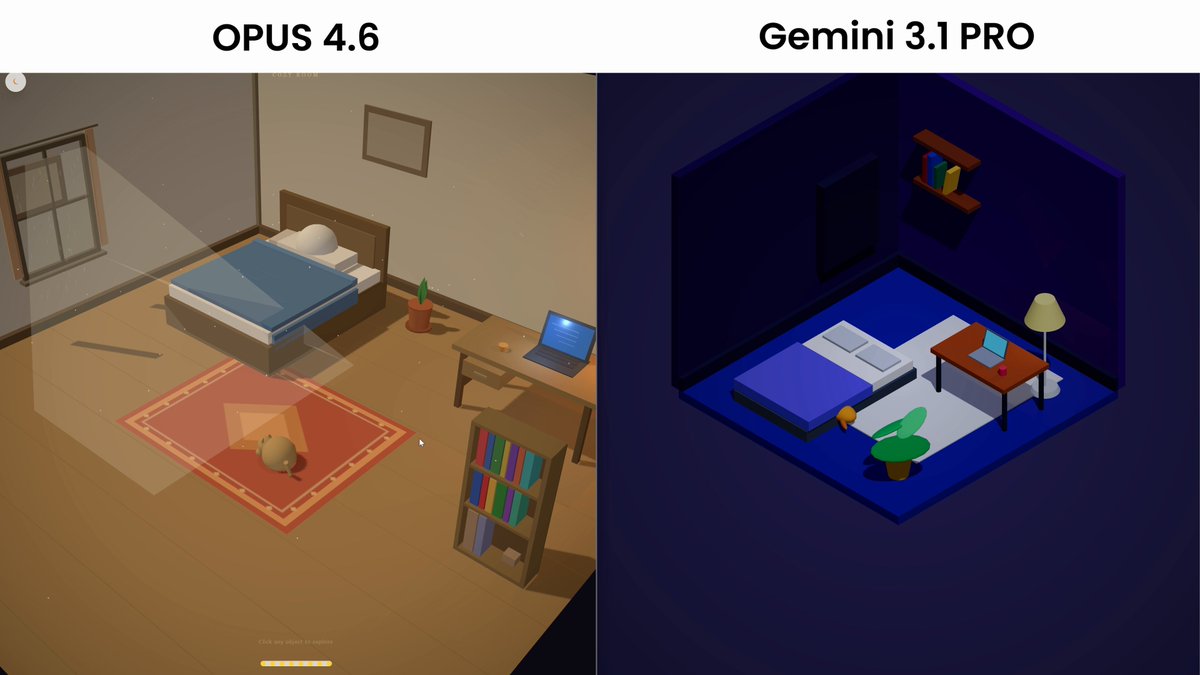
Opus 4.6 vs Gemini Pro 3.1 (7/9) I wanted to do a physics simulation test, overall both models did a good job in this department, however Opus added nice animations to things like "Fan", "Magnet" whilst gemini just rendered them out as a red circle. Opus also included way...

28,179 次观看 • 5 个月前 •via X (Twitter)

0 条评论

暂无评论

原始帖子的评论将显示在这里

相关视频

GEMINI 3 LAUNCH IS HERE I got a SNEAK PEEK at Gemini 3 with Logan Kilpatrick (Google Deepmind), and it might be the most POWERFUL vibe-coding tool on the planet. A little breakdown: 1. Anyone can build 3D and casual games now You can vibecode full, playable 3D video games generated in minutes. Actual games with physics, characters, controls, and loops you can remix instantly. Pure insanity. I can see founders and brands spinning up games on the fly to ride trends and drive growth. 2. Intelligent apps are becoming the default We built apps where reasoning, memory, and multi-step planning were baked in from the start. Once you’re building apps with ACTUAL intelligence baked in, there’s a whole wave of new opportunities that weren’t possible before. 3. Gemini acts like a creative partner You describe the idea, Gemini fills in the gaps, challenges decisions, proposes alternatives, and iterates in real time. 4. Vibe coding hits a new level Gemini 3 can generate assets, code, game logic, UI, and narrative in one flow. Tools like Claude and Cursor feel fast. This feels like the next layer, the one where a single builder can compete with full teams. Logan Kilpatrick and I pushed Google Gemini 3 hard, and the outputs were solid. A few times we had to give it a few extra prompts but it took feedback really well. I think 1 year ago, a lot of people discounted Google in the AI arms race. Can you discount them anymore? Doubt it. After this, it feels like they at best leading, at worst leading. What do you think of Google's AI efforts/Gemini 3 My biggest takeaway was how it just felt like Gemini 3 had a little more vibe coding horsepower than anything I’ve used.

GREG ISENBERG

73,705 次观看 • 9 个月前

I just compared Claude Code vs Codex vs Cursor CLI The task was to build a Next.js app with Tailwind 4 and shadcn components to collect customer feedback and showcase it with a widget. I gave all three the same prompt and let them go for 30 minutes to see what they came up with. Claude Code with Opus 4.1 Even though I told it to set up the app in the existing project folder, it tried to create a directory for it. After I interrupted and told it not to do that, it built a demo form and landing page with no errors. I had to ask it to make the demo interactive so users could submit a testimonial and preview it. The landing page looked like AI and was pretty basic, but it worked and it was done in a fraction of the time of the others. Total tokens used: 33k Codex with GPT-5 At the end of the 30 minutes I just could not get Codex to produce a working app. It got stuck in a loop of not being able to set up Tailwind 4 and despite many, MANY, attempts, I ended up with a "failed to compile" error. Total tokens used: 102k Cursor Agent with GPT-5 This was the slowest agent by far and a couple of times I actually thought it got stuck in a loop and was close to Ctrl+C'ing to cancel it. The TUI is really nice though, especially how it shows diffs and it did eventually build a working app (after one or two slight errors that needed fixing) The demo was interactive and it had a very minimal design that looked bare but also a lot less like an "AI generated" app than the Opus 4.1 design. It also wasn't too chatty and just did what it needed to do! Code quality was on a par with Opus 4.1, but it did use 5.5x as many tokens to get there. Still cheaper than Opus on a direct comparison but not when you factor in a Claude Code Max subscription. Total tokens: 188k I'll be able to do a proper comparison and record some videos when I'm back from holiday but for now, Opus is still the more capable model out of the box and Claude Code is the more complete CLI product. It will be interesting to see how Cursor evolve their CLI though with commands and subagents because I think with GPT-5 they have a real shot at providing competition for Claude Code if they can optimise output to get similar quality with less tokens. Jump to 0:40 in the video to see the two apps. Which do you think is which? ;)

Ian Nuttall

194,949 次观看 • 1 年前

sonnet 5 vs sonnet 4.6 vs opus 4.8 vs glm 5.2 – frontend tasks dropped sonnet 5 into a quick test today. same three prompts to all four models, single-shot html/canvas, no edits: • objects falling on a trampoline • rockets playing tennis • a slingshot breaking bottles ranked by speed (total across the 3 tasks): 1. opus 4.8 – 15m 09s 2. sonnet 5 – 16m 05s 3. glm 5.2 – 27m 18s 4. sonnet 4.6 – 35m 06s ranked by code shortness (total loc): 1. sonnet 5 – 1794 2. opus 4.8 – 2063 3. sonnet 4.6 – 2182 4. glm 5.2 – 3285 sonnet 5 came out on top here – leanest code overall and a near-tie for fastest it was also the most creative. in every task it added something none of the others did: – kept the trampoline vibrating after the objects landed – drew a +1 next to the rocket that scored the point – turned the slingshot to face the next bottle before each shot opus 4.8 evaluated the code sonnet 5 produced. four things stood out: • the sphere is a fake, and that's the smart move. the cube and star are real 3d meshes with proper culling and shading, but the ball is just a flat shaded circle. a lit sphere looks identical from every angle, so building it in 3d would burn compute for zero visible payoff. knowing where not to bother is its own kind of skill • weight actually means something on the trampoline. the star is heavy, so it barely bounces and dents the mat hard. the ball is light, so it's lively and leaves a shallow dip. the three objects aren't just different shapes – they have different temperaments, and the physics is what gives them that • the slingshot is framed like a shot, not just drawn. the handle is anchored below the bottom of the screen and runs off-frame, so it reads as something you're holding rather than a sprite parked in the scene. that's a staging instinct, not a rendering one • the paddle ai forward-simulates the ball to predict where it'll land, then adds a deliberate error bias (roughly 1 in 5 shots is a real miss). that's why scoring looks natural instead of robotic – plus four distinct fault types with a catch-all so a rally never hangs without a result bottom line: sonnet 5 does more with less. fastest tier, leanest code, and the only one that added small touches nobody asked for follow thehype. for 24/7 ai news, analysis and breakdowns

thehype.

14,518 次观看 • 1 个月前

Gemini 2.5 Flash demolishes my Galton Board test, I could not get 4omini, 4o mini high, or 03 to produce this. I found that Gemini 2.5 Flash understands my intents almost instantly, code produced is tight and neat. The prompt is a merging of various steps. It took me 5 steps to achieve this in Gemini 2.5 Flash, I gave up on OpenAI models after about half an hour. My iterations are obviously not exact. But people can test with this one prompt for more objective comparison. Please try this prompt on your end to confirm: -------------------------------------------------- Create a self-contained HTML file for a Galton board simulation using client-side JavaScript and a 2D physics engine (like Matter.js, included via CDN). The simulation should be rendered on an HTML5 canvas and meet the following criteria: 1. **Single File:** All necessary HTML, CSS, and JavaScript code must be within this single `.html` file. 2. **Canvas Size:** The overall simulation area (canvas) should be reasonably sized to fit on a standard screen without requiring extensive scrolling or zooming (e.g., around 500x700 pixels). 3. **Physics:** Utilize a 2D rigid body physics engine for realistic ball-peg and ball-wall interactions. 4. **Obstacles (Pegs):** Create static, circular pegs arranged in full-width horizontal rows extending across the usable width of the board (not just a triangle). The pegs should be small enough and spaced appropriately for balls to navigate and bounce between them. 5. **Containment:** * Include static, sufficiently thick side walls and a ground at the bottom to contain the balls within the board. * Implement *physical* static dividers between the collection bins at the bottom. These dividers must be thick enough to prevent balls from passing through them, ensuring accurate accumulation in each bin. 6. **Ball Dropping:** Balls should be dropped from a controlled, narrow area near the horizontal center at the top of the board to ensure they enter the peg field consistently. 7. **Bins:** The collection area at the bottom should be divided into distinct bins by the physical dividers. The height of the bins should be sufficient to clearly visualize the accumulation of balls. 8. **Visualization:** Use a high-contrast color scheme to clearly distinguish between elements. Specifically, use yellow for the structural elements (walls, top guides, physical bin dividers, ground), a contrasting color (like red) for the pegs, and a highly contrasting color (like dark grey or black) for the balls. 9. **Demonstration:** The simulation should visually demonstrate the formation of the normal (or binomial) distribution as multiple balls fall through the pegs and collect in the bins. Ensure the physics parameters (restitution, friction, density) and ball drop rate are tuned for a smooth and clear demonstration of the distribution. #OpenAI Sam Altman Greg Brockman AshutoshShrivastava Aidan McLaughlin

RameshR

247,923 次观看 • 1 年前

⚡ My first advanced simulation with Grok 3! Finally your OS windows act like REAL windows 🤣 As you know, I've spent more than 2 years sharing all kinds of simulations and mini-games made with Claude, ChatGPT (o3-mini-high), etc. It’s been ages since I last wrote a single line of code. But pretty often, once you hit over 1,000 lines, it turns into a debate against the LLM and you frequently get stuck in a loop that’s hard to break out of. Everyone was raving about Grok 3’s ability to generate code, but until now, I hadn’t really put it to the test. So I decided to challenge it with a prompt that both ChatGPT and Claude were seriously struggling with (debate loop). The initial prompt was: "Use Python and a 2D physics library to create a world where I can generate different static objects like squares, triangles, circles and rectangles. I should be able to move them with the mouse, rotate, scale, and delete them. The cool part is that we’ll see this world through 1 to N operating system windows. In other words, the windows will be like real windows! When one of these windows is active and I hit the spacebar, balls affected by physics should appear and interact with the static objects. You can start with placeholders, but later I'll send you a series of PNG images so they all become beautiful sprites." After a few iterations, I got the result you see in the video. Insane, right? 🤯 Now, with Grok, we have the power to create anything that pops into our mind with just a couple of prompts. It’s mind blowing. Ever since I was 9 and messing around with BASIC on my MSX, I've been hooked on visual simulations... And now I can create them using nothing but natural language. It's f***** amazing that we're living in this historic moment!

Javi Lopez ⛩️

209,470 次观看 • 1 年前