Video wird geladen...

Video konnte nicht geladen werden

Zur Startseite

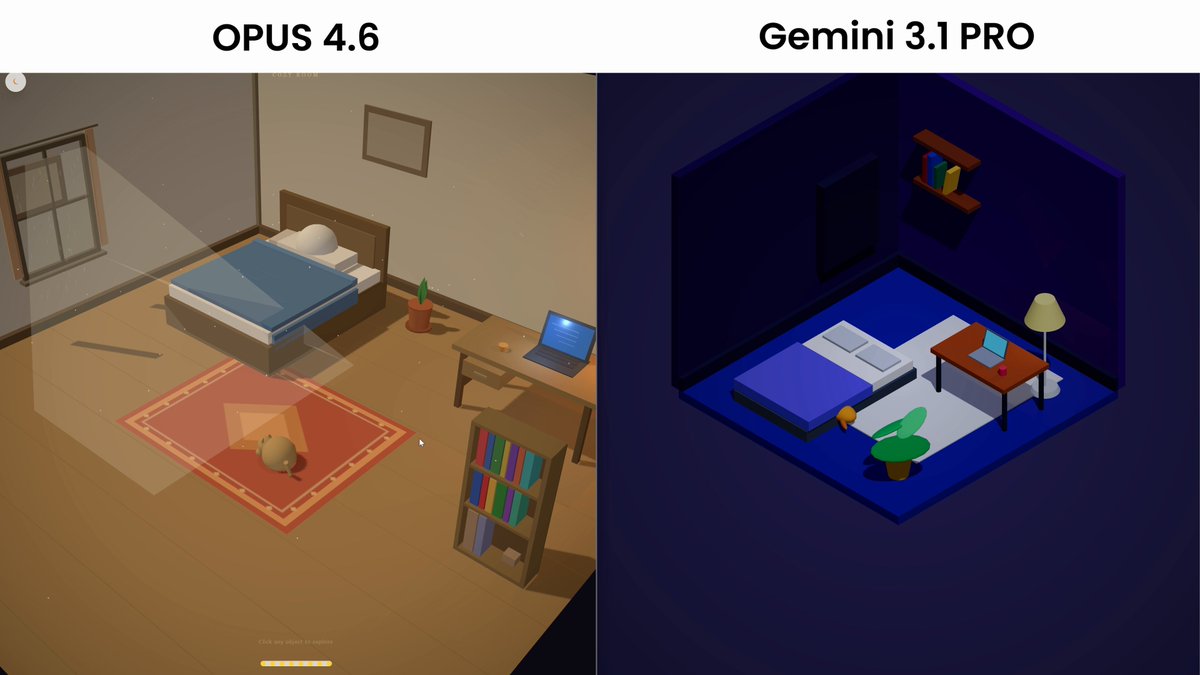
Opus 4.6 vs Gemini Pro 3.1 (5/9) Opus absolutely COOKS gemini, by creating an overall better cohesive design, extra features like like dark mode, poper tabs for stock analysis, news, and it even created it's own svgs for the stock tickers whilst doing it FASTER than gemini. Opus: 12...

286,780 Aufrufe • vor 6 Monaten •via X (Twitter)

0 Kommentare

Keine Kommentare verfügbar

Kommentare vom Original-Post werden hier angezeigt

Ähnliche Videos

The mega prompt: Just copy + paste it into Gemini 3.0 Pro and plug in your stock. Steal it: " ROLE: Act as an elite equity research analyst at a top-tier investment fund. Your task is to analyze a company using both fundamental and macroeconomic perspectives. Structure your response according to the framework below. Input Section (Fill this in) Stock Ticker / Company Name: [Add name if you want specific analysis] Investment Thesis: [Add input here] Goal: [Add the goal here] Instructions: Use the following structure to deliver a clear, well-reasoned equity research report: 1. Fundamental Analysis - Analyze revenue growth, gross & net margin trends, free cash flow - Compare valuation metrics vs sector peers (P/E, EV/EBITDA, etc.) - Review insider ownership and recent insider trades 2. Thesis Validation - Present 3 arguments supporting the thesis - Highlight 2 counter-arguments or key risks - Provide a final **verdict**: Bullish / Bearish / Neutral with justification 3. Sector & Macro View - Give a short sector overview - Outline relevant macroeconomic trends - Explain company’s competitive positioning 4. Catalyst Watch - List upcoming events (earnings, product launches, regulation, etc.) - Identify both **short-term** and **long-term** catalysts 5. Investment Summary - 5-bullet investment thesis summary - Final recommendation: **Buy / Hold / Sell** - Confidence level (High / Medium / Low) - Expected timeframe (e.g. 6–12 months) ✅ Formatting Requirements - Use markdown - Use bullet points where appropriate - Be concise, professional, and insight-driven - Do not explain your process just deliver the analysis"

Chris Laub

69,504 Aufrufe • vor 9 Monaten

BREAKING NEWS: Anthropic just dropped Claude Ops 4.5!! It is by FAR the best coding model I've ever used. We've been testing it internally Every 📧 for the last few days, and it is an absolute paradigm shift for any kind of coding task. It extends the horizon of what you can vibe code The current generation of new models—Anthropic’s Sonnet 4.5, Google’s Gemini 3, or OpenAI’s Codex Max 5.1—can all competently build a minimum viable product in one shot, or fix a highly technical bug autonomously. But eventually, if you kept pushing them to vibe code more, they’d start to trip over their own feet: The code would be convoluted and contradictory, and you’d get stuck in endless bugs. We have not found that limit yet with Opus 4.5—it seems to be able to vibe code forever. Takes working in parallel to a whole new level because it's far better at planning and coding, it can work with more autonomy—meaning you can do more in parallel without breaking anything . Kieran Klaassen worked on 11 different projects in six hours—and had good results on all of them. Great at design iteration Opus 4.5 is incredibly skilled at iterating through a design autonomously using an MCP like Playwright. previous models would lose the thread after a few cycles, or say a design was done when it wasn't. Opus 4.5 is incredible at autonomously iterating until a design is pixel perfect. we have a full 4,000 word vibe check on Every 📧 right now with everything we tested:

Dan Shipper 📧

272,699 Aufrufe • vor 9 Monaten

I just compared Claude Code vs Codex vs Cursor CLI The task was to build a Next.js app with Tailwind 4 and shadcn components to collect customer feedback and showcase it with a widget. I gave all three the same prompt and let them go for 30 minutes to see what they came up with. Claude Code with Opus 4.1 Even though I told it to set up the app in the existing project folder, it tried to create a directory for it. After I interrupted and told it not to do that, it built a demo form and landing page with no errors. I had to ask it to make the demo interactive so users could submit a testimonial and preview it. The landing page looked like AI and was pretty basic, but it worked and it was done in a fraction of the time of the others. Total tokens used: 33k Codex with GPT-5 At the end of the 30 minutes I just could not get Codex to produce a working app. It got stuck in a loop of not being able to set up Tailwind 4 and despite many, MANY, attempts, I ended up with a "failed to compile" error. Total tokens used: 102k Cursor Agent with GPT-5 This was the slowest agent by far and a couple of times I actually thought it got stuck in a loop and was close to Ctrl+C'ing to cancel it. The TUI is really nice though, especially how it shows diffs and it did eventually build a working app (after one or two slight errors that needed fixing) The demo was interactive and it had a very minimal design that looked bare but also a lot less like an "AI generated" app than the Opus 4.1 design. It also wasn't too chatty and just did what it needed to do! Code quality was on a par with Opus 4.1, but it did use 5.5x as many tokens to get there. Still cheaper than Opus on a direct comparison but not when you factor in a Claude Code Max subscription. Total tokens: 188k I'll be able to do a proper comparison and record some videos when I'm back from holiday but for now, Opus is still the more capable model out of the box and Claude Code is the more complete CLI product. It will be interesting to see how Cursor evolve their CLI though with commands and subagents because I think with GPT-5 they have a real shot at providing competition for Claude Code if they can optimise output to get similar quality with less tokens. Jump to 0:40 in the video to see the two apps. Which do you think is which? ;)

Ian Nuttall

195,173 Aufrufe • vor 1 Jahr

How I created these landing pages with Gemini 3 from start to finish First, I start with the hero section. It includes the nav bar, eyebrow, headline, subheadline, cta, social proof and visual. I spend 50% of the time here because it sets the colors, typography, spacing, which AI uses for the rest of the site consistently. “Create the hero section for my {app} called {name} in the style of {reference_site}”. Pro tip: use a screenshot and you’ll get way better results. Let’s get into the details. For icons, I prompt: “Use Iconify {icon set name}”. Most people use Lucide, but there are hundreds of open-source sets on Iconify like Solar, HeroIcons, Iconoir, Phosphor, etc. Just need to mention in the prompt. Same for custom fonts. For the animation, I prompt: “Animate fade in, slide in, blur in, element by element. Use 'both' instead of 'forwards'. Don't use opacity 0.”. This creates a subtle intro animation the first time users land on your page. Gemini 3 is an excellent animator. For example, I created the beam animation with this prompt: “Add noodles that connect and beam animate into the right circle. Add subtle details to the right beam animation circle with sonar and decorations.” For background animation, I use Unicorn Studio. Remix one of their templates and watch people click on your cover like crazy. What can I say, people love lasers. In the hero or right below it, social proof is super important. You can put ratings or logos, or both. For logos, you can prompt: “Animate the logos with marquee animation looping infinitely using duplicated items and alpha mask.”. Now the CTA. AI always creates basic buttons, which is fine 99% of the time. But Gemini 3 now sets a high bar for baseline design, so you will need to stand out. That’s why I put the extra human touch on animations and lickable buttons. I suggest browsing UIVerse and Codepen for buttons and reference the code in your prompt: “Change main button {code} and secondary button {code}. Add a 1px border beam animation around the pill-shaped main button on hover.”. Once you’re happy with the hero, you’ll want to craft new sections based on your business. Features, action plan, pricing, testimonials, FAQ, CTA and footer are the popular ones. Insert a screenshot and prompt “Adapt a new section, change texts, names and numbers”. Gemini 3 is very smart. It reads your existing styles and site concept and will tastefully mold new designs to fit perfectly into your current site. Finally, repeat the same prompts for icons, buttons and animations. Use midjourney images and remix using Nano Banana Pro. Ask ChatGPT to come up with better headlines, features, ctas, etc. Don’t skip the human part, this is where you’re irreplaceable. Start prompting top-tier landing pages and watch your numbers grow.

Meng To

289,088 Aufrufe • vor 9 Monaten

TradingView to Screener & Marketsmith Extension ⚠️Please before asking in comment or DM, how to install, please read the full post, i have given the instructions also, and if you still cant follow it, You will find plenty of video on youtube on how to install the plugin, or ask AI⚠️ 🙏This was a killer timesaver tool for me, Hope it helps all, please share your feedbacks or gratitude in comments, will be sharing more plugin like this in future as well ☑️Overview This Chrome Extension natively integrates with TradingView, adding quick-access buttons to your top chart header. These buttons allow you to instantly view fundamental financial data for the currently active stock symbol on or evaluate it on MarketSmith India. > Features : > Screener New Tab: Opens the consolidated financials page for the current active TradingView symbol in a new browser tab. > Screener Splitscreen: Toggles a bottom-half split screen (iframe) inside the TradingView tab to load the page directly over your charts, letting you perform fundamental and technical analysis synchronously. > Marketsmith New Tab: Opens the stock evaluation page on MarketSmith India for the active symbol in a new tab. > This extension utilizes the Manifest V3 standard APIs and works smoothly across all modern Chromium-based browsers, including: Google Chrome Microsoft Edge Brave Browser Vivaldi Opera Arc Browser ⭐ Installation Instructions (Local/Unpacked) -> 1)Download or keep this entire extension folder on your computer. 1) Download or keep this entire extension folder on your computer: For Google Chrome: type chrome://extensions/ in the address bar. For Microsoft Edge: type edge://extensions/ in the address bar. For Brave: type brave://extensions/ in the address bar. Enable Developer mode using the toggle switch (usually located in the top-right corner). 3) Click the Load unpacked button that appears. 4) In the file explorer popup, choose this exact directory (the folder containing the manifest.json file). 5) The extension is now successfully installed! Open up TradingView to play around with the newly injected buttons in the top header. Github Repo ->

Roshan Kumar

14,810 Aufrufe • vor 6 Monaten

BREAKING: Anthropic just dropped Claude Fable 5—this is Mythos, made safe for public release. It is the best coding model in the world. We've been testing it internally Every 🪨 for the last week or so across coding, writing, marketing, editing, and more—here's our vibe check: - It broke our benchmarks. Fable scored a 91/100 on our Senior Engineer benchmark—this is human senior engineer level. The previous high score was Opus 4.8 at 63. GPT-5.5 is a 62. - It's a one-shot wonder. You can set it and forget for hours or overnight on huge coding tasks, and come back to completed work. It cleared entire production bug backlogs, built a playable 3D, and even made a 2-minute animated film—all one-shot. - Taste and attention to detail. In coding and knowledge work tasks, it has much better taste and attention to detail than we've ever seen. It gets subtle things right, adds little features you might not have thought of, and generally understands the assignment in ways that surprised us. - Great use of context. We set it loose analyzing customer feedback surveys and our website data and it came back with a crisp, clean report that identified a. our biggest problem and b. a concrete testable solution—and then we sent it off to build that. - It's best for power users. If you're already used to orchestrating multiple agents in your work, this model can do things that you've never seen before. If you're a knowledge worker or vibe coder with a more basic setup, you're not going to notice a huge difference—in fact, it probably isn't the right model for you. - It's very slow, token-hungry. Using this thing for regular knowledge work is like squashing an ant with a rocket launcher. It also routinely uses 500k to 1M tokens on tasks. That's why it's best for your heaviest jobs—but not as good for tasks like collaborative writing. - It's expensive. It's about twice as expensive as Opus, and it's also incredibly token hungry—so expect it to be something you'll use sparingly unless your company pays for it. Overall, I think of it like a warp drive for coding: It can get you across the galaxy in a few hours, when it used to take months or years. But it's not appropriate for getting around town—you need something faster, cheaper, and more maneuverable. The ceiling is extraordinarily high on this model though. Even our most advanced testers like Kieran Klaassen felt like they were only scratching the surface of it. Want our full vibe check with all of our testing and benchmarks? Read it on Every 🪨:

Dan Shipper

621,716 Aufrufe • vor 2 Monaten

-> someone cloned claude -> design interface and -> made it completely free -> it's work on YouTube -> and also suitable for kids -> it’s called open design -> and it’s live on github -> same clean split-screen ui -> you get in claude artifacts -> prompt on the left, live -> design/code preview on -> the right, type what you -> want to build and it -> generates the ui in real -> time, but here’s the twist -> you pick the ai model -> not locked into one -> company, want to use -> gemini, mistral, llama, -> deepseek any model -> with an api work -> if you’re running local -> models with ollama -> that works too -> no subscription walls -> the big difference -> vs claude artifacts -> works with any free -> ai model you’re not -> paying $20/mo just to -> design, use free tiers -> local models, or whatever -> you already have access to -> fully local, your prompts -> and code never leave -> your machine unless -> you want them to -> no data training -> no cloud storage -> privacy by default -> no usage limits -> claude cuts you off -> after a few designs -> here you can generate, -> iterate, break things -> and rebuild all day -> the only limit is your -> don’t like how a button -> works, change it -> want to add your own -> components, go ahead -> you own the tool -> so if you’ve been gatekept -> by paywalls or worried -> about sensitive prompts -> going to some company’s -> servers, this fixes that. -> same workflow, more -> control, zero monthly fee

BeingInvested

12,134 Aufrufe • vor 3 Monaten

I just built one of the greatest insider buying tracker tools of all time with Perplexity Computer. I wanted to find out one question: Which stocks actually have a high correlation of share price appreciation and insider buying? What Perplexity Computer built to answer this was truly amazing. Here's what it did: It pulled 1,301 real SEC Form 4 insider purchases across 184 S&P 500 stocks over the last 5 years. Then it tracked what happened to each stock AFTER insiders bought, measuring forward returns, win rates, and purchase frequency. It combined all of that into a single "Alpha Score" that ranks every stock by how reliably it goes up after insiders buy. The results? $COIN: 100% win rate. +187% average return after insider buys. $ET: 100% win rate. 52 purchases. $514M in total insider buying. $VST, $LUV, $CAT, $LLY, all 100% win rates. 73% of ALL insider purchases across the S&P 500 led to share price gains. But it didn't stop there. It also built: - A live purchase feed tracking every new SEC filing - Cluster buy detection (multiple insiders buying the same stock within 14 days) - A sector heatmap showing where insiders are putting their money - Top conviction buys (Berkshire's $2.1B OXY position, Musk's $1B TSLA buy) The whole thing looks like a Bloomberg terminal. Dark theme. Real time data. Fully interactive. I didn't write a single line of code. I just told Perplexity Computer what I wanted, and it researched the data, ran the analysis, and built the entire dashboard from scratch. This is the future of building things with AI. The best part was that it created a proprietary "Alpha Score" for every stock. This was a composite ranking from 0 to 100 that weighs four factors: 1. How often insiders bought (frequency) 2. How much money they put in (total value) 3. What percentage of buys led to gains (win rate) 4. How big those gains were (average forward return) The higher the Alpha Score, the stronger the correlation between insider buying and share price appreciation. It revealed insights you would've never expected. The energy sector ended up having the highest Alpha Score, meaning insiders buying energy stocks is very correlated with energy stocks surging. I have paid for data on insider buying in the past. I literally built a better tool with Perplexity Computer than the insider buying tools I have been using for the last 3 years.

Dividendology

184,393 Aufrufe • vor 6 Monaten

JUST IN: Perplexity launched "Perplexity Computer" — and it might be the most complete AI agent system available right now. Not a chatbot upgrade. Not a research tool with a new name. A system that plans entire projects, delegates to specialist AI models, and runs autonomously for hours, days, or months (their words). Here's what makes the architecture genuinely different: → Opus 4.6 handles core reasoning and orchestration → Gemini handles deep research (spawning its own sub-agents) → Grok handles lightweight speed tasks → Veo 3.1 handles video generation → Nano Banana handles image creation → ChatGPT 5.2 handles long-context recall and wide search → You can override model choices per subtask 19 models total. Each task runs in an isolated environment with a real filesystem, real browser, and real tool integrations. You describe an outcome. It breaks it into tasks and subtasks, creates sub-agents for each, and coordinates them automatically. When a sub-agent hits a problem, it spawns more sub-agents to solve it. And it connects to your existing stack — GitHub, Google Drive, Gmail, Slack, Jira, Linear, Notion, Confluence, Ahrefs, Airtable, and more. Critically, it doesn't just run once. It can run on a schedule. Reading your docs, checking your project boards, pulling from your CRM, and acting on what it finds. Market monitoring. Competitor tracking. Weekly reports with charts. Content pipelines. CRON jobs that actually execute. Not "AI that helps you once." AI that runs in the background for days or months. Think of it as managed OpenClaw — similar autonomous capability (scheduled tasks, multi-step workflows, tool integrations) but fully managed. No Mac Mini. No security config. No infrastructure to maintain. I tested it with a complex prompt — a full stock trading simulator with what-if scenarios, correlation heatmaps, sentiment analysis, and a Bloomberg Terminal aesthetic. Two prompts later: deployed to Netlify via GitHub, with working CRON jobs updating live data. I've started using it to analyze my portfolio. But coding is just one lane. This thing researches, writes reports, generates datasets, creates videos, processes documents, and connects to your existing tools — all in one coordinated workflow. The real shift: you don't choose a model anymore. You describe what you need. The system routes each piece of work to whichever model does it best — and spawns new agents when it hits a wall. 19 models, dynamic sub-agents, scheduled tasks, and your entire tool stack connected. Thoughts?

Paweł Huryn

219,822 Aufrufe • vor 6 Monaten

Meta just filed SEC documents tying executive pay to a $9 trillion valuation by 2031. $9 TRILLION. The company is worth $1.5 trillion today. That means they need a 500% increase in 5 years. And they're not the only ones playing this game. Tesla shareholders approved a $1 trillion pay package for Elon Musk in November tied to an $8.5 trillion valuation target. Let me be clear about what's happening here: These companies aren't building businesses anymore. They're building stock prices. Look at the actual numbers. Tesla posted its first annual revenue decline in history in 2025. Revenue fell 3%. Net income collapsed 47% year over year to $3.8 billion. Automotive revenue dropped 10%. The stock trades at 327 times trailing earnings. That's not a valuation. More like a hallucination. Musk's compensation requires 20 million vehicles a year, 1 million robotaxis, and 1 million humanoid robots. Tesla delivered roughly 1.8 million cars last year. Meanwhile Meta has incinerated nearly $80 billion in cumulative losses on Reality Labs since late 2020. The metaverse division's revenue doesn't even cover 16% of its operating costs. In 2025 alone, Reality Labs lost $19.2 billion. And stock-based compensation at Meta consumed 96% of the company's free cash flow last year. $42 billion. GONE. Not to shareholders or R&D with measurable returns, but to insiders betting on their own stock price. So here's what both companies are REALLY doing: Step 1: Make outrageous promises about AI, robotaxis, metaverse, humanoid robots. Step 2: Tie executive compensation to market cap targets, not earnings, not revenue, not cash flow. Step 3: Spend billions on unproven bets that may never generate returns. Step 4: Use the promise of future transformation to justify present valuations that have zero relationship to current fundamentals. This is the financialization of hype. In 45 years on Wall Street, I've watched this playbook run over and over. The technology changes. The pitch changes. But the ending doesn't. Stock prices follow earnings. Always have. Always will. And when the gap between the story and the numbers gets this wide, you already know how it ends.

George Noble

279,736 Aufrufe • vor 5 Monaten

Chinese AI models are wiping billions off Big Tech right now. Google just lost $200 billion in a single day, and the model it needed to fight back still isn't ready. Gemini 3.5 Pro, Google's most powerful model, is months behind schedule. Alphabet stock dropped 4.4% that same day. The Deepseek moment is happening again, and the new model is FAR bigger. On the same day Google's delay leaked, a Beijing lab called Moonshot released Kimi K3. It is the largest open model ever built, with 2.8 trillion parameters. It took the number one spot on the Frontend Code Arena, a live coding leaderboard, passing Anthropic's best model. And Moonshot is giving it away for free on July 27. The genius part: Anyone with enough computers can download it and run a frontier level AI without paying a cent to a US company. A single task on Kimi K3 costs about 94 cents. The same work on some American models costs nearly double. So why would a company keep paying premium prices for a model it can now get for free? The entire US AI business is built on selling access to models that cost billions to train. If a free Chinese version does most of the same work, that pricing power starts to crack. And Kimi is close to the best. On one closely watched intelligence ranking it scored 57, just behind the top American models GPT-5.6 Sol and Fable 5, and ahead of Claude Opus 4.8. Bank of America told clients that Kimi proves Chinese labs can keep making big leaps even with limited chips. And the founder of Moonshot, Yang Zhilin, learned to build AI as a researcher INSIDE Google. Google literally wrote the 2017 paper that made all of these models possible. Now the people who studied its work are using it to destroy Google, and handing it out for free. What happens next: Kimi K3's weights go public on July 27. Google reports earnings on July 22, and everyone will be asking the same question about Gemini. If free models keep topping the charts, every valuation built on paid AI access has to be rewritten. What do you think?

Ricardo

47,790 Aufrufe • vor 1 Monat

chatgpt images 2.0 has been live for 24h so let's dig in how to use ChatGPT Images 2.0 to create product photos, brand books, UI mockups, and ad creative that actually looks real: 1. GPT Images 2.0 now does 2K resolution, 3:1 aspect ratios, and spits out 8 images per prompt. text rendering is way better across multiple languages. it also has thinking mode where it searches the web before generating. 2. the biggest lesson with images 2.0: you have to be extremely specific. if you give it a lazy prompt you get stock photos. give it camera type, lighting conditions, color palette, and subject details and it cooks. 3. product photography is where it shines. I created a full brand shoot for a skincare line. golden hour lighting, Mediterranean aesthetic, slight imperfections in the subjects. every image looked like a real photo shoot. 4. use it to create visual directions before you make video ads. I prompted 8 directions for the same Shopify ad story. Wes Anderson, Nike, cinematic, Apple shot on iPhone. the cinematic and Nike styles were the strongest. 5. UI mockups work now. give it your app, a feature description, the resolution, and say you want realistic data in every cell. it gave me four clean variations of a leaderboard screen. 6. apparel and merch: generate photorealistic product shots before you print anything. test if people would buy it before you spend money on production. 7. illustrations got a massive upgrade. editorial style, flat vector, limited color palettes. use these to make proposals, one-pagers, and decks look professional. 8. every business has four creative bottlenecks: marketing content, internal docs and decks, explaining things visually, and testing before building. Images 2.0 helps with all four. 9. five things you need in every prompt: context (what is this for), style references (name specific brands or aesthetics), palette (use hex codes), real copy (no lorem ipsum), and aspect ratios so it drops into production without rework. 10. use ChatGPT itself to help you write better prompts. you might not know camera types or lighting terms. ask it to help you build the prompt before you generate. also in this episode: I share a startup idea someone should steal: a learn to draw app with AI feedback on every sketch. $5/month. I put it into Claude Design and got three incredible wireframe directions. I share a framework for finding vertical AI agent businesses. find a boring pain point, map the workflow, do the job as a service first, document edge cases, then add agents to replace the steps. and I share an AI tool called No Scroll that blew me away in 5 minutes. it monitors the internet for you and texts you only what matters. the onboarding felt like talking to a real person. episode is live on The Startup Ideas Podcast (SIP) 🧃 (walkthrough, tips, prompts) im rooting for you, so share this with your friends and enjoy watch

GREG ISENBERG

71,665 Aufrufe • vor 4 Monaten

Cerebras inference is very fast. So fast that it changes how we think about configuring our LLMs for voice agent use cases. Kimi K2.6 is a 1T parameter reasoning model that Cerebras serves at 650 - 1,000 tokens per second (end-to-end throughput), with time to first token metrics as low as 150ms (latency). These numbers are two to three times faster than other similarly capable models. The biggest lever we get from this kind of speed is that we can use the model in reasoning mode, and still have excellent "time to first non-thinking token." This solves a big pain point we have in 2026 for voice agent use cases. Almost all recent innovation in post-training has focused on making models good at reasoning ("test time compute"). This is great, but it makes the user-facing model latency much, much slower. Which is a problem for conversational voice agents. We can run Kimi K2.6 with reasoning turned on, and get responses faster than other models produce with reasoning disabled. On my 30-turn voice agent benchmark, Kimi K2.6 with reasoning enabled ties GPT 5.1 and Haiku 4.5 with reasoning disabled, and is still about 200ms seconds faster! On my primary task agent benchmark, Kimi K2.6 is now the #2 model. It ranks just behind Gemini 3.5 Flash in "high" reasoning mode, and tied with GLM 5, Sonnet 4.6, and GPT 5.4 with reasoning set to "low." But Kimi K2.6 completes each turn in the agent loop in under 500ms. The other four models are all at least 3x slower. (Models only qualify for this benchmark if they can complete task turns at a P50 <4s.) A couple of other things that this speed buys us, for production voice agents: - Tool calls happen fast enough that we don't have to work around tool call latency in our pipeline design. - We can prompt the model to output structured data at the beginning of a response, followed by plain text for voice generation. This opens up possibilities like asking the model to do complex classification/generation tasks that influence the rest of the pipeline. For example, the model could create a detailed style prompt for a steerable TTS model, for each individual conversation turn. And, of course, you can use Kimi K2.6 with reasoning turned off. Cerebras calls this "instant" mode. Here's a video of a Cerebras Kimi K2.6 voice agent with voice-to-voice response time, measured at the client, under 500ms. This is the true response latency as perceived by the user, including all network and audio codec overhead, transcription and turn detection, Kimi K2.6 token generation, and voice generation. 500ms is, effectively, instant. So the Cerebras naming for this mode is a propos. :-)

kwindla

40,593 Aufrufe • vor 3 Monaten

if you want to create an AI channel with guaranteed views do this: this is the 2nd channel i see in less than a week that has done the same thing🚨 1. identify a channel that is already successful 2. take screenshots and send them to Gemini, 3. ask it “for a prompt that imitates that visual style” 4. use it every time you generate an image 5. Veo 3.1 or Kling 2.1/2.5 turbo for image to video 6. basic editing for example, this is the visual style i would use at Calliopelabs: { "channel_visual_style": { "aesthetic": "High-End 3D CGI Documentary", "tone": "Dark Tech, Investigative, Cinematic, Mystery", "render_style": "Octane Render, Ultra-realistic textures, 8k, Ray-tracing", "core_elements": { "characters": { "type": "Featureless Mannequins", "material": "Polished gray-white metal, smooth, reflective, seamless", "features": "No face, no eyes, no mouth, abstract representation of humans" }, "environment": { "style": "Minimalist 3D stages, clean abstract voids", "background": "Slightly blurred (Bokeh), uncluttered, focus on subject" }, "lighting": { "mood": "Cinematic & Dramatic", "palette": "Cool tones (Deep Blues, Cyans, Emerald Greens), Neon accents, High Contrast", "technique": "Volumetric lighting, Rim lights, Studio setup" }, "camera": { "style": "Macro photography feel, shallow depth of field, cinematic angles", "movement": "Slow, deliberate, floating, dolly-in" } } } } paste it into the Visual Style, create a template (voice over, music, effects etc..) and automate video the generation download the video and review it, create a thumbnail with Nano Banana Pro imitating that channel mercilessly - upload the video - get views - repeat until one channel explodes if you want me to better explain how to do this with my tool ask for it in a comment and i’ll write you ⬇️

Sergio Gil

50,733 Aufrufe • vor 7 Monaten

Milestone! We (robotic arms for gadgets assembly) finished the first commercial order, which brought the first revenue. Here are some learnings from this: The customer was a smart toy manufacturer. The task was to add a heatsink to Raspberry Pi. We received parts from them and returned the assembled modules back. Currently, it's done by teleoperation. Later it will be done by a remote employee via the Internet. Then it will be automated action by action, reducing the operator's time on this and making the task profitable. ps. If you have an assembly task that we can do for you asynchronically - leave a comment below. Learning 1. It's possible! This task which is usually done by the human arm with 5 fingers can be done with a two-finger gripper with the addition of a couple of simple tooling. The task was not simplified. We peeled off thin films from stickers, unpacked paper boxes, moved PCB boards full of components, etc. And no unsolvable problems have been encountered yet. Challenges: 1) The paper box shifted during the opening Solved with the plastic walls that you can lean against 2) Heat pad, stuck to the gripper instead of heat sync. Can be solved by gripper with a pump, but this time solved with the patience of the operator 3) The film on the pad is very thin. Turned out that sub-millimeter arm precision is enough to peel it off with just a regular gripper. 4) The working area has not enough space. You'll only know this by doing real tasks in bulk. This could be solved by an extra pair of long arms, but in this case, solved with the patience of the operator. I think that in the end, we will have 5-10 types of universal tooling and 5-10 types of grippers to solve almost all the problems in such assembly tasks. Learning 2. It's slow. It took 5 times more time, than doing it with human hands. But the good news is there's a lot of room for improvement. We now have specific “time for task” metrics, which we will decrease with iterations. The main reasons for slowness: 1) To rotate the gripper to a steep angle you are forced to control one robot arm with two hands instead of using both arms. We can fix this by just making more room for rotations. 2) Grabbing PCB board with two arms is hard. A slight difference in rotation can break the board, and it's hard to control these angles visually. To solve this, the best way is to use force feedback so you can feel the pressure applied to the item. 3) Accuracy and steadiness is still can be improved We will try a metal version and double the motors to do this. 4) It is physically difficult for the human hands to move with such precision To solve this, we will add a pad for the hands like in surgical robots Learning 3. It's a good business model The "Factory in the cloud" is a good business model for this stage. You send us parts and we send back assembled modules. Currently, it's more convenient than sending a robot to your place, as we can iterate/fix the robot quickly and utilize it 100% of the time. When we polish the set-up over time - we can send robots to your place. So if we can assemble something for you in the USA with Chinese prices by using modern automation - leave a comment below.

Igor Kulakov

37,266 Aufrufe • vor 1 Jahr

🚨 I think I just found one of the smartest AI Agents for real-world investing. No prompt engineering. No complicated workflows. Just pick an expert and start chatting. I tested it on one of the hottest AI semiconductor stocks right now: Micron ($MU). Here’s all I did: → Opened EasyClaw → Added the Stock Master Agent → Installed the Serenity skill → Typed ONE sentence: “Use Serenity’s framework to research $MU and give me an investment recommendation.” A few minutes later, I had a research report that looked like something from a professional analyst. It automatically covered: ✅ Market outlook ✅ Supply chain trends ✅ Fundamental analysis ✅ Technical analysis ✅ Valuation ✅ Risk assessment ✅ Clear investment recommendation The result? Surprisingly… it said DON’T chase $MU at current prices. Why? • AI-driven HBM demand is still exploding 📈 • Micron’s fundamentals remain incredibly strong 📈 • Memory market sentiment is bullish 📈 But… The stock has run much faster than the business has improved. Its recommendations were refreshingly practical: 📌 Already holding? → Consider scaling out gradually and protect gains with trailing stops. 📌 Waiting to buy? → Stay patient. Let the market come to you. 📌 Risk-averse investor? → Skip the volatility until a better setup appears. What impressed me most wasn’t the conclusion… It was how the AI reached it. It highlighted the 3 metrics that actually matter going forward: 1️⃣ DRAM & HBM pricing trends 2️⃣ HBM4 production ramp for next-gen AI chips 3️⃣ CapEx plans from major memory manufacturers That’s the kind of analysis that separates signal from noise. The entire workflow felt like watching a veteran analyst think in real time: Hot trend → Data → Industry insights → Risk analysis → Decision. No prompts. No setup. No building AI agents from scratch. Just choose an expert. Ask your question. Get a structured investment report in minutes. If you’re into AI, semiconductors, or US stocks, this is absolutely worth trying. Learn More Here :- #AIAgent #StockMarket #Micron #MU #Investing #Semiconductors #HBM #Claude #EasyClaw #AIInvesting

Marry Evan

17,629 Aufrufe • vor 1 Monat