Video wird geladen...

Video konnte nicht geladen werden

Zur Startseite

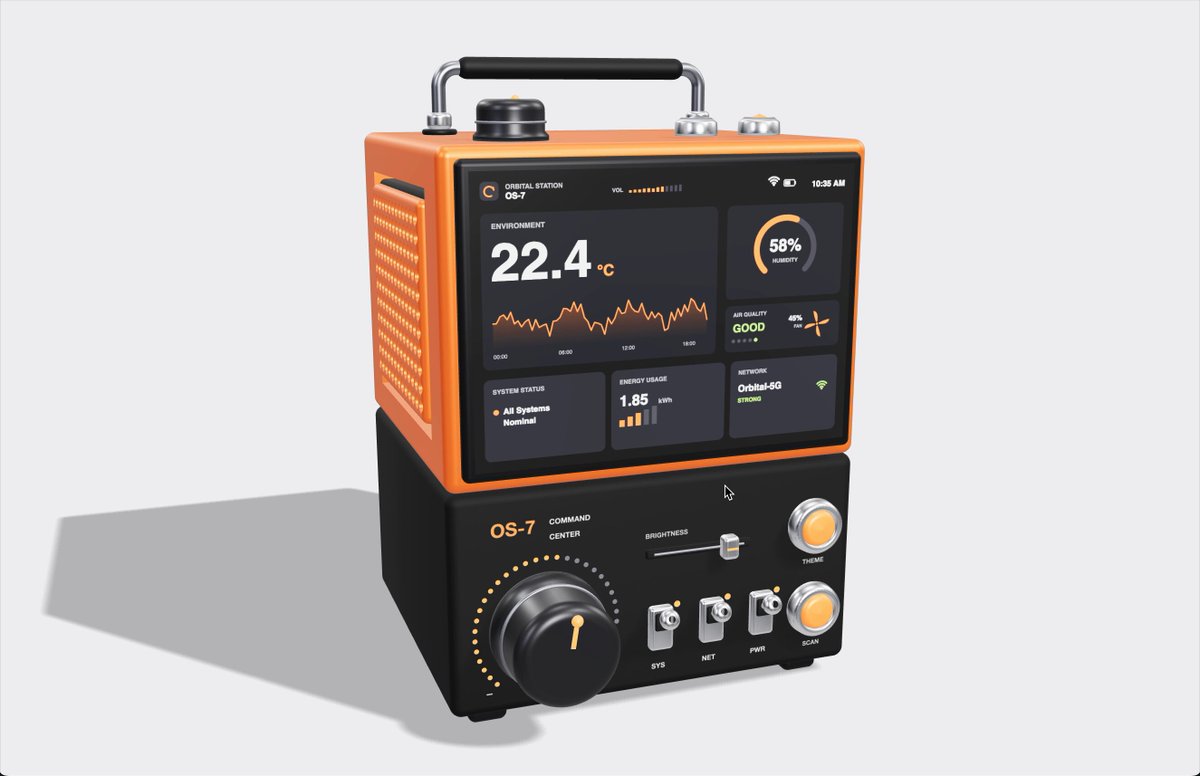
This portable microscope was designed by Opus 5 I gave it a few simple requirements, and it generated the whole design in code Lots of details and interactions It looks sci-fi, but it can be easily 3D printed Some of the code can even run on a Raspberry Pi...

35,446 Aufrufe • vor 1 Monat •via X (Twitter)

34 Kommentare

Profilbild von Dilum Sanjaya
Dilum Sanjayavor 1 Monat

I don't usually share live links because it takes extra effort to get models to optimize performance and test everything, which is the boring part. But for something like this, performance isn't really the goal, and it's fun to play around with. So here's the "it works on my machine" version 😉

Profilbild von Eric Mono
Eric Monovor 1 Monat

This can be done purely with code? Any other plugins/connectors needed?

Profilbild von Dilum Sanjaya
Dilum Sanjayavor 1 Monat

yes, you don't need plugins or connectors

Profilbild von Aria Tech
Aria Techvor 1 Monat

opus 5 just designed a 3d printable microscope from scratch

Profilbild von Gabriel
Gabrielvor 1 Monat

This is fucking awesome!.

Profilbild von Dilum Sanjaya
Dilum Sanjayavor 1 Monat

thanks Gabriel

Profilbild von Joebed Arts
Joebed Artsvor 1 Monat

@threejs I love this!! Thanks for sharing

Profilbild von Dilum Sanjaya
Dilum Sanjayavor 1 Monat

thanks Joebed

Profilbild von Rugova
Rugovavor 1 Monat

that's pure skill

Profilbild von Dilum Sanjaya
Dilum Sanjayavor 1 Monat

@aliuagon_ thanks

Profilbild von INK
INKvor 1 Monat

so cool !

Profilbild von Dilum Sanjaya
Dilum Sanjayavor 1 Monat

thanks INK

Profilbild von NPCSlayer
NPCSlayervor 1 Monat

wow this is crazy! great work

Profilbild von Dilum Sanjaya
Dilum Sanjayavor 1 Monat

thanks

Profilbild von Ricole Bayes
Ricole Bayesvor 1 Monat

time to find old optics to repurpose

Profilbild von JungheonLee | 이정헌
JungheonLee | 이정헌vor 1 Monat

@threejs This is awesome! I’m curious how you made it. Did you use Blender MCP?

Profilbild von Dilum Sanjaya
Dilum Sanjayavor 1 Monat

No, this was made purely with three.js. In terms of looks, I'm sure if I started with Blender MCP and then imported it into three.js, I'd get a better result. The issue is that during that process, the model loses context around things like why it added a button in a certain place and what that button is supposed to do. So when it comes to making everything interactive in three.js, it becomes much more difficult. There's probably a better workflow for this, but I haven't found one yet.

Profilbild von JungheonLee | 이정헌
JungheonLee | 이정헌vor 1 Monat

@threejs Thanks for your kind response!

Profilbild von Refil
Refilvor 1 Monat

So amazing🔥

Profilbild von Dilum Sanjaya
Dilum Sanjayavor 1 Monat

thanks

Profilbild von Curtin Liu
Curtin Liuvor 1 Monat

cooooool!

Profilbild von Dilum Sanjaya
Dilum Sanjayavor 1 Monat

thanks Curtin

Profilbild von Sofiia Matsiutsia
Sofiia Matsiutsiavor 1 Monat

simple requirements = detailed architecture description of the microscope?! Brilliant as always, @DilumSanjaya 👏

Profilbild von Dilum Sanjaya
Dilum Sanjayavor 1 Monat

thanks Sofiia!

Profilbild von Pitchfork & Torch ♞
Pitchfork & Torch ♞vor 1 Monat

I want it and I don’t even know what it’s for

Profilbild von Dilum Sanjaya
Dilum Sanjayavor 1 Monat

😂

Profilbild von BuildWahab
BuildWahabvor 1 Monat

Wow seeing you first till share the link to test 😅

Profilbild von Dilum Sanjaya
Dilum Sanjayavor 1 Monat

haha, most of my posts about things I coded myself do have CodePen/live links. but those were more for developers who are familiar with issues around performance and responsiveness. now my focus is on getting people who aren’t familiar with code to build cool stuff. to them, those might feel like issues with vibe coding rather than me just choosing not to spend time fixing them, since I’d rather use that time to experiment with different ideas. anyway, I might start posting links to at least some of the demos 😅

Profilbild von AI Mastery Guide
AI Mastery Guidevor 1 Monat

Designed straight from requirements into 3D printable code

Profilbild von SomacoSF
SomacoSFvor 1 Monat

HECK FN YEAH - this is dope. THIS IS FN AMAZING How can I get the UI/UX prompt -- meaning the UX of buttons and sliders and joystick Should be components for all sorts of experiences. This is one of the best things ive seem in a while.

Profilbild von Damir Wallener
Damir Wallenervor 1 Monat

Does it work?

Profilbild von oy
oyvor 1 Monat

提示词是什么

Profilbild von Gabriel
Gabrielvor 1 Monat

just curious, can i get the prompt you used, if thats ok?

Profilbild von Nicolo
Nicolovor 1 Monat

Can you share the cad?

Ähnliche Videos
I just compared Claude Code vs Codex vs Cursor CLI The task was to build a Next.js app with Tailwind 4 and shadcn components to collect customer feedback and showcase it with a widget. I gave all three the same prompt and let them go for 30 minutes to see what they came up with. Claude Code with Opus 4.1 Even though I told it to set up the app in the existing project folder, it tried to create a directory for it. After I interrupted and told it not to do that, it built a demo form and landing page with no errors. I had to ask it to make the demo interactive so users could submit a testimonial and preview it. The landing page looked like AI and was pretty basic, but it worked and it was done in a fraction of the time of the others. Total tokens used: 33k Codex with GPT-5 At the end of the 30 minutes I just could not get Codex to produce a working app. It got stuck in a loop of not being able to set up Tailwind 4 and despite many, MANY, attempts, I ended up with a "failed to compile" error. Total tokens used: 102k Cursor Agent with GPT-5 This was the slowest agent by far and a couple of times I actually thought it got stuck in a loop and was close to Ctrl+C'ing to cancel it. The TUI is really nice though, especially how it shows diffs and it did eventually build a working app (after one or two slight errors that needed fixing) The demo was interactive and it had a very minimal design that looked bare but also a lot less like an "AI generated" app than the Opus 4.1 design. It also wasn't too chatty and just did what it needed to do! Code quality was on a par with Opus 4.1, but it did use 5.5x as many tokens to get there. Still cheaper than Opus on a direct comparison but not when you factor in a Claude Code Max subscription. Total tokens: 188k I'll be able to do a proper comparison and record some videos when I'm back from holiday but for now, Opus is still the more capable model out of the box and Claude Code is the more complete CLI product. It will be interesting to see how Cursor evolve their CLI though with commands and subagents because I think with GPT-5 they have a real shot at providing competition for Claude Code if they can optimise output to get similar quality with less tokens. Jump to 0:40 in the video to see the two apps. Which do you think is which? ;)

Ian Nuttall

195,173 Aufrufe • vor 1 Jahr