正在加载视频...

视频加载失败

# Three doors, one building: API, CLI, MCP API, CLI and MCP are three ways to connect an AI system to a tool. Picture one building with three entrances. 1. **API: the loading dock.** A program sends a precisely formatted request and receives structured data. Useful for bulk work,...

22,500 次观看 • 1 个月前 •via TikTok

0 条评论

暂无评论

原始帖子的评论将显示在这里

相关视频

CLI, API, MCP — the 3 ways your AI connects to everything (and when to use each) Your AI's brain is useless if it can't reach anything — the real power is in the connections. There are exactly 3 doors your AI can use, and once you know all three you can connect it to basically anything: DOOR 1 — CLI (the workshop) → typed commands. Commands are text, and text is what AI does best — so an AI with terminal access is a power user at your machine. And it's not just local files: GitHub, Stripe, Google Cloud, even your whole Google Workspace ship command-line tools. You say "pull last month's payments" — it types the commands. Job's on your computer or a tool has a CLI → this door. DOOR 2 — API (the service counter) → every serious online service has an official software entrance. Send a precise request, get an exact structured answer. Trade-off: each service needs its own wiring + key. Need ONE service with deep control → this door. DOOR 3 — MCP (the universal plug) → the standard built FOR AI. A service runs a small MCP server that announces its tools, and any AI can plug in — no custom wiring. Plug in once, the tools just show up. Want plug-and-play → this door. The real answer: a serious AI employee uses all three. They're not competitors — they're three doors on the same building, and you pick per job. Want to learn this whole world from scratch — AI, automations, agents, connecting everything, all the way to AI employees? That's exactly what I teach. Link in my profile. #aiagents #cli #mcp #api

Professor Glitch

12,200 次观看 • 3 个月前

New course: MCP: Build Rich-Context AI Apps with Anthropic. Learn to build AI apps that access tools, data, and prompts using the Model Context Protocol in this short course, created in partnership with Anthropic Anthropic and taught by Elie Schoppik Elie Schoppik, its Head of Technical Education. Connecting AI applications to external systems that bring rich context to LLM-based applications has often meant writing custom integrations for each use case. MCP is an open protocol that standardizes how LLMs access tools, data, and prompts from external sources, and simplifies how you provide context to your LLM-based applications. For example, you can provide context via third-party tools that let your LLM make API calls to search the web, access data from local docs, retrieve code from a GitHub repo, and so on. MCP, developed by Anthropic, is based on a client-server architecture that defines the communication details between an MCP client, hosted inside the AI application, and an MCP server that exposes tools, resources, and prompt templates. The server can be a subprocess launched by the client that runs locally or an independent process running remotely. In this hands-on course, you'll learn the core architecture behind MCP. You’ll create an MCP-compatible chatbot, build and deploy an MCP server, and connect the chatbot to your MCP server and other open-source servers. Here’s what you’ll do: - Understand why MCP makes AI development less fragmented and standardizes connections between AI applications and external data sources - Learn the core components of the client-server architecture of MCP and the underlying communication mechanism - Build a chatbot with custom tools for searching academic papers, and transform it into an MCP-compatible application - Build a local MCP server that exposes tools, resources, and prompt templates using FastMCP, and test it using MCP Inspector - Create an MCP client inside your chatbot to dynamically connect to your server - Connect your chatbot to reference servers built by Anthropic’s MCP team, such as filesystem, which implements filesystem operations, and fetch, which extracts contents from the web as markdown - Configure Claude Desktop to connect to your server and others, and explore how it abstracts away the low-level logic of MCP clients - Deploy your MCP server remotely and test it with the Inspector or other MCP-compatible applications - Learn about the roadmap for future MCP development, such as multi-agent architecture, MCP registry API, server discovery, authorization, and authentication MCP is an exciting and important technology that lets you build rich-context AI applications that connect to a growing ecosystem of MCP servers, with minimal integration work. Please sign up here!

Andrew Ng

142,494 次观看 • 1 年前

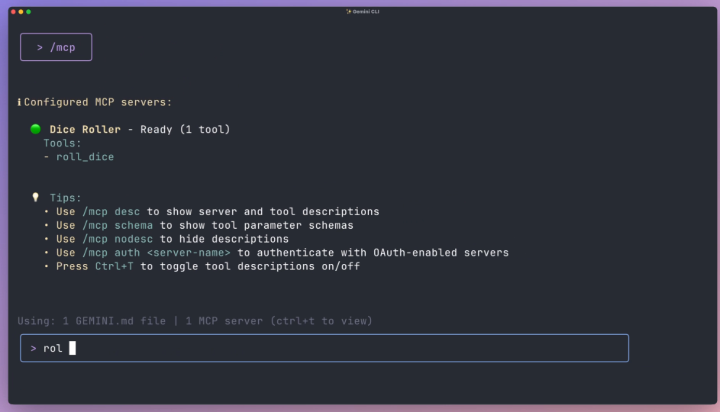
MCP explained in one drawing: how your AI gets inside your apps (Claude, n8n, Gmail) Here's how your AI actually gets inside your apps. It's called MCP, and it fits in one drawing. On its own, an AI is a brain in a box. It can talk and think, but it can't open your email or build anything in n8n. It has no hands. 1. The door is the API. Most apps have a door for other software: Gmail has one, GitHub has one, n8n has one. Every door is a different shape, with its own rules and its own key. 2. The plug is MCP. It's one standard shape. On one side is the AI. On the other side is a small program called an MCP server, one per app, and it knows that app's door. The AI plugs in, and the server does the walking through the door. 3. The menu is the list of tools. When the AI plugs in, it sees every tool the app offers, in plain words. Gmail's server offers create a draft, search mail and read a message. n8n's server offers list workflows, create a workflow and test it. The AI reads the list like a menu, picks a tool and calls it. That's how Claude builds a whole workflow inside n8n, node by node, and checks its own work, while you never open n8n. 4. Connecting one takes one sentence. In Claude Code, say: "Connect yourself to my n8n, here's the address and a key I made just for you." Claude writes a small settings file with the server's name and the key. Type /mcp and it says connected. That's the setup for most apps. Some, like Gmail, you just sign in to instead. 5. The key is the important part. An MCP server can only use the tools on its menu, and only as far as its key allows. So make a key that can do the job and nothing more. If the app lets you limit a key, make it read only when reading is all you need. If it doesn't, use a test account. And if a key ever leaks, cancel it inside the app. One click, and nobody can use it, the AI included. One honest line: MCP doesn't make the AI smarter. It gives a smart thing a way to act, and everything it does through that plug, it does as you. So you still check the work, like you would a new hire's. If you're starting from scratch, I have step-by-step lessons for all of this inside my community. There are eight courses, in order, from the basics of AI to automations, building websites and apps, and AI agents. If you're interested, the link is in my profile. #mcp #cli ##aiagents #aiautomation #claudecode

Professor Glitch

18,500 次观看 • 26 天前

The real difference between an API and an MCP One small detail makes the whole thing click: when an AI connects to a tool the new way, the tool talks first. The old way ran the internet for twenty years. Every serious app has a plug on the back — the API — and a programmer reads the manual, writes code that speaks its exact language, and wires two apps together by hand. Rock solid. But every move that connection can make was written ahead of time, by a person, and it repeats those moves forever. Then AI showed up — a worker that decides its next move LIVE, mid-job. It needed a way to walk up to a tool it has never seen and learn it on the spot. That's what MCP does. Connect an AI to your calendar and the calendar introduces itself first: here's what I can do — send an event, search the week, move a meeting — and here's what each one needs. The AI reads that card like a new employee reading the equipment list, picks the right tool, and fires. On its own. And the detail I love: under the hood, MCP still runs through the same plug. The API does the actual work. MCP adds the introduction on top, written so an AI can read it. That's how AI got hands inside real accounts — inbox, calendar, sheets. Log in, grant access, minutes. And tools that ship next year work the day they arrive, because they introduce themselves too. Keep one line: programs need instructions. Intelligence just needs an introduction. #api #mcp #aiautomation #aiagent

Professor Glitch

14,100 次观看 • 2 个月前