ๆญฃๅœจๅŠ ่ฝฝ่ง†้ข‘...

่ง†้ข‘ๅŠ ่ฝฝๅคฑ่ดฅ

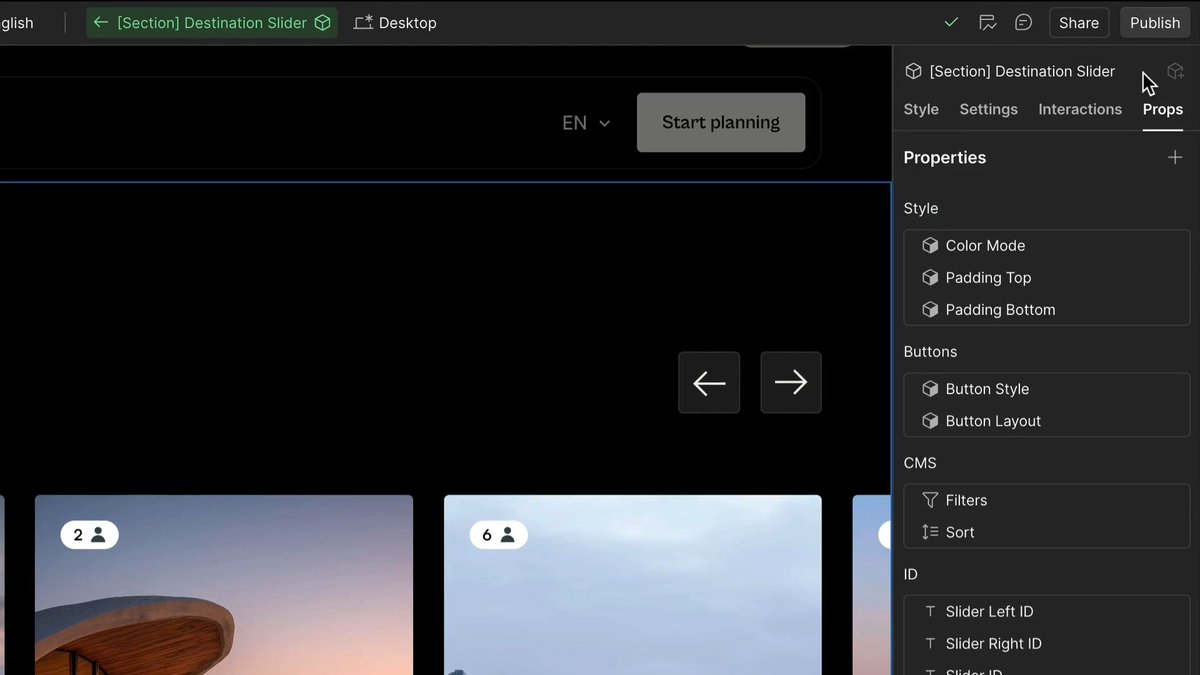
๐๐š๐ฏ๐ข๐ ๐š๐ญ๐ข๐ง๐  ๐Ÿ๐ซ๐จ๐ฆ ๐ญ๐ก๐ž ๐๐จ๐ซ๐ญ๐š๐ฅ Easily move between different sections using the dropdown menus. Section icons open pop-ups, meaning you can sort and manage key areas instantly - all without leaving your main screen ๐Ÿ’ป

253,189 ๆฌก่ง‚็œ‹ โ€ข 9 ไธชๆœˆๅ‰ โ€ขvia X (Twitter)

0 ๆก่ฏ„่ฎบ

ๆš‚ๆ— ่ฏ„่ฎบ

ๅŽŸๅง‹ๅธ–ๅญ็š„่ฏ„่ฎบๅฐ†ๆ˜พ็คบๅœจ่ฟ™้‡Œ

็›ธๅ…ณ่ง†้ข‘

Obsidian 1.11 is now available for desktop and mobile! Mobile: - The interface has been refreshed to improve the editing and reading experience. - Lock Screen, Control Center, and Home Screen widgets let you quickly create a new note, open a specific note, open daily note, open search, or open Obsidian. - When scrolling down in a note, the navigation hides to maximize screen space for reading. - New sidebar navigation for switching sidebar tabs and actions, aligned to the bottom for better ergonomics. - Added double-tap to switch a note from reading mode to editing mode. iOS - Shortcuts to open a note, open daily note, capture to a note. Capture shortcuts allow you to append or prepend text to a note, without opening the Obsidian app. - Siri integration such as "Capture using Obsidian", "Capture to Obsidian", "Open my daily note in Obsidian", "Search in Obsidian". -Searching for Obsidian in Spotlight shows additional actions: New Note, Search, and Daily Note. Android - New widgets: Open Note, New Note, Search, Daily Note, Open Obsidian. You can add multiple widgets of the same type to open different files, or trigger different search queries. - Quick Settings Tile and new shortcuts: Open note, Daily note. Editor - Markdown links are now supported in text and list properties. Internal links are automatically updated when the destination file is moved or renamed. - When text is selected, pasting a URL into the editor will convert the selection into a Markdown link using the URL. Settings - New "Keychain" settings section for storing plugin secrets. A guide for plugin developers is published in our docs. - Added icons to settings sections. - Community Plugins โ€บ Automatically check for plugin updates. Obsidian will check for plugin updates in the background every 3 days, or after the app updates. - New setting Files & links โ€บ Default file to open. Choose between "Last opened files", "New note", "Specific note", or "Daily note". - The daily note format can be selected from a list of predefined formats. Obsidian URI - New, open, and daily URI actions now support a new paneType param.

Obsidian

191,518 ๆฌก่ง‚็œ‹ โ€ข 6 ไธชๆœˆๅ‰

IF YOU SPIN A FEW MIN A DAY YOU REVERSE AGING, RAPIDLY, 1 OF 9999999999 BENEFITS OR CURES HOW TO SPIN: Move from left to right, spinning around and focusing your vision on your left thumb. Then spin from right to left, focus your vision on your right thumb. When you complete spinning, however many times you spin, bring your palms together at chest level. Press them together, keeping your eyes open, and balance yourself with your feet a shoulder's width apart so that you feel anchored and still feel the spinning at the same time. This tremendously accelerates the spinning of the chakra systems inside your body. Many suggest to spin only clockwise but from my experience both directions are necessary! I spin in both directions. I find that I can really stimulate the vestibular system by spinning one way and then suddenly switching to another direction. Its different for everyone but the main goal is to make the fluid in the vestibular system to move in as many different directions as possible. The fluid in the vestibular system has both physical and spiritual qualities. It can be influenced by physical movements and it also can be influence through non physical stimuli like thoughts, emotion, aura fields etc. Eventually you will be able to move the fluid by will. The fluid is what creates the vortex you see. The key to spirituality is the fluid. If you can manage to keep the fluid stimulated and in activity you will be truly spiritual. As a child you had a heightened spirituality! Dont worry, nothing has been lost itโ€™s still all inside you!

9

92,801 ๆฌก่ง‚็œ‹ โ€ข 4 ไธชๆœˆๅ‰

My AI made Shopify pages are getting better and better everyday Hereโ€™s an example of a Shopify section I built with the reference page and the result on my store ๐Ÿ‘‡ Guide: To make good AI landing pages, you need to use the same method as making good AI UGC or AI product images you have to take something that's already good as a reference for Claude/gemini to analyze and adapt for your product/brand for now you can't adapt full landing pages to your product because the Claude context gets bloated fast and you get poor output. Listicles are the only kind of page you can "one shot" with Claude. But Product pages are another story Analyze an existing page and adapting it to your product section by section is the way to go. The results are 10x better. here's an example (on the video): 1- I found this good product section from im8's product page. I screen-recorded the section on both desktop and mobile, going through the animations to capture the dynamism that a screenshot wouldnโ€™t show. Then I asked Claude Web or Gemini to analyze the recording and produce a very detailed report. Full prompt is on my TG channel, it's quite long. 2- then ask Claude (inside your Shopify brand project folder): "I have a detailed UI/UX specification document for a product page section I want to adapt to my product. Recreate this exactly on Shopify as a section template and adapt it to [name of the product] using the brand guidelines" (paste the result prompt from step 1 ). 3- you will have your section ready after 3-4 minutes. you'll probably have to change a few things. spacing, small visual bugs, price not appearing correctly. it will take you 5 minutes maximum. 4- then you can ask Claude to make 4 different variations of the section using different designs and pick the best one using this prompt: "Create 4 design variations of this section. Keep the content and layout structure identical across all, only vary the visual treatment (color usage, typography hierarchy, spacing, component styling). I will choose the one I like the most." after that you have a pretty good section, and you can do the process again for all sections of the page. The less complex the section, the faster the process will be. note: I know the AI result is not perfect, but it's pretty impressive imo and it will only get better.

Olivier

84,679 ๆฌก่ง‚็œ‹ โ€ข 4 ไธชๆœˆๅ‰

๐˜๐จ๐ฎ๐ซ ๐๐จ๐ฅ๐ฒ๐ฆ๐š๐ซ๐ค๐ž๐ญ ๐๐ง๐‹ ๐ข๐ฌ ๐›๐š๐ ๐›๐ž๐œ๐š๐ฎ๐ฌ๐ž ๐ฒ๐จ๐ฎ ๐๐จ๐ง'๐ญ ๐ก๐š๐ฏ๐ž ๐ญ๐ก๐ž ๐ซ๐ข๐ ๐ก๐ญ ๐ญ๐จ๐จ๐ฅ๐ฌ. ๐‡๐ž๐ซ๐ž'๐ฌ ๐ฉ๐ซ๐จ๐จ๐Ÿ. Introducing PolyTech โ€“ a Telegram trading bot for Polymarket that lets you buy/sell instantly, copy profitable wallets, and manage your portfolio without ever leaving Telegram. --- โ€ข Why PolyTech? Speed + automation + intelligent copy trading = better PnL. --- โ€ข ๐Ÿ“Š Features Browse Markets Search, filter, and discover Polymarket opportunities directly from Telegram. โ€ข Instant Buy & Sell Execute orders in seconds. No web UI. No delays. Never miss a move. โ€ข Copy Trading Auto mirror top profitable wallets in real time. Let the best traders work for you. --- โ€ข โš™๏ธ How It Works โ€ข Buy & Sell โ€“ Instantly When markets move, you move faster. Pure speed from Telegram. โ€ข Copy Top Traders โ€“ Automatically ยท Auto mirror profitable wallets ยท Customizable trade limits ยท Real time position sync โ€ข Generate PnL Cards Create beautiful, shareable cards with your trades, profits, and performance. Flex on your community. --- โ€ข FAQ ~ Do I control my funds? Yes. Your wallet stays yours. Export anytime. ~ Is there a fee? Yes, a small fee per transaction to keep the bot fast and reliable. --- Get Started in 10 Seconds 1. Open PolyTech on Telegram โ†’ type /start ( 2. Follow PolyTech & Maestro ๐“ƒต 3. Auto-generated wallet ready 4. Deposit funds โ†’ start trading or copy winning wallets instantly

Maestro ๐“ƒต

10,953 ๆฌก่ง‚็œ‹ โ€ข 3 ไธชๆœˆๅ‰

Here are some tips for those who want to practice face acting: โžก๏ธU motion: Move your head in a "U" Shape so it's never stuck in the same place. This will help your movements look more interesting. โžก๏ธKey points: When practicing with your model, learn to get to a "Key point." This is when you can automatically get to an expression without using toggles. I use surprised and angry expressions a lot, so I know exactly how to move my face to achieve that look, mainly for clips or comedic effect. I practiced enough so I know what it will look like on the model. โžก๏ธHead tilts: If you struggle with face acting, a simple head tilt will go a long way. Overall, the movement and face acting of your model does matter. It can help it look more interesting, but also, it's okay if you can't face acting all the time. Using just key animations when you're gaming will work perfectly. Example: You died in a game, and you go to the key point of surprise. You know, making this face will make your model look shocked, so you will do a dramatic eye open and mouth agape to achieve this, to reflect onto your model. Lastly. The way your model moves is usually 30% rigging artist,20% tracking (webcam/iPhone), and 50% you. Your rigging artist can give you the tools, but only you can make your models' results reflect your emotions. As always, DO YOUR PARAMETERS AND SETTINGS IN VTUBE STUDIO. It will not be perfect to your face and camera settings unless you adjust the model, (This is an old video I did on parameters) Holy Yapfest.

โ™ฅ๏ธCutiepierin | L2D RIG ARTIST

93,206 ๆฌก่ง‚็œ‹ โ€ข 9 ไธชๆœˆๅ‰

Exodus | Official Gameplay Trailer Full Video โ–ถ๏ธ Details โ–ช๏ธThe basics: Action RPG with dialogue choices, your own ship, companions both human and alien, skill trees, etc โ–ช๏ธPlay as "Jun", who the team describes as sort of a mix between Indiana Jones and Paul Atriedes โ–ช๏ธYou can customize your character, male or female, choices you in the game define you โ–ช๏ธGame Structure: There are structured quests as well as areas you can explore around in, similar to KOTOR, Mass Effect, Dragon Age Origins. You decide the manner in which you do quests โ–ช๏ธYou go on quests to retrieve Celestial technology, and depending on what you decide to do with that tech (help your society, advance militarily, etc), the game world can change drastically โ–ช๏ธSome choices you make with the Celestial tech can open up entirely different weapons and technology โ–ช๏ธYou are joined by a large cast of companions, and you bring two along with you on quests like Mass Effect โ–ช๏ธRomances confirmed to be in the game โ–ช๏ธSome companions "will be at each other's throats", and you'll have to side with some over others โ–ช๏ธSome companions can change "radically" depending on choices you make, for example through time dilation: leaving companions behind may change them, age them, etc by the time you come back Need itttt ๐Ÿ˜ฉ #Exodus

Shinobi602

162,317 ๆฌก่ง‚็œ‹ โ€ข 1 ๅนดๅ‰

Possibly the biggest change in Microsoft Teams history? Teams without the Teams? Public preview in November to desktop, mobile, iOS, and Android. Here is what you need to know: ๐ŸŸฃ Microsoft is introducing a new combined chat and channels experience. Meaning chat and teams/channels will show up under the "Chat" sidebar icon. No more dedicated Teams sidebar button. ๐ŸŸฃ Teams and Channels will have their own section in chat. ๐ŸŸฃ Group your chats and/or channels however best works for you with favourites and custom sections (up to 50 sections and 50 items per section) ๐ŸŸฃ โ€œUnread,โ€ โ€œChat,โ€ โ€œChannels,โ€ โ€œMeetings,โ€ and โ€œMutedโ€ Filters ๐ŸŸฃ New message can initiate a new chat or new channel post ๐ŸŸฃ New Mention view gathers all your mentions into a single interactive list. ๐ŸŸฃ At launch, a self-service, guided onboarding will help users discover the new experience and configure it to their preferences (on or off) ๐ŸŸฃ Users who prefer to keep chat and channels separate can easily do so during the onboarding process or at any time later. So far, it looks like there are no IT/tenant-level override controls. This experience change is targeted at getting more users using teams/channels. Most Teams users live in "chats", not teams/channels. There will undoubtedly be some pushback from users who use teams/channels well and like having the mental separation of teams/channels vs chats. I've been fortunate to be using it for a while, and I'm personally a big fan; my use of the correct channels has gone way up, and now I can find them all in one place in the app, particularly on mobile. I'm now much more likely to see channel conversations I need to see. What do you think? #MicrosoftTeams #Microsoft365

Tom Arbuthnot

64,526 ๆฌก่ง‚็œ‹ โ€ข 1 ๅนดๅ‰