
Bjarne Øverli
@iamdothash • 8,744 subscribers
Omarchy Core Team member Creator of Cliamp, Aether & Flux. CTO Unite AS
Shorts


Videos


Introducing Flux for Omarchy, take 2. This time it has a proper marketing video!
Bjarne Øverli86,688 views • 28 days ago

Introducing Flux Flux is your phone link for Omarchy. Many of the features → Clipboard sync → Fingerprint approval for sudo → File transfer → Phone notifications on the desktop → Notification replies → Notifications to the phone (flux notify) → Build and job alerts (flux notify --run) → Call alerts → Pause media on calls → Do Not Disturb sync → Find my phone → Find my PC → Browse phone storage → Browse PC files → Omarchy commands → Text scan (OCR) → QR and barcode scan → Photo to PC → Document scan to PDF → Auto-send screenshots → Auto-send photos → Phone as webcam → Phone as microphone → Screen mirror → CLI KDE Connect on roids. In early stages.
Bjarne Øverli81,861 views • 29 days ago


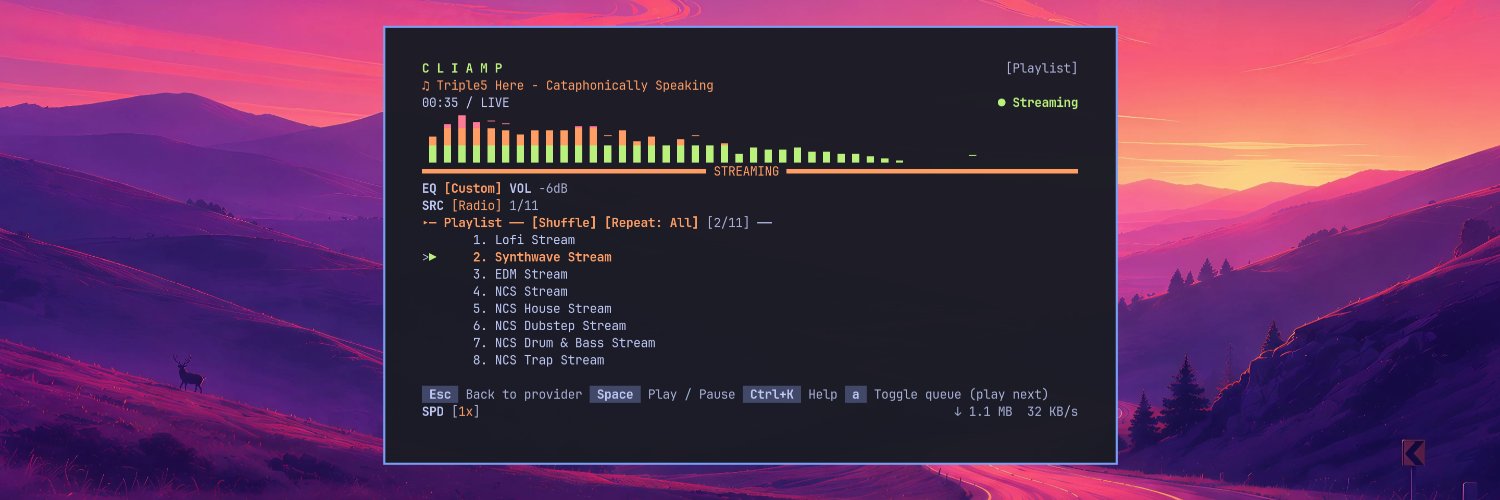
In March 2026, I started on a TUI-based music player called cliamp. It was made as a tribute to Winamp, which we all love. I gained traction on my first post, which was really shitty compared to what I can do now, but nostalgia kicked in. It was a few months ago, included as the default Omarchy TUI music player. cliamp has separate providers, like - Spotify - YouTube Music - Jellyfin - SSH streaming - Local streaming - 30k+ radio channels - And much more It can run in daemon mode (no tui), it has IPC to be controlled by and from whatever you want, a full cli. The cliamp radio channel has exploded, and in the last seven days it has had around 115,000 sessions in total. The goal is to make cliamp even better, so I am working on the architecture. E.g., better IPC, so you can run it in daemon mode and build what you want on top of it to control it. I am also working on a GUI version that will use the IPC, as many have requested a GUI. Anyways, here's a short video of cliamp. It is pretty. It might not be the best UX to use yet, but it is the prettiest TUI music player out there. Thanks
Bjarne Øverli107,444 views • 2 months ago


Are you lacking themes for your Omarchy Quattro experience? No worries, I have launched a site with 3088 wallpapers, each with 5 theme variants. You can apply this through the browser. You can click the edit button to open it in Aether to tweak it. Give it a go!
Bjarne Øverli89,369 views • 2 months ago

How do you manage it? You use Flux. Connect your phone and Omarchy.
Bjarne Øverli26,405 views • 20 days ago


Omarchy OS Android Important note: This is just me using my creativity. It is nothing official or anything that DHH has started working on. I just feel a burning desire to learn how to build a layer on top of Android and how user interactions would work in such a case. Something clean, elegant, and intuitive to use.
Bjarne Øverli79,565 views • 2 months ago


Added a requested feature by many: Connect apps to windows in workspaces. For the interested ones, here is a full list of the changes made, written by AI: - Pin an app to a workspace so it opens there wherever you launch it from, using a Hyprland window rule - Pin an app to a numbered place, or to several places at once - Put several apps in one place; whichever is open takes it - Search every app installed on the machine, not just what is running - Read names and launch commands from desktop entries - One button opens everything the workspace is missing, one window per empty place - Terminal apps like nvim and btop open in your terminal under a class the pin can match - A pin corrects itself when a launch opens a window under a different class, as webapps and terminal apps do - A pin remembers the command that opened it and the readable name of the app - Split a slot the other way, so a column becomes a top and a bottom - Split that half again, three levels deep: columns, then rows, then columns - Drag the divider at every level, including the one inside a split - Extra windows become real places instead of a temporary stack while you work in the panel - Editing a shipped layout makes a copy called custom-xxxx and leaves the original alone - Capture builds a layout plus pins from the windows already on screen - Drag one tile onto another and the two swap their apps - Hold a tile near an edge and that half lights up; drop it there and the place splits, your app takes the half, and the place it came from disappears - Hover a tile for two arrows that split it either way - Right-click a tile to split, merge, remove, even out, clear its apps, or put an app in it - Right-click a workspace to hand it back to Hyprland, capture it, or clear its apps - App names are drawn inside the tiles they live in - The tile you are carrying follows the cursor with its name and target - A layout per monitor, sitting between the per-workspace choice and the profile default - Clicking a workspace takes you to it - The panel scrolls when it grows taller than the screen - Single-key shortcuts are gone; Esc closes, everything else is pointed at - Sixteen command-line commands: status, workspace, json, profiles, apply, layouts, set, reset, pin, unpin, capture, launch, open, close, show, hide, toggle - Full command-line documentation in docs/cli.md
Bjarne Øverli39,329 views • 1 month ago

I know you all love Omarchy themes. Here's 100 themes for you to install. Enjoy!
Bjarne Øverli19,650 views • 24 days ago


I love Aether, but I love the terminal even more. Here's Peachy. Omarchy is the first-class citizen for theming. However, it has full support for all kinds of distros. It even supports macOS. Started playing Arc Raiders during the Holidays, so a new theme had to be made.
Bjarne Øverli95,096 views • 9 months ago