Video wird geladen...

Video konnte nicht geladen werden

Zur Startseite

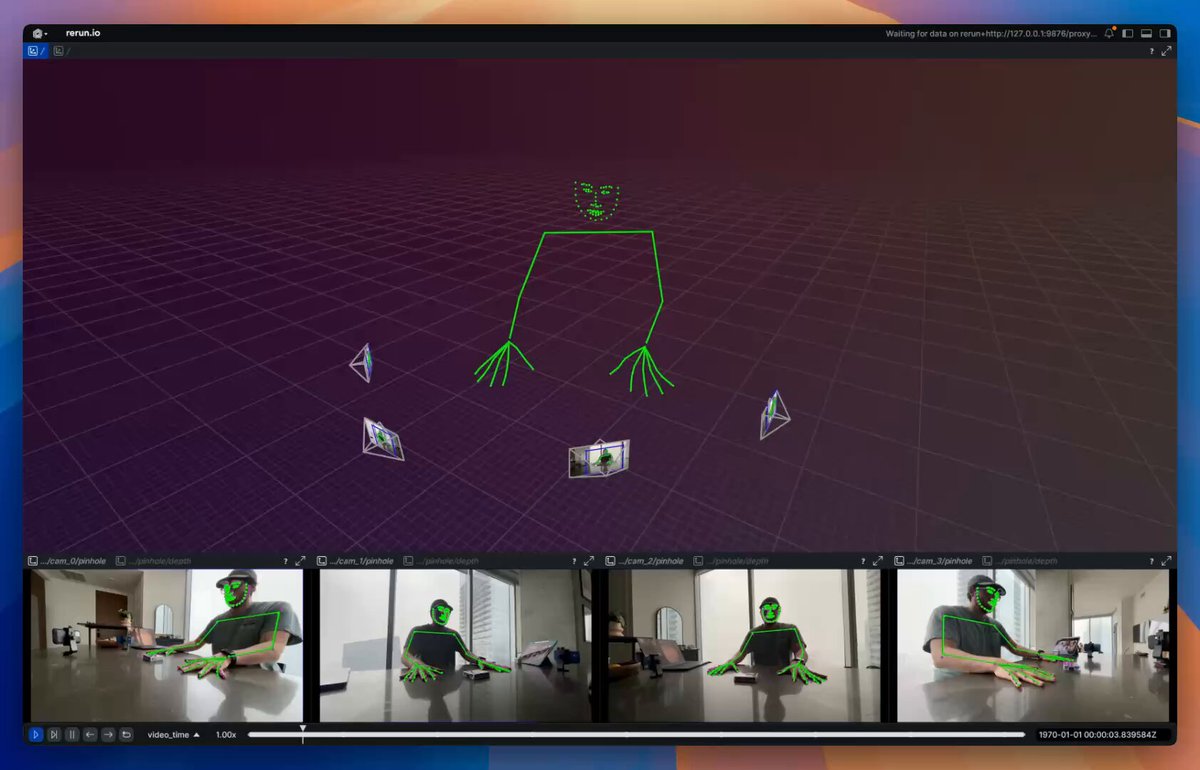
4DGS volumetric video captured with iPhones. 📱 Until now, capturing 4D Gaussian Splats meant million-dollar studios and fixed camera rigs. Radiant just changed the game - genlock-syncing multiple iPhone 17 Pro Max cameras with Tilta Chronos cage and Blackmagic ProDock into one fully wireless mobile capture rig. Pixel-level sync,...

12,189 Aufrufe • vor 4 Monaten •via X (Twitter)

0 Kommentare

Keine Kommentare verfügbar

Kommentare vom Original-Post werden hier angezeigt

Ähnliche Videos

MVP of Multiview Video → Camera parameters + 3D keypoints. Visualized with Rerun The basic pipeline as of right now looks like this: 1. Capture 🔴 – Using 4 iPhones and an Insta360 Go. iPhone videos are captured via Final Cut Pro Multicam for easy sync and the exocentric view; the Insta360 Go is used for the egocentric view. 2. Sync 🕒 – Custom Gradio app using two Rerun viewers and callbacks for easily aligning frame timestamps so the ego and exo views are aligned. 3. Calibrate 🎯 – Use VGGT from Jianyuan and AI at Meta to get intrinsics/extrinsics for sparse cameras. 4. Estimate 3D 🕺 – Use RTMLib whole‑body keypoint estimator on each frame, then triangulate in 3D. What's missing? 1. No temporal coherence: I’m estimating keypoints one frame at a time and one camera at a time. This leads to a lot of jittering. For now, I plan on adding a One Euro Filter to help with jittering. Long term, I'd want to train a multiview keypoint estimator 2. Kinematic fitting is still missing; this is my next goal. The output will be joint angles, as explored in my previous posts. 3. Missing dense point cloud: VGGT seems to fail for me here. I’m looking to explore using MP‑SFM as a method for generating dense multiview depth maps + normals (plus it has a friendlier license compared to VGGT). 4. Eventually, creation of 4D Gaussian splatting using something akin to DN‑splatter—my long‑term goal is a data engine that provides poses/depths/splats/keypoints/etc.

Pablo Vela

42,785 Aufrufe • vor 1 Jahr

Fast Company just published a great piece on World Labs , Fei-Fei Li , Marble, and the idea that spatial intelligence / world models may be one of the next big shifts in AI. I was happy to be quoted in the article, but I also wanted to share more context about my own experience with World Labs and Marble, and why this direction is especially interesting to me. My starting point: volumetric capture — For the past few years I’ve been exploring and using volumetric capture and reconstruction (photogrammetry, NeRFs, 3D Gaussian Splats) mostly capturing locations around Montreal. Alleys, museums, urban interiors. I love every step of it: the capture itself, the pipeline, and what can be done with the output. Turning real spaces into real-time explorable systems. I do this personally, sharing explorations here, and professionally as chief technologist, and co-founder of Dpt. Physical reality + generative manipulation — In my work I’m especially drawn to mixing physical reality with generative and digital manipulation: using physical interfaces (light, clay, ink, ... ) to drive generative AI pipelines, building mixed reality prototypes that reshape your surroundings, or starting from real captured spaces and transforming them using tools like Marble. Like many people, I saw the World Labs announcement on Twitter in September 2024, and Marble when it surfaced in early December. But by then, I already had a sense something was coming. The first conversation — As someone deep into volumetric capture and radiance fields, I obviously knew about Ben Mildenhall and his pioneering work on NeRF. To my surprise, Ben reached out to me in late June 2024. He’d been following some of my experiments and wanted to chat about my process and workflows and how I was using this “stuff” creatively. At that point he didn’t share what he was building, but we had a genuinely great conversation about radiance fields, AI, and my work. He was curious about the creative perspective, not just the technical one. When the World Labs announcement dropped a few months later, it all made sense. I understood what Ben had been working on, and why the creative angle mattered to them. Then in August 2025, he invited me to try the Marble beta, and I’ve been experimenting with it since. Experimenting with Marble — The first thing I used Marble for was materializing scene and world concepts during ideation at the studio, and seeing if and how it could fit into our production pipeline. In parallel, I dove into a series of experiments focused on world manipulation: starting from real captured spaces and transforming them using Marble. I’d already been exploring that idea using img2img diffusion with ControlNet on NeRF renders, real-time video streams, and even mixed reality using headset camera feeds. But Marble brings something different. It generates persistent, spatially cohesive 3D worlds that can be rendered in real time across a wide range of devices. That’s a real shift. Experiment 01: Parallel Realities — The first experiment, Parallel Realities, starts from a volumetric capture of a real location, reconstructed as 3D Gaussian Splats. Using Marble, I generate an alternate version of that same space, something informed by the original architecture: abandoned, nature-reclaimed, alternate era. Then, using Spark (World Labs’ 3D Gaussian Splatting renderer for THREE.js) I make both realities coexist in the same spatial coordinate system. From there, I use a portal UX mechanic to let the user step between the real reconstruction and the Marble-generated version. Experiment 02: Hidden Depth The second experiment, Hidden Depth, does not transform a space as much as expand it. A captured location has a visual boundary (a mural, a doorway, a dark corridor) and Marble generates what exists beyond it. For example: a Montreal alley has a painted mural; step through it and you’re inside a world informed by what is actually depicted there. World Labs showcased part of this work here: And in their Spark 2.0 post: The project page is here: Why this matters to me — Being able to start from a real 3D Gaussian Splat scene and manipulate it with Marble opens up a lot of ideas. The 3DGS pipeline is becoming an increasingly compelling foundation for exploration, experimentation, and storytelling. What matters most to me right now is more control. The more I can steer the generated scene or world, the more useful the tool becomes. I want more features like the already existing multiple input images and Chisel, the blockout-based approach. I would like better local control, the ability to expand a generated world more and more while preserving coherence, and the ability to directly import 3D Gaussian Splat scenes to be used as a starting point. I want more ways to shape the result, not just a “prompt and hope” approach. — It is exciting to see this field moving from research and demos toward actual creative workflows.

Hugues Bruyère

69,960 Aufrufe • vor 2 Monaten

This is a big update! visionOS 2.4 Beta is now available and I’m genuinely excited! The public release hits in April, but here’s the rundown of what’s available in visionOS 2.4 Beta today: • Apple Intelligence is coming to Vision Pro! All those rumors that said the first model wouldn’t get it. Dead wrong. We’re getting Image Playground to whip up fun images, Genmoji for custom emojis, and my personal favorite, Writing Tools. This is just the start of Apple Intelligence on Vision Pro and I’m excited to see where it takes us. • Guest User feature! Hand your Vision Pro to someone, and your nearby iPhone or iPad pings with an 'Allow Guest User' option. You pick their apps from your device, kick off View Mirroring with AirPlay to see what they’re seeing, and guide them through the experience. It’s clean, easy, and something many of us have been asking for. • A new Spatial Gallery app! Apple’s curating a stunning lineup of spatial photos, videos, and panoramas from artists, filmmakers, and brands like Cirque du Soleil and Porsche. Can’t wait to dive into that. • A new Vision Pro app for iPhone! Browse and queue up apps or games to download, discover spatial content from Apple TV and Spatial Gallery, and grab handy tips—all from your iPhone. It’ll roll out with iOS 18.4 wherever Vision Pro’s sold. I think it’ll be super useful. visionOS 2.4 is a big step up and it’s another strong signal that we have a lot to look forward to with spatial computing from Apple. We are just getting started.

Justin Ryan ᯅ

83,414 Aufrufe • vor 1 Jahr

One of the things I’m most excited about in our recently announced partnership with Niantic Spatial 🌎, is how clearly it shows what becomes possible when world-class reconstruction technology is paired with a new kind of imagery infrastructure. At a high level: Spexi drone pilots capture imagery, and Niantic Spatial turns it into incredible city-scale reconstructions. But the real unlock is the infrastructure behind that capture. At Spexi, we’ve built what we believe is the world’s first fully standardized drone imagery infrastructure called LayerDrone. Anyone with a compatible drone and the right credentials can contribute. No building flight plans. No estimating overlap. No adjusting camera settings in the field. Pilots simply get within visual line of sight of a Spexigon, open the Spexi app, press “Fly,” and the drone autonomously captures the 25-acre area to our standard. That standardization means imagery can be collected consistently, affordably, and repeatedly across cities, one Spexigon at a time (we have now captured over 225,000 of them). That is what makes living digital twins possible, dynamic representations of the physical world that can be updated as the world changes. Niantic Spatial’s city-scale Gaussian splats show what becomes possible when the right pixels go into the system. As physical AI advances, those pixels matter even more. Robots, drones, vehicles, maps, and spatial intelligence systems will all need current, high-resolution data about the real world. And as you can see below.. the results are not just beautiful, but real, measurable reconstructions of the physical world, one Spexigon at a time!

Alec Wilson

10,641 Aufrufe • vor 2 Monaten

🚁 My war drone simulator Apocalypse Drone now has support for 32 players! I also made it Conquest/CTF so you have multiple bases that you have to capture, each round the map is procedurally generated and random so every time it's different (like Battlefield) There's still some bugs to work out and most importantly I have to figure out soldier animations, because they're fixed models now But I have got really far this time I think and coding with AI is really way further than it was a year ago, you mostly notice that how few times you get stuck, only one time this month building this I got stuck which was today where I moved the AI players to the server and they kept showing up as invisible, very buggy, every time I told it that it couldn't fix it though Then I asked it to fundamentally analyze the current server-side AI player code and make it work like industry standard, and it took a long time and fixed everything Last year I'd get stuck hundreds of times and the AI just couldn't get itself out of a hole, but now it can I think it's impressive that just last year only for the first time we could make actual games with AI But this year as non-game dev, I can get pretty close to the level of a multiplayer game from 20y ago (like Battlefield 1942, that lots of ideas here are based on, but with drones :D) Obviously we're still far away from AAA (I hate that term though) but the curve of exponential progress is there again, as it was in AI image generation, then video, and now code, first bad, then better, then good enough! Here's a video of gameplay from my drone sim You can play it with the link in the reply below and it's multiplayer!

@levelsio

55,036 Aufrufe • vor 3 Monaten

📱 iPhone 17 Giveaway 📱 To celebrate our mobile app launching, we’re giving away an iPhone 17. backstory about the way we designed this Mobile app. For the last years, we’ve heard again and again that our users wanted folk to go Mobile. But it didn’t felt right to simply replicate the product and all its features on Mobile. Desktop and Mobile are completely different contexts. Our desktop version is built for productivity. We designed the interface to be simple and lightweight so not to overwhelm you, but with condensed information so you can have a high level view of what’s going on in your CRM. We’ve built it for bulk actions so can get through your tasks in reduced time. It’s the perfect companion for deep, focused work. Mobile is different. You check your mobile when you’re on the go. Heading into the office, between client meetings, traveling for work, or simply off and far from your screens. And salespeople are often far from their desktop. Sales is about connecting, go meet your prospects on the fields, engage with them, shake hands. These moments are precious, that’s where trust is built. To shine during these moments, it’s about the little things. Remembering your prospect’ daughter’ name. Making sure action points discussed in the meeting are well passed to the team. Ensuring you actually reach out to the lead you met at that conference, as you promised. We wanted to design the perfect companion for that. Contacts by folk is built as a contacts app that shows all your contacts from folk CRM. But designed to give you context and let you capture more context. - Sync contacts from multiple places - your emails, LinkedIn, calendar, WhatsApp, or any contact you add in the CRM - Add new contacts easily, including with business card scanning - Search contacts smartly - you can search by name, but also company, job title or even through your notes - Add notes on the go, mention your teammates, and even record notes with voice-to-text - View past notes and past interactions before a meeting across all your channels Think the native Contacts app, reinvented for today. Want to win? Comment “CONTACTS” below 👇👇👇 We’ll randomly pick 1 winner ◾ 1x iPhone 17 ◾ 1 year of folk CRM ⚠️ Get a second entry if you repost!

Simo Lemhandez

51,577 Aufrufe • vor 1 Monat

This soldiering training is the most impressive and immersive I've ever tried. It is 10x better than a YouTube tutorial video. It really allowed me to see the procedure from all the points of view, and even get super close to get the details. It is a collaboration between Gracia and Imperial College London: they recorded a soldering session with Gaussian Splatting Videos (4DGS), so that you can enjoy it from your VR headset. You can see the action happening in front of you; you can pause and re-watch what you need, change the point of view, get closer, get more distant. And the quality with which it has been shot is impressive: I enjoyed this experience with my DELL Pro Max Tower T2 with NVIDIA Pro RTX 6000, and I could really see all the small details of the PCB that was being soldered! I was really impressed by it. But I also noticed some drawbacks. First of all, some scenes have artifacts that make seeing the details of the PCB hard. I think when it comes to training involving small details, the capture and reproduction of the splat should be flawless. Then, as much as I loved it as a passive experience, I would have liked to have also some sort of practice session in VR. The power of VR is to let you learn by doing in full safety, and this kind of training does not exploit it. But maybe the best way to enjoy it would be in MR, where you have this training video close to a real workbench where you do the actual soldering while following the tutorial. Gaussian Splat can really revolutionize training: this kind of recording is much better than any flatscreen experience, and more accurate than any 3D CGI recostruction. I suggest you give it a go at this experience in the Gracia app (it's free). Then let me know your impressions! #VirtualReality #training #DellProPrecision #GaussianSplat #technology [Disclaimer: I'm a DELL Pro Precision Ambassador, and this is why I mentioned the model of my PC. I have been given a PC to do cool tests and share my results on social media. No monetary compensation or sales affiliation is part of the collaboration]

TonyVT SkarredGhost

37,934 Aufrufe • vor 13 Tagen

I deleted half of my AI-video prompt — and the result got better. 😶 Here's the before/after that changed how I prompt, and the skill I open-sourced from it. 🧵 We've been prompting video models like a film shot list: 24mm, f/1.4, "volumetric fluid simulation," frame-by-frame timing. But a lot of the time you don't need to — the smarter the model gets, the simpler the prompt can be: tell the story, the texture of the air, the emotion, and let it pick the shots, light, and rhythm. ByteDance shipped this idea with Seedance 2.0 and called it "Vibe Creating" — I open-sourced the skill and the philosophy behind it. Same scene, two prompts 👇 🔧 Regular: "85mm f1.4 macro, 120fps, dolly 0.6x, freeze the sweat at 1/250…" ✨ Vibe: "Late-night street stall. The cook flicks the wok; a ball of orange flame lights up his sweating face. Noodles fly. He plates them and wipes his brow." Same model. One of them feels alive. The skill is built for story-driven video — concept shorts, micro-narratives, emotional or atmosphere pieces, anything where you'd rather describe the moment than dictate the camera. Feed it your idea (or your over-stuffed prompt) and it hands back the version the model actually shoots better. The one place it won't go: UI demos, step-by-step tutorials, or exact dialogue sync — there it'll tell you it's the wrong tool rather than flatten a prompt that needed to stay precise. Try it on your next prompt — repo 👇

Alisa Qian

11,983 Aufrufe • vor 2 Monaten

This is big. NVIDIA and Apple just unlocked the next level for Vision Pro with CloudXR. Here’s what you need to know: It streams from a PC or the cloud directly to your Vision Pro. No cables. Up to 4K at 120fps. The technology is called dynamic foveated streaming. Your eyes only see in full resolution at the center of your gaze. CloudXR tracks exactly where you’re looking and delivers maximum resolution there. Everything in your periphery gets optimized. The stream stays efficient without you ever noticing a difference. Why does this matter? Vision Pro is already the most advanced spatial computer ever made. But standalone processing has a ceiling. There are workflows that need more compute than any headset can carry. CloudXR removes that ceiling by connecting Vision Pro to the full power of NVIDIA RTX in real time. This is not a workaround. It is a native visionOS integration. Also worth knowing. Gaze data never leaves your device. Not to the app. Not to the server. Developers get the full performance benefit of foveation without ever touching your raw eye tracking data. Privacy built into the architecture. Three industries are already on this: Kia, Rivian, and Volvo are running 1:1 scale design reviews with photorealistic accuracy. Full size vehicle models evaluated in spatial computing before a physical prototype exists. That is a fundamental shift in how design works. Foxconn is walking factory floors digitally, optimizing facilities before construction begins. Switch is managing data center infrastructure through a full digital twin. Companies using this approach are reporting up to 30% improvement in development processes. And sim enthusiasts finally get to cut the cord. iRacing and X-Plane 12 are the first titles. Full GeForce RTX power, streamed wirelessly to Vision Pro, inside your physical space. For developers: one Xcode template, one codebase, deployed across Vision Pro, iPhone, and iPad. And multiple headsets can share the same streamed environment at once. Some fully immersed, others on a tablet. That collaborative layer is what enterprise has been asking for. Coming this spring with visionOS 26.4. It’s wild to think about what this unlocks. The future of spatial computing is incredibly bright. Live from GTC. More coming soon.

Justin Ryan

43,685 Aufrufe • vor 5 Monaten

If you take a movement to unpack this visualization... You'll see how it simply breaks down how reality works. At frame 0 you have a static image. Everything is one, this is the monad. As soon as you hit frame 1 there is movement, there is change. Now you have two states, moving, or static. When Nikola Tesla says you can explain everything in frequency and vibration. The difference between frame 0 and 1, is vibration. The difference between movement and no movement. This is like binary logic we use in code which is made up of 0's and 1's. After frame 1, is when frequency emerges. Because the difference between frame 1 and all frames after is about how fast is the vibration/movement happening. If we skip forward to frame 50... You have a shape that begins to emerge, this is the 8 dots, then the 6 dots. Notice how unstable it is, it's 8 dots, then 6, then a moment with 4 in a rectangle These shapes are emergent properties. The first two emergent properties after the monad was vibration and frequency. Next comes shape (i'm skipping over rotation and direction). These shapes of dots can only exist when you have frequency and rotation. This frequency and rotation creates vortex energy. It's the same energy that things like your chakras use. Or the same energy we harness in devices like engines, airplanes, fans, blenders, hard drives, etc. It's also the same vortex energy you'll see in a tornado or hurricane. They are powered because they harness rotation and frequency(change/movement). Going back to the video, notice that it is inside the entire shape, the internal structure is manifesting before the external structure does. Then around frame 60 the hexagon of circles begins to rotate. First it was the two dots that moved and now it's a complex shape that is coming to life. This is a higher dimension (or lower depending on how you look at it) manifesting into existence. The internal state is "awakening" and experiencing it's own change like what happened to the whole shape in the first frames. But it is unstable. That's why it doesn't persist for long. If you think of the 8 dots being the octahedron, they map to the element of air. Air is in the material world, but it is not something you can see. The brief moments the 8 dots are visible is similar to that effect. They are only experienceable between a small frequency band of frames. Now here's where stability begins to appear in the internal structure. This is when the 4 dots appear. You'll see that the four dots, the square, is stable and persists the most visibly for the most amount of frames. The square represents earth in the platonic solids to elements mapping. Earth, is material, it's stable. We build our buildings in squares and with earth because it is a solid shape to build on. This visualization shows you why. Across different vibrations (frame rates) it can self sustain. Between this point and frame 180, you'll see a new emergent property. Which is depth. A new dimension is introduced at around frame 90 but really becomes visible at around frame 110. You can see a foreground and background. There is the shape of the dots, but also the triskellion wave happening in the background. Let's jump to frame 180. Notice how it is the same as frame 0 except... It's flashing. If you were paying attention, you'll notice you could see flashing at frame 90 and frame 120, but they didn't persist for long. At around 150 it started to reach stability and 180 it was solidified. Between frames 150 and 180 there is flashing, but the image is still moving. Only for a brief moment at frame 180 is the movement frozen and the flashing persists. Think of that like your computer screen. It's what your screen is doing right now as you read this. Even tho the text isn't moving, the screen is flashing at 60 or 120hz. The images appear on your device because this flashing brings things to life. The entire material realm and your physical body right now, is doing the same thing. While you look solid... You're flashing in and out of existence at very high frequencies. You can look at frame 180 and frame 0 as the same essence but it is the mid point between an octave change. In the video, the ying and yang was vertical, now it is horizontal. This is a phase shift. If you notice at exactly frame 180, the rotation freezes and then the direction of rotation changes. The process then repeats all the way to frame 360 but in the opposite sequence. Once it reaches frame 360, that is an octave change and the process repeats. Each time you repeat the process is a layering of the same patterns into higher octaves. This is the same as your chakras or how other things work. They are like russian nesting dolls where every octave is layering onto the next. The complexity of your body is a layering of basic principles that emerged in earlier stages. Your organs are built of systems that are built with cells that are built with proteins that are built with atoms and so on. The atoms, work just like your body at a basic level. Your body works just like the galaxies. At each level you'll have the same pattern. This is where the idea "As Above, So Below" from. The monad, splits in two, and so on and so on. One cell, splits into two through mitosis in the same logic. We could spend all day going through examples of how biology, physics, spirituality, etc. aren't really different. They are just categories that we use to dissect these frequencies and octaves of energy but they only start paying attention within the confines of materialism. The problem is, none of the sciences start at the root patterns. Because that is reserved for religion or spirituality. It's too woo-woo to take seriously so it's dismissed. And because of that... We're left ignorant on the simple explanations for how things work. Now you need some expert with tools you don't have access to in order to explain things. When you could be understanding them without the tools. The Yin and Yang symbol in this video is 3,000 years old. It's simple. Yet I just showed you how it explains deeper layers of reality.

Jamal ☯︎ 🔆🧘🏽🧠

13,149 Aufrufe • vor 4 Monaten