Video yükleniyor...

Video Yüklenemedi

Ana Sayfaya Dön

Instead of using UE, I built my own Vulkan engine for full control over rendering and memory. Features: - Data-driven rendering - Preallocated arenas, no runtime heap - Cascaded shadow maps - Temporal AA Currently building a fully 3D voxel GUI. #cubeworld #vulkan

445,939 görüntüleme • 11 ay önce •via X (Twitter)

0 Yorum

Yorum bulunmuyor

Orijinal gönderinin yorumları burada görünecek

Benzer Videolar

I built a Three.js rendering study inspired by Tiny Glade’s painterly aesthetic, and got it running at 120fps in the browser. Over the past few weeks, I’ve been studying how stylized games achieve that soft, handcrafted look in real time. Tiny Glade was a huge inspiration, and I wanted to use the browser as a constraint: no compute shaders, no native GPU access, and single-threaded JavaScript. As part of this study, I implemented: - GPU-driven instanced brick walls with procedural noise jitter and elastic build animations - Tree, bush, and flower rendering with billboard card expansion, wind sway, and grow animations - Procedural grass with terrain conformance and interactive push deformation - Animated water with layered noise, interactive ripples, and Fresnel-based reflections - Procedural terrain with slope-aware triplanar materials, dirt paths, and rocks - A 7-pass post-processing stack with TAA, bloom, depth of field, painterly filtering, ACES tonemapping, 3D LUT color grading, and film grain The hardest part wasn’t writing any single shader. It was making all of these systems work together at high frame rates inside WebGL, where every millisecond counts and performance problems compound quickly across animation, materials, post-processing, and scene management. Some techniques in this study were inspired by analyzing Tiny Glade’s rendering approach, while others were original implementations built from scratch from visual reference. That contrast taught me a lot: recreating an effect is one challenge, but designing your own shaders and systems to achieve a similar feel is a very different one. This is a private educational rendering study. Some temporary placeholder content is being used during the research phase, and any public or production version would use original or properly licensed assets. Huge credit to Pounce Light for the incredible art direction and rendering work in Tiny Glade: Three.js #gamedev #webgl #threejs #rendering #graphics #realtimerendering #shaderdev

Ibrahim Boona

58,625 görüntüleme • 3 ay önce

Working on Sparse Volumetric Light-maps. Thanks to CynicatPro🎃 for pointing me at Unreal's version. In a nutshell it's just another sparse voxel data structure. My implementation is, no doubt, different from Epic Games Store's own. I'm using 4x4x4 probe grid with intermediate nodes having very wide branching factor of 64 as well (4x4x4). I liked the parameters that Unreal is using, of limiting both total memory as well as the lowest level of detail, which is common in sparse grid implementations. Here's Bistro scene with just 1Mb limit. This is roughly equivalent to a 512x512 lightmap texture in 2d, except surface light maps require unique UVs and you typically get very little detail out of 512 resolution texture with a lot of light leaking. There is also no directional response. My implementation encodes second-order spherical harmonics for each probe (9 coefficients), encoding RGB channels as RGBE9995 (4 bytes). So far only worked on the structure, actual bake is yet to come. I've been eyeing sparse voxel structures for a while now, and have been studying them roughly since the GigaVoxel paper by Cyril Crassin but never really implemented anything for the GPU before. I was always the BVH-kind of guy. It's a fascinating topic. --- Stats for the scene: --- Total memory usage: 1.000 MB Node count: 609 Unique probe count: 24,025 Probe reuse: 38.36 % Unexpanded nodes: 15,714 --- Again, note that there is no GI going on here, only the structure of the probe tree and the algorithm for building it from a given scene.

Alex Goldring

11,519 görüntüleme • 6 ay önce

** Sega Genesis 3D engine update 8.5 ** A smaller update - Scrolling left or right of the sprite based background is implemented along with X camera shifting of the 3d plane. The Exodus emulator has been used with sprite boxing enabled so you can see the background sprites making up the object ( their outlines ) and how they move to tilt the image . The background is made up of 112 sprites (51 are multiplexed in that number as the Genesis is limited to 80 without mulitplexing eg basically re-using sprite hardware as the screen is being drawn ) . In a 6 x 17 sprite grid of 16x32 pixel high sprites. If the tilt affect was not neccessary or only 1/2 the angle of tilt effect was needed, I could get away with 1/2 the number of sprites and just used 32x32 sprites instead. I think the tilt effect adds a bit to movement however. This is very similar to how a Neo Geo would build its backgrounds up - in 16 pixel strips however its sprites are tall as the screen or more but the concept of making backgrounds up in 16 pixel wide strips is similar. The NG uses sprites to build any background layers required. Here on the Genesis the reason is rendering is much faster using both the 3d planes and using a total sprite background for this engine. Initially i had a lot of things breaking when I tried to move the camera in the X dimension much , as i'd optimised the vertex transform path heavily and once beyond a certain camera offset the X value was wrapping around causing a lot of breakage in the rendering. Thankfully solved that issue without marginal impact to cpu . It still needs work , perspectives are a bit wrong etc but it won't be hard to fix. Also found some rendering speeds ups, about 8% by optimising fully onscreen quads and optimising the clearing of the frame buffers more efficiently. Toni Gálvez - Megastyle - BG. has been hard at work on HUD elements and more 3d models so will have something to show for that soon. #SGDK #SegaMegadrive #SegaGenesis

Shannon Birt

20,122 görüntüleme • 7 gün önce

Introducing Aval - a new open source format for interactive video on the web. It has a built-in state machine, frame accurate transitions, and packed alpha transparency. This is probably the craziest thing I’ve ever built with Codex. I’d been dreaming about this technology for years. Before AI, building it would have taken months of work. I could never justify that investment for a noncommercial open source project. Then, a little over a year ago, Airbnb created Lava for almost exactly the same purpose. That gave me hope. But Lava was never released as open source. So I decided to build my own, with AI. Aval comes with a compiler and a web renderer. Together, they give you: • a deterministic state graph - named states, authored triggers, and routing where the latest trigger wins. • frame accurate routes with transitions that begin on authored content frames using portals, finishes, cuts, and reversals. • small file size and low CPU overhead, perfect for small icons designed and animated in Blender. • seekless loops so the decoder timeline keeps moving forward across loop seams instead of seeking. • packed alpha transparency. transparent prerendered motion composited with WebGL2. • a web native runtime: decoding with WebCodecs and rendering with WebGL2. • progressive fallback: Host-owned fallback markup remains available for unsupported and reduced motion contexts. Now it exists, it’s open source, and it’s available today as a technical preview. I’ll be polishing it further over the next few days.

Alex Barashkov

270,798 görüntüleme • 17 gün önce

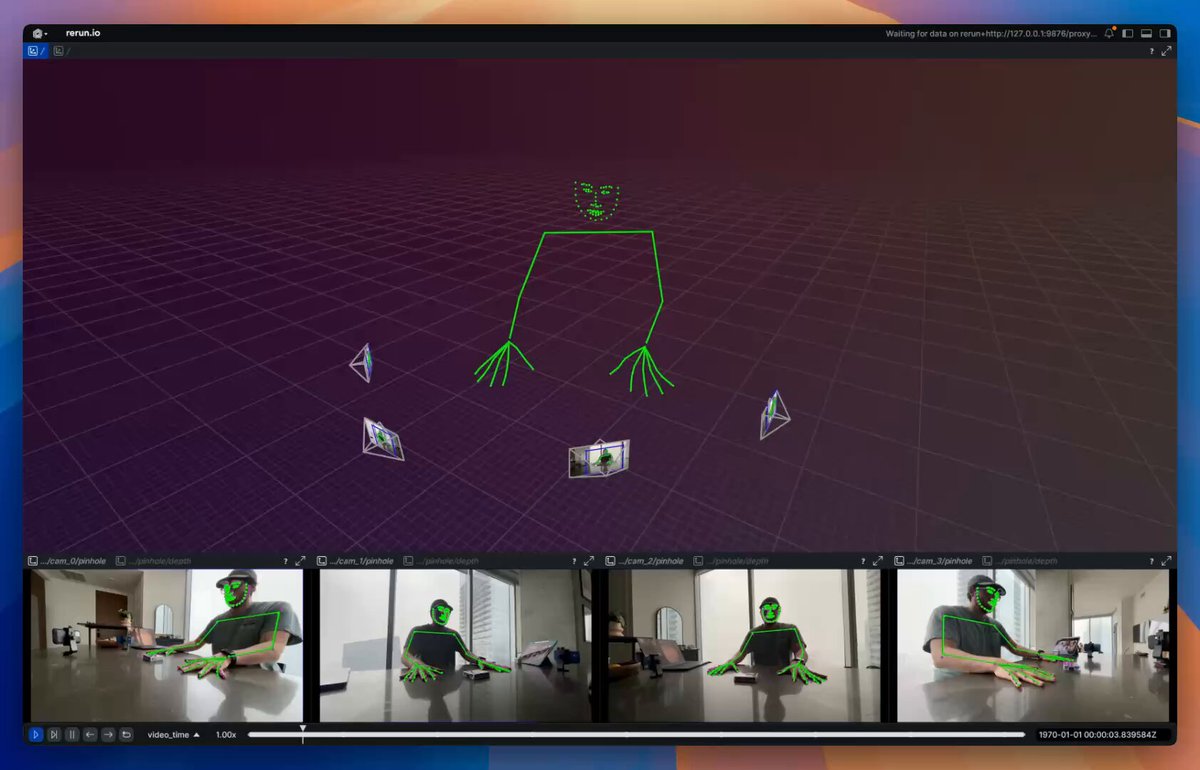
MVP of Multiview Video → Camera parameters + 3D keypoints. Visualized with Rerun The basic pipeline as of right now looks like this: 1. Capture 🔴 – Using 4 iPhones and an Insta360 Go. iPhone videos are captured via Final Cut Pro Multicam for easy sync and the exocentric view; the Insta360 Go is used for the egocentric view. 2. Sync 🕒 – Custom Gradio app using two Rerun viewers and callbacks for easily aligning frame timestamps so the ego and exo views are aligned. 3. Calibrate 🎯 – Use VGGT from Jianyuan and AI at Meta to get intrinsics/extrinsics for sparse cameras. 4. Estimate 3D 🕺 – Use RTMLib whole‑body keypoint estimator on each frame, then triangulate in 3D. What's missing? 1. No temporal coherence: I’m estimating keypoints one frame at a time and one camera at a time. This leads to a lot of jittering. For now, I plan on adding a One Euro Filter to help with jittering. Long term, I'd want to train a multiview keypoint estimator 2. Kinematic fitting is still missing; this is my next goal. The output will be joint angles, as explored in my previous posts. 3. Missing dense point cloud: VGGT seems to fail for me here. I’m looking to explore using MP‑SFM as a method for generating dense multiview depth maps + normals (plus it has a friendlier license compared to VGGT). 4. Eventually, creation of 4D Gaussian splatting using something akin to DN‑splatter—my long‑term goal is a data engine that provides poses/depths/splats/keypoints/etc.

Pablo Vela

42,785 görüntüleme • 1 yıl önce

There's so much focus on "how can AI do my work for me?" I think the more important question is "what work can I now do with AI that I would have never attempted before?" Earlier this year I wrote freestiler, a vector tiling engine for R and Python, with the help of Claude and Codex. I knew what the ideal engine looked like and how it would work at a high level. I didn't know how to put it together, and I don't know Rust, the language I wanted under the hood. Previously I would never have attempted this project as the ROI wasn't there. It would have taken me a year or more to learn the internals of a vector tiling engine and enough Rust to implement one. With Opus-level models, I could take it on. freestiler now powers all my vector tiling pipelines, including the map below rendering 143 million jobs from LODES, and it has 114 GitHub stars. Building this way has required a different set of skills. I don't review the code line by line. I set up adversarial agents to do that and write the test suites. What I review is the architecture, the behavior, and the results. Agent teams surface findings and explain their reasoning; I evaluate and critique. My job isn't to stress over code formatting, but instead to focus on questions like whether the engine is designed right, whether the output is correct, and if the UX makes sense. This means that I haven't "replaced my work." I've taken on entirely new work, with the help of agents, that I would have never done otherwise. It has taken some getting used to shipping code I haven't personally typed. In the old way of working, I built understanding through writing that code. Now I build understanding through managing the project - writing a spec, reviewing structure, evaluating UX. And that's helped me think a whole lot bigger in terms of what I can now do.

Kyle Walker

13,740 görüntüleme • 24 gün önce

DIGITAL TWIN UPDATE: The Unreal Engine digital twin project is CANCELLED! WE ARE OPEN SOURCING THE WORK!!!!!!! Instead, I'm building an end-to-end land management platform I'm calling Mazzap because it's an app and it's a map and also I'm Mr. Mazza. I'm also not calling a digital twin anymore; I'm calling it a V.E.I.L. which stands for Virtually Embodied Intelligent Land which serves the dual purpose of sounding way cooler and also conveys the long-term aims of the prject way better. With Mazzap anyone can easily generate a veil with nothing but publicly available data (and some photogrammetry objects if you so choose). Everything is perfectly georefrenced and you can right-click anywhere on your veil to get coordinates you can plug into google maps yourself. The next step for this is going to be building a survey companion mobile app so you can get field data yourself complete with attribute tables to drop in to get even HIGHER fidelity data than USGS. My stretch goal is using something like SAM 3D (but better) to generate georefrenced 3d tree assets based on the real trees on your land (which will eventually lead to growth and fruiting simulators based on your soil and hydrology data). Then again maybe that's not the next step; maybe the next step is plumbing in IoT devices so you can view assets in real time on your land. GPS trackers on the sheep, or maybe data from your solar controller. Or maybe it's up to you, because it's completely open source and it has an agents markdown file ready for your own coding agent to read and adapt for your purposes (did I mention this is vibecloded slop? sowwyyyy) Watch demo below and see how you can go from zero to beautifully rendered 3d map of your property in less than 15 minutes! If you're coming in cold to all this, below in the QT is a nested thread of reverse chronological tweets of my work on this (in unreal) so far.

Zy

54,025 görüntüleme • 5 ay önce

This is how you get 15x fable 5 usage. Fable -> Composer 2.5 reading Fable -> GPT 5.5 execution I built CNVS to make agent orchestration dead simple and insanely visual. You can watch fable 5 delegate work to cursor, codex, open code, all your agents. using your exsisting ai subs no api pricing. The canvas is fully voice controlled locally with nvidia parakeet for fast and free, or gpt realtime 2 for a fully conversational jarvis experience. The built in mcp and cli means agentic control is bidirectional they can prompt and spawn each other and read agent states. but there is more I built it from the ground up in swift for native performance on mac os. My old 16gb m1 mbp can easily spin up and control eight agents across multiple canvasses. The hermes integration + remote canvases allow you to run agents fully in the cloud on your VPS think google docs of vibe coding. You can literally turn off your mac and they keep working, open cnvs back up and pick up where you left off. I built a cross agent memory system based on 2026 research so all your agents feel like one brain. its SIMPLE and on demand. This eliminates context bloat, and the research supports a massive uptick in cross agent performance. There is soo much more. PS - I am a father building this project 100% solo in my basement on live stream everyday, my goal is to push vibe coding to the next level PPS - CNVS is a lifetime license becuase you DO NOT need another subscription in your life.

Max Blade

29,504 görüntüleme • 28 gün önce

It's PS5 RDNA 1.5 all over again, and reading responses, like a certain fandom never gets tired of being let down or uninformed. There's reasons PS5 often outperforms Xbox Series X despite the latter having 44% more compute than PS5 and being "full RDNA 2", which Digital Foundry did a video on. As I said at the start of the gen, most RDNA2 features Xbox/PC fans claim PS5 is missing, it was unlikely to use as they're Microsoft DirectX RDNA tie in features, and PS5 doesn't use DX but instead its own proprietary custom API called AGC. Why would PlayStation push for Microsoft DirectX RDNA features, when they don't use DirectX? Any AGC API specific graphics features PS5 uses (that Xbox wouldn't have) are not widely publicly advertised, as PlayStation don't need to advertise them the way Microsoft does due to their PC DirectX market. Thus every customisation PS5 has (which Kepler seemingly glosses over or doesn't recognise), from its faster clockspeeds, cache scrubbers, I/O set up, CPU alleviating decompression, DMA controllers and processors, geometry engine etc, will have been specifically designed around AGC or vice versa, NOT DirectX RDNA2 features. PS6 will be no different. There may be DirectX RDNA5 features they do not need or use, but there will inevitably be other unique customisations of their own and for their OWN proprietary API instead, no doubt bolstered by Amethyst custom features from their partnership with AMD. If history is any indicator, PlayStation is right to prioritise their own API and modifications, as these tend to have greater cost to perfomance results for the hardware vs the competition. The RDNA2 DirectX image below is taken directly from AMD's website, and again, PlayStation doesn't use Microsoft's DirectX. #PS6

NIB

48,097 görüntüleme • 5 ay önce

NVIDIA just handed every solo creator and freelancer an unfair advantage. Jensen Huang walked on stage and announced RTX Spark. An ARM-based laptop chip that nobody saw coming. They called it the most power efficient PC chip ever built. 20 cores. Blackwell graphics. 6144 CUDA cores. Up to 128GB of LPDDR5X memory. But forget the spec sheet for a second. Here is what actually matters. RTX Spark is built to run AI models locally. No cloud subscription. No API costs. No waiting on a server somewhere. Everything runs directly on the laptop at full speed. That changes the math completely for anyone using AI to make money. The guy generating 3D assets in Blender with Claude his renders now take minutes instead of hours. More projects per day. More income per week. The girl producing AI kids content for YouTube local rendering means no upload wait times, no generation limits, no monthly fees eating into her margins. The freelancer building websites and automating outreach every AI tool in his stack now runs faster and cheaper than before. 30 laptops from Asus, Dell, Lenovo, MSI and others. Available this fall. For years the barrier was hardware. You needed an expensive setup to run serious AI workflows locally. NVIDIA just put that power inside a thin laptop anyone can carry anywhere. The people who already figured out how to monetize AI are about to move twice as fast. The people who haven’t started yet just ran out of excuses. Save this.

Shelpid.WI3M

27,774 görüntüleme • 2 ay önce