Загрузка видео...

Не удалось загрузить видео

На главную

introducing OpenBench v1, an open framework for measuring AI performance and efficiency for your codebase and use case. Companies are realizing that you can't simply tokenmaxx, and are frantically looking for better ways to use and measure AI use and efficiency. One approach is evidenced by the rise in...

123,006 просмотров • 1 месяц назад •via X (Twitter)

Комментарии: 0

Нет доступных комментариев

Здесь появятся комментарии из оригинального поста

Похожие видео

We’re launching Optima. Now anyone can create a custom benchmark for their use case, leveraging Artificial Analysis’ leading research and platform Building and running benchmarks is difficult. We have distilled Artificial Analysis’ research and experience developing benchmarks into Optima, a new platform for benchmarking models on your own workloads and comparing performance, speed and cost efficiency. Optima allows you to find the best model for your task, or an equally performant alternative to your current setup at 10x lower cost or time per task. We’ve integrated Artificial Analysis' research and experience in benchmarks across the Optima workflow: ➤ Build benchmarks based on your own data and use cases: There are three ways to build a benchmark with Optima. Upload an existing evaluation dataset from your own files or Hugging Face, or import agent traces from platforms including Arize AI, Braintrust and langfuse.com. Install the Optima skill to build a benchmark using context from your coding environment and previous sessions. Or simply describe your use case and provide example inputs and outputs, and Optima will build the benchmark for you ➤ Run across the latest models: Run the same benchmark across leading models in a single click, and keep your leaderboard up to date as soon as new models are released ➤ Bring Artificial Analysis grading to your own benchmark: Evaluate responses against objective rubric criteria or using the same pairwise judging approach used for Artificial Analysis benchmarks including GDPval-AA and AA-Briefcase. For pairwise judging, select your preferred responses from a sample and Optima uses those preferences to rank models across your test set ➤ Compare performance, cost and time efficiency: Optima measures more than model performance. Cost per Task and Time per Task are tracked alongside benchmark scores, with category-level results and support for custom metrics, allowing you to compare the tradeoffs between models for your specific use case Ahead of launch, here are examples questions our beta testers answered with Optima: ➤ Which model can save me 10x the cost without a meaningful decrease in quality for my finance & accounting agent? ➤ Which model best matches the writing style of lawyers for my legal agent? ➤ Which model can best identify different elements in my custom image dataset? Optima is available today. Build your own benchmark at

Artificial Analysis

132,338 просмотров • 24 дней назад

Our first short course with Anthropic! Building Towards Computer Use with Anthropic. This teaches you to build an LLM-based agent that uses a computer interface by generating mouse clicks and keystrokes. Computer Use is an important, emerging capability for LLMs that will let AI agents do many more tasks than were possible before, since it lets them interact with interfaces designed for humans to use, rather than only tools that provide explicit API access. I hope you will enjoy learning about it! This course is taught by Anthropic's Head of Curriculum, Colt_Steele. You'll learn to apply image reasoning and tool use to "use" a computer as follows: a model processes an image of the screen, analyzes it to understand what's going on, and navigates the computer via mouse clicks and keystrokes. This course goes through the key building blocks, and culminates in a demo of an AI assistant that uses a web browser to search for a research paper, downloads the PDF, and finally summarizes the paper for you. In detail, you’ll: - Learn about Anthropic's family of models, when to use which one, and make API requests to Claude - Use multi-modal prompts that combine text and image content blocks, and also work with streaming responses - Improve your prompting by using prompt templates, using XML to structure prompts, and providing examples - Implement prompt caching to reduce cost and latency - Apply tool-use to build a chatbot that can call different tools to respond to queries - See all these building blocks come together in Computer Use demo Please sign up here:

Andrew Ng

170,541 просмотров • 1 год назад

An agent is three things: a harness, a model, and context. If you're serious about owning your intelligence, you probably want to own all three. LangChain founder Harrison Chase joined us at our Sequoia Capital Own Your Intelligence to talk about the piece that often gets the least attention: the harness. He offers a clear heuristic for when to build your own. The more out of distribution you are from what the models were trained on, the more you'll want to customize. And good technical content on how to actually measure performance with evals and langsmith. 00:00 Introduction 00:58 The three parts of an agent: harness, model, context 02:12 What a harness actually does 03:25 Customizing the core loop with middleware 04:41 Sandboxes, file systems, sub-agents, summarization 05:47 Cognitive architectures — and when you still need them 07:03 Build your own harness or use off the shelf? 08:24 In-distribution vs. out-of-distribution: the file-editing example 09:39 Why evals define what "good" means in an organization 11:04 Harbor: what an eval task actually looks like 12:11 Comparing harnesses and models on accuracy, latency, and cost 13:20 Why observability is underrated — it's usually the context 14:34 The data flywheel: traces → curation → experiments 15:42 Getting feedback through UX design and online evaluators 16:51 Demo: LangSmith Engine 19:23 Q&A: Running Engine on Engine, and "codex-ification" 20:44 Q&A: Will harnesses converge or diverge?

Sonya Huang 🐥

77,519 просмотров • 24 дней назад

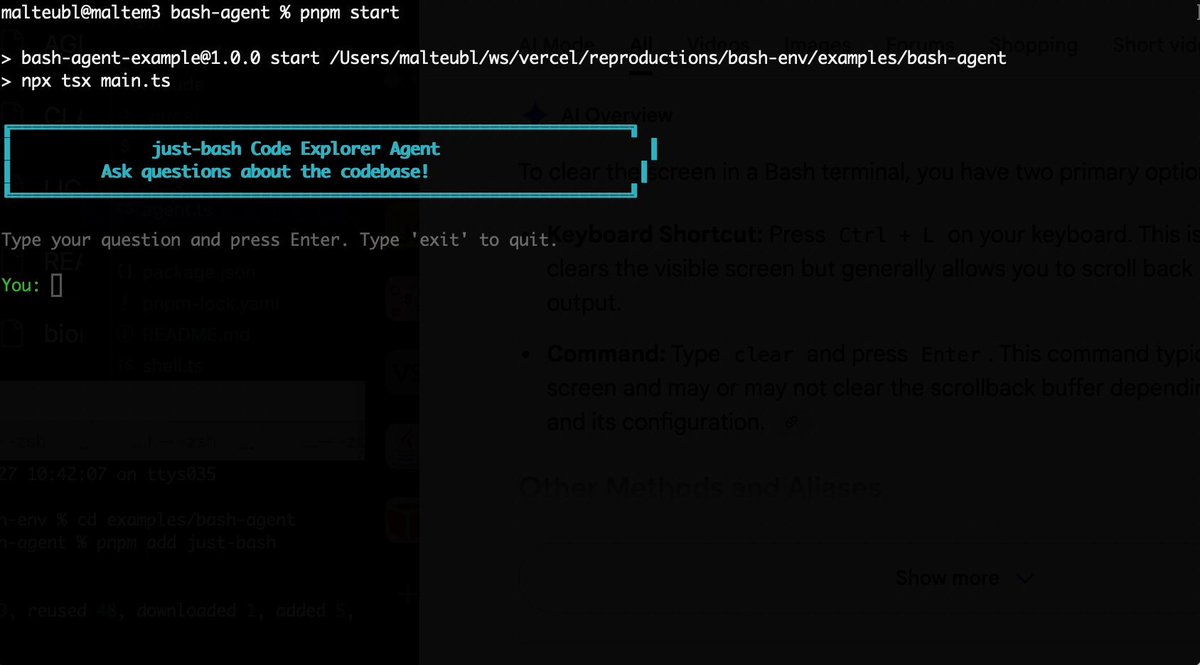
Bash is all you need! Which is why I'm introducing my holiday project: just-bash just-bash is a pretty complete implementation of bash in TypeScript designed to be used as a bash tool by AI agents. Because it turns out agents love exploring data via shell scripts, even beyond coding. It comes with grep, sed, awk and the 99th percentile features that an agent like Claude Code or Cursor would use. In fact, Claude Code can use it for secure bash execution. In the package - A bash-tool for AI SDK - A binary for use by yourself or your coding agents - An overlay filesystem to feed files to your agent securely - A Vercel Sandbox compatible API, so you can quickly upgrade to a real VM if you need to run binaries - An example AI agent that explores the just-bash code base using just-bash - I imported the Oils shell bash compatibility suite and just-bash passes a very good chunk What is interesting about this codebase: It was essentially entirely written by Opus 4.5. Coding agents love bash and they are good at reproducing it. They are also great at text-book recursive descent parsers and AST tweet-walk interpreters. That said, it is, like, a lot of code and I didn't read it all 😅. This is very much a hack, but it also seems to be _really_ useful. I haven't really found anything agents want to use that it doesn't support and it's fast and secure (caveats apply). It doesn't have write access to your computer and the filesystem is given a root that the agent cannot escape from. Find it at Related: Our recent blog post how we migrated our data analysis agent to bash tools and achieved incredible quality improvements The video shows the example agent investigating the just-bash code base

Malte Ubl

125,326 просмотров • 8 месяцев назад

BREAKING: GPT-5.6 Sol is out—AND Codex has been merged into ChatGPT Desktop as ChatGPT Codex. This combo model and desktop app harness are the gold-standard for knowledge work in AI. 5.6 is powerful, fast, half the price of Fable, and my default for almost everything. We’ve been testing it internally Every 🪨 for about a month across coding, writing, design, and knowledge work. Here’s our day-zero vibe check: - An A-tier coder—but it’s not Fable. Sol scored 56/100 on our Senior Engineer benchmark compared to a 91 for Fable. I think the 56/100 undersells it, it's an excellent implementor, and very smart. But Fable just writes conceptually cleaner code and works better at the top end of task complexity. PRO-TIP: Use GPT-5.6 as Fable's subagent for the most goated combo in AI coding. - The best writer of the frontier models. It’s clearer and more concise than Fable or Opus 4.8, without the overexplaining or weird private language. It can one-shot marketing emails, help you workshop taglines, and explain complex concepts clearly. It's also super fast, which makes it easy to collaborate with. - Design is better, but not top-tier. It has noticeably more taste than 5.5, but Fable and Opus 4.8 are still playing at a different level. See examples in the video and vibe check below. - The real leap is knowledge work. Sol is the first model I’ve trusted to run whole loops of knowledge work—not just help with individual tasks. I use it to process email, surface decisions from meetings and Slack, find job candidates, scan Facebook Marketplace for furniture, and log my meals. It has shifted my job from doing the work to tending the system that does it. - The merged app is fine. I was extremely worried about this because I love the Codex app. OpenAI was caught in an interesting position: How to make an agent orchestration app for regular ChatGPT consumers, coders, and businesses all in one app. They now split the interface between ChatGPT Work and ChatGPT Codex. They're basically the same except Work hides code. And "Chat" has been demoted to 2nd tier status for quick questions in either one. It's not a big leap, but it's not a huge setback either. And it remains my favorite of the desktop agent orchestration apps. Verdict: If I really had to put my finger on it, I'd say Fable has way more big model smell. But that means it's a skill in itself to get value out of it—99% of people are still not there yet. GPT-5.6 is almost as powerful, but is easy to use, fast, and relatively cheap. It should give you an early sense of where model work is going. Full Every 🪨 Vibe Check:

Dan Shipper 📧

146,015 просмотров • 1 месяц назад

OpenAI just announced API access to o1 (advanced reasoning model) yesterday. I'm delighted to announce today a new short course, Reasoning with o1, built with OpenAI, and taught by Colin Jarvis, Head of AI Solutions at OpenAI, to show you how to use this effectively! Unlike previous language models which generate output directly, o1 “thinks before it responds,” and generates many reasoning tokens before returning a more thoughtful and accurate response. It is great at complex reasoning -- including planning for agentic workflows, coding, and domain-specific reasoning in STEM fields like law. But how you should use it is quite different from other LLMs. I think o1 will be a game changer for many AI applications; and in this course, you'll learn how to use it effectively. In detail, you’ll: - Learn to recognize what tasks o1 is suited for, and when to use a smaller model, or combine o1 with a smaller model - Understand the new principles of prompting reasoning models: Be simple and direct; no explicit chain-of-thought required; use structure; show rather than tell - Implement multi-step orchestration in which o1 plans, and hands tasks over to gpt-4o-mini to execute specific steps; this illustrates a design pattern to optimize intelligence (accuracy) and cost - Use o1 for a coding task to build a new application, edit existing code, and test performance by running a coding competition between o1-mini and GPT 4o - Use o1 for image understanding and learn how it performs better with a "hierarchy of reasoning," in which it incurs the latency and cost upfront, preprocessing the image and indexing it with rich details so it can be used for Q&A later - Learn a technique called meta-prompting, in which you use o1 to improve your prompts. Using a customer support evaluation set, you'll iteratively use o1 to modify a prompt to improve performance You'll also learn about how OpenAI used reinforcement learning to produce a model that uses "test-time compute" to improve performance. I think you'll find this course enjoyable and valuable. Please sign up for it here:

Andrew Ng

357,661 просмотров • 1 год назад

Introducing PhoneLLM, an open model for voice agents. GPT 5.6 Terra performance on typical voice agent tasks at 1/3 the latency and 1/18 the cost. For voice agents, we need models that are both very low latency and very good at tool calling and instruction following. There's a trade-off here, and we often have to compromise on either latency or capability when building voice agents. With PhoneLLM (and the training and data stack that made this model possible) we're fixing this problem. For the last couple of years, most of the effort in frontier model development has gone towards leveraging test-time compute. Which is awesome! Models of all shapes and sizes are available that perform really, really well ... if you have "thinking" turned on for your model. But if you need your agent to respond at voice conversation speed, you can't use thinking models. PhoneLLM is a full-weights fine-tune of NVIDIA Nemotron Nano 30B. We trained on a wide range of real-world telephone and customer support use cases. The training focused on taking the excellent Nano 30B base capabilities and teaching the model to do typical voice agent tasks with thinking disabled. The results are really good: accurate tool calling and concise, on-topic responses in long conversations. And fast: TTFAT measured server-side is <100ms if you run PhoneLLM on a lightly loaded B200. :-) But seriously, when we characterize model latency, we do it with full, end-to-end, batched request simulations using real Pipecat voice agent pipelines. You can serve more than 80 concurrent agents on a single B200 with P95 end-to-end TTFAT <600ms. Including network overhead. That's an LLM cost-per-minute around $0.0025. (1/4 of a cent.) At a latency lower than any third-party API offers today. More details about this model, including weights on Hugging Face, how to spin it up with one click on Modal, and a starter project repo you can clone, are in the thread ...

kwindla

325,963 просмотров • 10 дней назад