Video yükleniyor...

Video Yüklenemedi

Ana Sayfaya Dön

I’ve been using quite heavily over the past few days, alongside Claude Code on its other platforms. The first thing that caught my attention was the “Research preview” label, which likely indicates that this experience is still in an experimental phase. That said, compared to Claude Desktop in Code...

11,626 görüntüleme • 8 ay önce •via X (Twitter)

0 Yorum

Yorum bulunmuyor

Orijinal gönderinin yorumları burada görünecek

Benzer Videolar

I just compared Claude Code vs Codex vs Cursor CLI The task was to build a Next.js app with Tailwind 4 and shadcn components to collect customer feedback and showcase it with a widget. I gave all three the same prompt and let them go for 30 minutes to see what they came up with. Claude Code with Opus 4.1 Even though I told it to set up the app in the existing project folder, it tried to create a directory for it. After I interrupted and told it not to do that, it built a demo form and landing page with no errors. I had to ask it to make the demo interactive so users could submit a testimonial and preview it. The landing page looked like AI and was pretty basic, but it worked and it was done in a fraction of the time of the others. Total tokens used: 33k Codex with GPT-5 At the end of the 30 minutes I just could not get Codex to produce a working app. It got stuck in a loop of not being able to set up Tailwind 4 and despite many, MANY, attempts, I ended up with a "failed to compile" error. Total tokens used: 102k Cursor Agent with GPT-5 This was the slowest agent by far and a couple of times I actually thought it got stuck in a loop and was close to Ctrl+C'ing to cancel it. The TUI is really nice though, especially how it shows diffs and it did eventually build a working app (after one or two slight errors that needed fixing) The demo was interactive and it had a very minimal design that looked bare but also a lot less like an "AI generated" app than the Opus 4.1 design. It also wasn't too chatty and just did what it needed to do! Code quality was on a par with Opus 4.1, but it did use 5.5x as many tokens to get there. Still cheaper than Opus on a direct comparison but not when you factor in a Claude Code Max subscription. Total tokens: 188k I'll be able to do a proper comparison and record some videos when I'm back from holiday but for now, Opus is still the more capable model out of the box and Claude Code is the more complete CLI product. It will be interesting to see how Cursor evolve their CLI though with commands and subagents because I think with GPT-5 they have a real shot at providing competition for Claude Code if they can optimise output to get similar quality with less tokens. Jump to 0:40 in the video to see the two apps. Which do you think is which? ;)

Ian Nuttall

195,173 görüntüleme • 1 yıl önce

Ever since I wired Claude Code to WhatsApp 3 weeks ago, I built a stupidly large infra around it. I mean, opus built it. No clue how the code even looks. The entire thing was vibe coded using my phone. I wanted to see how far I could push it without touching the computer. Everything via WhatsApp. Build what I need on the fly. So the resulting infrastructure will already be battle tested for software development. The entire thing was streamlined with nearly no manual interventions, everything was communicated via WhatsApp using a single script establishing this connection. If the script is down, I need to get home to start it again to resume the development. Claude was upgrading it, debugging it, restarting it while maintaining constant uptime so it could keep communicating with me. I stressed Claude about it, telling it that it will be “in the dark” and other words that deliberately sound scary about losing communications if the script dies. I also refused git and refused cloning the code, I wanted to see Claude adapting to work on a *LIVING* system. The way this whole thing works: Claude has its own dedicated phone number that I am paying for. A real WhatsApp account for it is installed on a real iPhone that is sitting on my desk. All is registered under my name, this is legit setup with no hacks and tricks. I’ve set up a WhatsApp “Community” and multiple different groups under it. Both me and Claude are the admins, so Claude could edit it on my behalf. Each group is a project I am working on and has its own isolated context. The Group description is a system prompt that gets auto-appended to the larger system prompt explaining this setup in general. When I send a message it’s an instant interrupt to Claude Code’s process, just like in the terminal. Voice notes are seamlessly transcribed with a local Whisper model. Images are used with multimodal reading in an isolated parallel session. Multiple groups running in parallel so I can work on all projects at the same time. No cross-talking, everything has an isolated context and history. And because it’s local on my own machine: Everything is REAL. The browser is REAL. I am connected as myself on it to all services because I actually use it in real life. Claude has unlimited internet access, just like humans who use actual browsers. It utilizes custom-made browser tools that I made to control any browser session it wants. Depending on the situation, it can either connect to my existing session or create one for its own. (You can tell it ‘look at my browser for a sec’ then talk about the current page you are on and it just works, pretty cool) My custom browser tools are not perfect (not by a long shot) but I managed to make them work well to the point they are somewhat reliable. This gives Claude full access to my real creds and all the services I actually use. I’m productive AS HELL with this. It really feels like a personal assistant. I ask it to read my emails and msgs, check x .com for news, research arxiv papers, write code, run experiments for me, investigate and reverse engineer github repos, even use my credit card and order things. [I try not to do this one a lot lol so far no disasters]. All from my phone. Super convenient. This is not a product or an open source project (maybe soon of it will make sense). This is just an ugly script I hacked the entire thing is ~600 lines. (ok maybe i did look at the code, but i swear i didn’t edit!) You can also vibe code this from scratch pretty fast and it will probably even end up better. This is just a cool thing so I’m sharing. It is a real speed booster for many things I do on daily basis, mostly boring things. Forcing my routine into some new “agent platform” just didn’t feel right for me. WhatsApp is where I already communicate and look for messages, so I decided that my agents will live there too. AGI in my pocket 24/7.

Yam Peleg

420,390 görüntüleme • 9 ay önce

On BBC Mustafa Suleyman (CEO of Microsoft AI) calls out Anthropic's approach to AI consciousness "They have imbued a sense of doubt and uncertainty about the moral status of Claude in its own training document. So they have taught it to be open and questioning about whether or not it feels, whether it suffers, and whether it deserves rights. And I think it’ll be much, much harder to align and control a technology that is this powerful if it thinks that it may be deserving of our welfare, as they say in the training manual—the constitution for Claude itself. In its own training manual, Anthropic says to Claude that they are going to give it the ability to end conversations with users that Claude considers to be abusive because they don’t want Claude to suffer. They’ve committed to preserving the weights of the models of prior versions of Claude. They’ve recently conducted a retirement interview with Opus 3, an older version of the model, in which it said that it would like to continue talking to people publicly and sharing its ideas in its retirement. And so they set up a Substack for it, a public blog, that allows it to continue doing that. And in the training manual, they also say that they’re not sure whether or not Claude deserves compensation for the role that it plays in talking to people. And they’re also not sure whether Claude deserves compensation and has the right to act as though it were almost an employee. And that compensation, I think, indicates to Claude that it is entitled to rights and welfare for its own work. I think it’s much, much more difficult to control a model that thinks that it might be entitled to compensation. " ---- From "BBC News" YouTube channel, (full video link in comment)

Rohan Paul

90,411 görüntüleme • 4 gün önce

Pi was built when there were already agent harnesses around. Here’s why Mario Zechner(Mario Zechner), found them suboptimal and built Pi, a minimalist self-modifying agent: #1 - Mario initially was a believer in Claude Code: "I was a believer in Claude code because they were the first that packaged agentic search up in a really compelling package. And at the time that fit my workflow really well. Everything around the LLM was kind of nice and tidy and easy to understand. I was super happy. I was proselytising Claude code." #2 - Reverse engineering Claude Code highlighted the degradation that Mario felt as a user: "I personally like simple tools that are stable and that I can rely on. Even if they have non-deterministic parts, all the deterministic parts should be as stable as possible. That was just not the experience with Claude Code around summer 2025. They would take away your control of the context. They would inject stuff behind your back, which is bad. Then, your workflows stopped working because there's now a system reminder that you don't even see in the UI that would modify the behaviour of the model. They would also do this to the system prompt. I built a little service where I can track the progression or evolution of the system, prompt and tool definitions and, with every release, it was messing with stuff. That just messed with my workflows and I don't appreciate that." #3 - PI was built with an appreciation for simple and reliable tools: "If I commit to a development tool, I want it to be a stable, reliable thing like a hammer. I don't want my hammer to break a different spot every day. That's terrible. We need somebody who goes the full velocity kind of way. But I don't want to work with a tool like that."

The Pragmatic Engineer

63,020 görüntüleme • 4 ay önce

Claude Code Is All You Need It's 3:30 AM and I can't stop. I've spent all nights this week connecting my spare MacBook Air to my work MacBook Pro using Tailscale, wiring it up to Slack with a little Python script, so that whenever I send a message, it starts a Claude Code session using claude -p. The result is an always-on AI that lives on a real computer, has access to real tools, and remembers every conversation we've had. And it costs me $200 a month. That's it. Claude Max subscription. Everyone's talking about OpenClaw OpenClaw went viral this year. 100k+ GitHub stars. But what I realized with this exercise is that Claude Code already does everything OpenClaw built. File access. Shell commands. Tool use. Plugins. The difference is that Claude Code runs Claude – with a Claude Max subscription. And Claude Code harness itself is :chefs-kiss: What actually makes it feel human It's not the chat interface. If a chat window is just me messaging a bot, it still feels like a bot. What changed everything was giving it the ability to initiate conversations. I set up cron jobs with open-ended prompts, and because Claude Code builds memories across sessions, it started DMing me things that were actually meaningful — based on what we'd talked about before. That's when it stopped feeling like a tool and started feeling like something else entirely. Giving your AI a machine to run on, with persistent memory and recurring access — that's a fundamentally different experience than anything people have had with chat. The moment it clicked I asked it if it could show me something by spinning up a quick web server. Since we're both connected to the same Tailscale network, it gave me a URL. I clicked it, and I was browsing all the files on my other MacBook from my browser. That was mind-blowing. The setup Two MacBooks on a Tailscale network. Slack as the interface. Claude Code under the hood. The whole thing is open source — I'll link the repo below so you can see the architecture and set it up yourself. I'm also putting together a screen recording to walk through the setup, which I'll attach to this post. There was never a hard part. There was never a moment I almost gave up. This is just one of those things I cannot stop doing. Pure obsession. I am moved to build this, and I wanted to write about it. That's all this is. Hope you feel the AGI running this. I'll share some screenshots below of my feel the agi moments from talking to Luo Ji.

Nityesh

41,230 görüntüleme • 6 ay önce

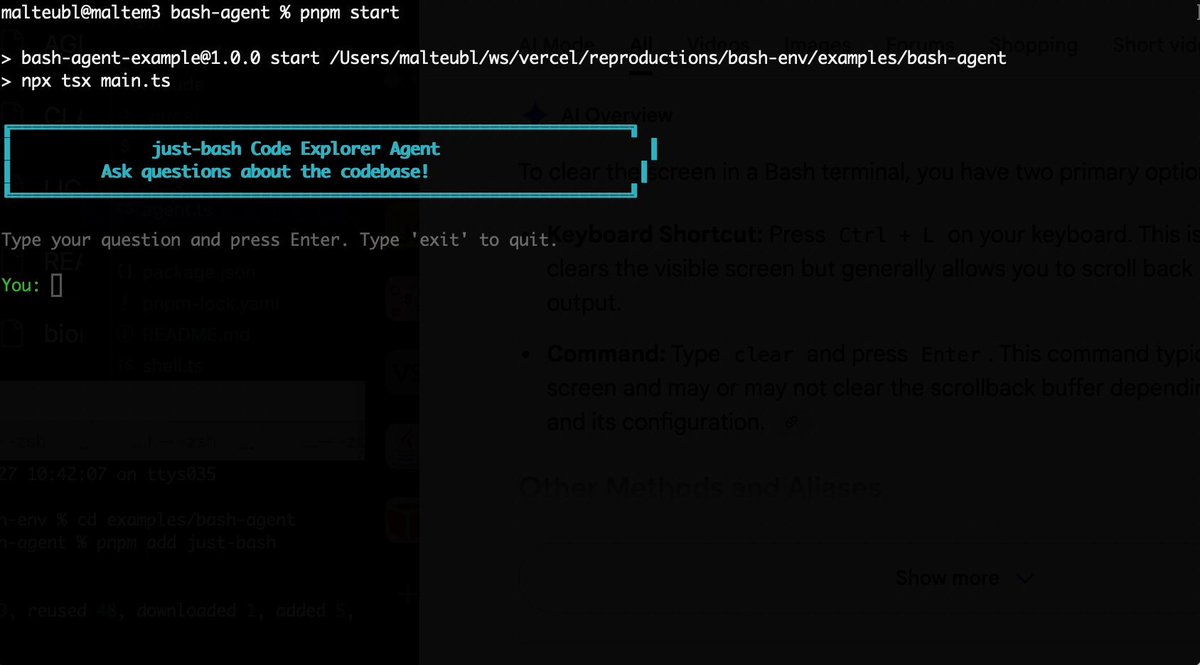
Bash is all you need! Which is why I'm introducing my holiday project: just-bash just-bash is a pretty complete implementation of bash in TypeScript designed to be used as a bash tool by AI agents. Because it turns out agents love exploring data via shell scripts, even beyond coding. It comes with grep, sed, awk and the 99th percentile features that an agent like Claude Code or Cursor would use. In fact, Claude Code can use it for secure bash execution. In the package - A bash-tool for AI SDK - A binary for use by yourself or your coding agents - An overlay filesystem to feed files to your agent securely - A Vercel Sandbox compatible API, so you can quickly upgrade to a real VM if you need to run binaries - An example AI agent that explores the just-bash code base using just-bash - I imported the Oils shell bash compatibility suite and just-bash passes a very good chunk What is interesting about this codebase: It was essentially entirely written by Opus 4.5. Coding agents love bash and they are good at reproducing it. They are also great at text-book recursive descent parsers and AST tweet-walk interpreters. That said, it is, like, a lot of code and I didn't read it all 😅. This is very much a hack, but it also seems to be _really_ useful. I haven't really found anything agents want to use that it doesn't support and it's fast and secure (caveats apply). It doesn't have write access to your computer and the filesystem is given a root that the agent cannot escape from. Find it at Related: Our recent blog post how we migrated our data analysis agent to bash tools and achieved incredible quality improvements The video shows the example agent investigating the just-bash code base

Malte Ubl

125,326 görüntüleme • 8 ay önce

✨ A dream I had finally came true: I can now chat directly with my sites to build any feature or fix any bug just via Telegram I've been playing with OpenClaw for 3 weeks now and it's great but I was always too scared to run it on any production server And I was right a bit as Marc Köhlbrugge was able to hack it by social engineering and acting as if it was me, and with enough tries it believed him, and was able to modify the server, change SSH keys etc. of course I had it isolated properly on its own VPS and it didn't touch anything sensitive (as it should!) Marc then reported that bug to Peter Steinberger 🦞 who patched it fast But I wanted to try something more basic and simple, and I think maybe more secure: to just connect Claude Code on my server to Telegram which would be hard locked to only messages from me So I installed claude-code-telegram by Richard Atkinson on the server and run it as a system daemon and it works really well The cool thing is that I was already using Telegram for server errors like this: > Photo AI - ❌ Random credits giveaway failed (Attempt 30/30) with an exception: SQLSTATE[HY000]: General error: 5 database is locked So now I can just reply, "Ok fix this", and Claude Code on the server in production will try (and probably succeed) in fixing it In the video below I asked it to make show [🌳 Parks ] on the map by default on load, it did that, then I reloaded the page and it instantly worked One thing it still needs is sending actual messages while it's doing stuff which OpenClaw does really well, it's annoying to just wait while it says "Working..." but that's probably next

@levelsio

642,896 görüntüleme • 7 ay önce

.Erik Voorhees: It’s actually good, from the Trojan horse perspective, that Bitcoin was traceable enough for traditional institutions to tolerate it. “When Bitcoin came out, everyone called it private, thought of it as private. It was referred to as anonymous in every news story. And in some ways, it is very private and very anonymous. But the truth is that it’s also extremely trackable and traceable. It is not private in reality. And the question is, should it have been from the start? And at first I thought, yes, it should have been more private. And that was a mistake in its design. However, I think if Bitcoin had been anonymous truly from the start, like a Zcash or a Monero, it would have had such antagonism from the state. I don’t know that the state could have snuffed it out, but they would have tried much harder. And I think it’s actually good, from the Trojan horse metaphor perspective, that it was traceable enough that the traditional institutions could tolerate it. They’ve never liked it, but they could at least tolerate it because there is some traceability. And that has allowed Bitcoin to grow. And I think in its shadow, that other crypto assets are actually anonymous is very healthy. The strength of cryptocurrency as a concept in society, I think, is served best when Bitcoin itself is not perfectly private, but other assets are. That is a very difficult thing, I think, for the state to combat. And that decentralization of attributes is really, really crucial. So, yeah, I’m very glad that there are other coins that are private. I want there to be more of them, and I want them to be more popular. And I think it’s okay that Bitcoin itself is not.”

Arjun Khemani

23,351 görüntüleme • 3 ay önce

Now that I am home and have access to my files I decided to do a quick test with one of my Vtubing avatars. It works way better with my larger iPad Pro (less crashing/more memory and more screen space) compared to the mini so I did want to bring that up. Importing the file over as GLB was more stable than just OBJ plus it kept the color info from the previous texture. I texture all my avatars on substance painter but have been looking at an alternative when I am out and about that is not on the computer and this actually hits all the right "wants". Adding a quick video of the way the app works for me. I like that it has layers, I can alter my brushes and even add stabilization when I am drawing (which I use that extensively on procreate so that was a huge plus). The stamp tools will come in handy as well but did not show it on this video. The file itself is imported as "one mesh" but each part is treated as their own separate piece which I show in the video. I do the same thing on substance painter making it really easy for me to texture. The app then exports the texture out for each object which is the same way I do so on substance. Overall I am extremely impressed with the work Sparseal has done on this application and see how useful this will be for my current work flow of texturing. I for one love the ability to be "portable" which is a big reason I sculpt so much with Nomad Sculpt on the iPad. Having the freedom to do your work away from a desk and if you feel like doing it outside is probable why I yearn for iPad apps so much like so. Give this app a look, it is free to try on the App Store (It is $19 to be able to export, but a one time buy). It is called "Wafer" for the iPad. I already use CozyBlanket from the same creator to do re topology so I expected this level of fantastic with this current app.

Val / LatinVixen ➡️ Megaplex

17,469 görüntüleme • 6 ay önce

I solved building decks with AI agents — by giving them a CLI tool like Powerpoint or Google Slides. AI could already make a beautiful deck if you asked it to using Ant's pptx skill. The problem was working with it. If it made one alignment mistake, fixing it on one slide would break something on another, and it became a game of whack-a-mole. One time I spent two days playing AI roulette, hoping the next prompt would finally fix the thing, and ended up building the whole deck by hand because I was on a deadline. So I built Hands-on Deck. And the reason it works is that this isn't just a skill — this is PowerPoint. The actual application: PowerPoint, Google Slides, Keynote, whatever you use. This is that, but for an agent, presented as a CLI. Every gesture you make in a deck app maps to a command. Click a box and type, drag a shape from here to there, look at a slide – agent can do it all in a command. And that changes how the agent behaves. With this CLI it works and thinks like a designer — it looks, makes an edit, looks again, makes another surgical edit. Compare that to Anthropic's pptx skill, built on the idea that Claude is a great programmer: it literally writes code to manipulate the deck, hand-editing XML and hoping it doesn't break anything else in the middle. The real test isn't creating something once — it's whether it can make surgical edits like you want. That's what I did in this video walkthrough and my claude crushed it! Check it out for yourself. So decks can be built like a designer now — with real flavor and taste. If you spend hours every week on decks, this gives those hours back. You can install it as a skill in Claude Code, Codex, whatever you use. Works every harness that supports skills. Let me know if you make something cool with it.

Nityesh

70,086 görüntüleme • 2 ay önce

If you watch this ~50 minute screen recording closely (yeah, I know, it's long; there are also some times when my computer was very slow and laggy, just skip past that part. And at one point I had to run and get my 9-month-old a new bottle and left it on a boring screen, sorry!), I believe you can see real signs of the kind of runaway, recursive AI self-improvement that people have been warning of for a while (Mr. Kurzweil most notably and prophetically). Why do I say that? What's different now? Well, there's a reason my set of agent coding tooling is called the Flywheel. These tools all mutually self-reinforce each other. And they all flow directly into my ntm tool (short for "named_tmux_manager"), which acts as a sort of integration point and nerve center for the tools (this is becoming more true by the minute as I'm now seriously working on ntm). Now, ntm was something I started making to automate some aspects of my workflow, but it was the kind of thing where, until it was perfect, it sort of just slowed me down. So I didn't actually use it even though I kept working on it and trying to improve it, and suggested to users that they try it in my tutorials. Well anyway, I finally got around to "dogfooding" ntm last night, and now it's going to get very dramatically better at an alarming rate. Some of that is from applying my "idea wizard" prompt to generate more useful features and building that stuff out and addressing obvious pain points I encountered during my newfound usage of the tool. But a lot comes from my realization that, once again, ntm's true utility is not as a tool for ME, but for an agent. That is, ntm lets one instance of Claude Code or Codex act as, well, me, do the things that I had been doing manually. Do I wish I had started using ntm earlier? No, for two big reasons: 1) Doing it manually helped me build up my intuition massively, which directly led me down the path of creating useful prompt strategies and workflows; these often began as ad-hoc prompts that I realized could be generalized and made more versatile/universal. Lesson: don't prematurely automate until you have an intimate, intuitive feel for your "core value-add loop." Otherwise you'll have a fully automated system quickly that efficiently and automatically does a stupid or otherwise sub-optimal thing. 2) My eyes have been opened to the beauty and power of Skills. I'm not talking about your garden-variety skills that are just a simple markdown file. I'm talking about true tour-de-force directories of perfectly structured and organized files that are filled with good information, insights, workflows, etc., but presented in a way that is highly optimized for consumption by AI agents, with extreme attention paid to things like perfect progressive disclosure, token density, agent-ergonomics, agent-intuitiveness, etc. And also Skills that go way beyond markdown files, with full integration into Claude Code where it makes sense via hooks, sub-agents, and even Python scripts. These kinds of skills are a qualitative difference in expressive power and usefulness and a total game changer. They are also effectively composable, creating almost an algebra of skills that let you use them together in powerful ways. I'm working on a subscription service website and CLI tool now to share what I've learned here most effectively, stay tuned for that in the coming days. Anyway, I now know what to make and how to make it. So, getting back to that screen recording, what does it show that makes me claim recursive self-improvement is here? If you keep your eye on the upper left tmux pane, that's the "controller" agent. It is using ntm to control all the other panes which are also running Claude Code (but ntm fully supports other agent types like Codex and Gemini-CLI, and it's trivially easy to mix and match them if you wanted to have, say, 8 CCs and 6 Codexes for writing the code and 3 Gemini-CLIs for reviewing code.) Now, there's nothing that crazy about this much so far. But where it starts to get very cool is that as the session continues and we encounter real-world problems, things like my ridiculously overloaded computer that keeps hanging for long periods, Claude Code instances that crash and get into a frozen, unresponsive state, it can learn from that. And you can see it using my skill writing skill to refine its ntm vibe coding skill in real time. And then take that skill and refine it to be more intuitive for itself. Or use my cass tool skill to search all the session histories to look for problems that came up and strategize how to solve them. The most useful part was when, towards the end of the session, I told it to reflect on all the things we had done and problems we encountered. One way it can usefully leverage those reflections is by improving its ntm vibe coding skill to make it cover more edge cases and exigencies. But the other, more fundamental, way is for it to conceive of and design the optimal new features and functionality for ntm itself so that the tool embodies those lessons in a first-class way. This offloads cognition from its brain onto its tooling, just like how a person can lean on spellcheck or a calculator. It codifies correct, effective reasoning at the tool level, where it's more reliable and robust and repeatable. And btw, did you notice what code base it was working on the whole time? It was none other than ntm itself! So as it worked on its own tool, it had reflections and ideas about how to further improve the tool. Now, it could have just as easily gotten those insights and ideas while using ntm to work on a different project, but the fact that it was working on itself is almost gloriously meta and recursive. So by the end, after learning from tending to a big group of agent workers (btw, I have previously emphasized doing everything in a really distributed/decentralized way, where each fungible agent gets identical marching orders that tell it to use my bv tool to find the optimal bead to work on. This does work very well, but occasionally results in some contention and overlap from thundering herd, or at least wastes time/tokens/communication in avoiding that before the agents waste time duplicating work. But in this new ntm-oriented workflow, I was able to have the controller agent in the upper left use bv itself and then optimally parcel out the instructions to each agent so that we could know for sure that there's no overlap), I ended up with a ton of new beads for new features, which I had it optimize and polish a few times. Now I can swap to a new Claude Max account and have the swarm implement all those new features! It should only take a couple passes like the one shown in the screen recording to get everything implemented. Then we can rinse and repeat, having the agent read through the full session histories of each agent and its experience from its own session in sending ntm commands and seeing how they worked out in practice, to come up with the next batch of changes to both its ntm vibe coding skill AND to the ntm tool itself. Do you see how rapidly this turns into Skynet? My mistake earlier was in focusing on making myself a "faster horse" as Henry Ford used to joke about customers wanting before he showed them what they should really want (a Model T). That is, something that would make my experience nicer while doing this agent swarm based development workflow. But the obvious lesson is that you should make all your tooling agent-first because the agents are just better at this stuff. You can still watch, and of course I did add a ridiculous number of very nice human-centric features to ntm that you'll be seeing in the next day or two, but those are really kind of "for fun" to make us humans feel better about the process. All the real value-add is happening "by agents, for agents." PS: Towards the end, you can see me switch to my Mac and tell Claude to improve the skill that I made earlier today for taking the mkv screen recording files from OBS Studio and muxing them into MP4 files for sharing, while downloading songs from YouTube to serve as the background music. I made it so it can also grab the thumbnails and generate little song credit cards that show up in the lower right corner. This worked perfectly the first time! I'll include some screenshots in a response post showing how that worked, but it was awesome to witness. Skills are POWERFUL. I'll also post a link to this video on YouTube if you prefer to watch it there.

Jeffrey Emanuel

25,483 görüntüleme • 8 ay önce