Загрузка видео...

Не удалось загрузить видео

На главную

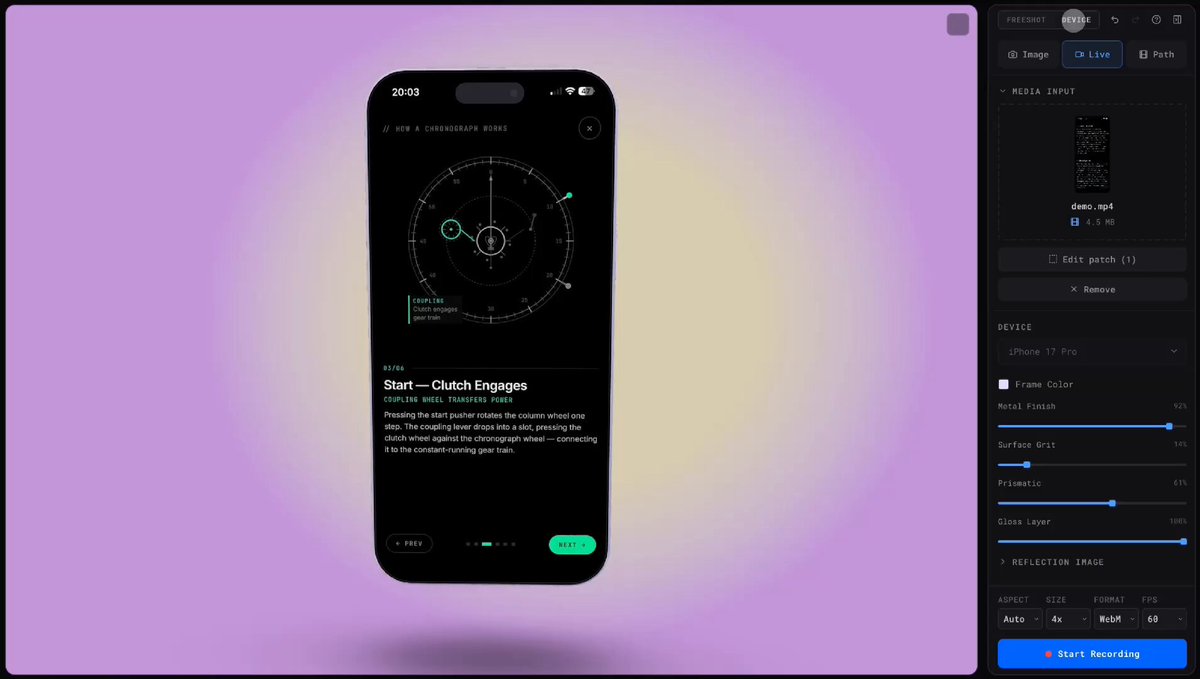
THIS GUY BUILT A SCREEN RECORDER THAT MAKES YOUR DEMOS LOOK LIKE AN APPLE COMMERCIAL every founder right now has the same problem. you build something cool but your demo video looks HORRIBLE (like a janky screen recording from 2014) this tool records your screen and automatically makes it...

155,041 просмотров • 3 месяцев назад •via X (Twitter)

Комментарии: 0

Нет доступных комментариев

Здесь появятся комментарии из оригинального поста

Похожие видео

how to use Google's NEW open source Design.md + AI Skills to make your startup look like a $100 million company in 1 hour: 1. Design.md is an open source file from Google that captures the soul of a design. Typography, colors, spacing, all in one markdown file. You attach it to your prompt and your agent builds beautiful things every time. 2. Think of it this way. The HTML is the finished dish. The design.md is the recipe. The skills are the ingredients. Put them together and everything you build looks consistent and professional. 3. Don't create a design system from scratch. Find a brand you love. Linear, Stripe, Vercel, whatever resonates. Study it. Use ChatGPT or Claude to help you extract the design language into your own design.md file. 4. Build skills on top of your design.md. A landing page skill. A mobile app skill. A motion design skill. A slide deck skill. Each one references the same design.md so everything looks like it came from the same designer. 5. The biggest mistake people make: they nail one screen and then everything else looks generic. Design.md solves this. One file keeps every page, every format, every medium consistent. 6. Use it across everything. Your landing page. Your app. Your pitch deck. Your promo videos. Same DNA. Same taste. Same system. That's what separates a startup that looks real from one that looks vibe-coded. 7. Build a second brain for design inspiration. When you see something beautiful in the real world or online, capture it. Save it. When you're building something new, reference it. Taste is developed, not downloaded. 8. It's obvious but the difference between a product people trust and a product people bounce from is how it looks and feels. Design.md gives you that edge. you can watch below shoutout to Meng To for coming on The Startup Ideas Podcast (SIP) 🧃 and walking through his full workflow. if you want to use AI to actually build gorgeous designs, you'll want to use see this. watch

GREG ISENBERG

508,512 просмотров • 3 месяцев назад

Introducing the Clips chrome extension - the easiest way to send bug reports to agents with video, transcript, and browser debug info captured automatically. 100% free and open source. If you are like me and get tired of manually typing instructions to agents, attaching screenshots, pasting debug logs, and all of that, this might be your new favorite tool. With the Clips chrome extension, you can just click the Clips icon, hit record, and start talking. Visually demonstrate your issue, go through the flow, point out what’s broken. Clips will capture everything on your screen, plus network requests, browser logs, client errors, and all the details around them. And it redacts sensitive information. Then it gives you a link you can send to humans so they can play it and take a look. Or, more importantly, just give it to your agents by just pasting the URL to them. The link has special metadata for agents so just from the URL, the agent can pull all information from the clip automatically. No plugin or MCP server required. That means it can "see and hear" what’s in the video - read the transcript, grab snapshots at any timestamp, and inspect the logs and network requests that were shared with it. So whether you want to quickly demo an issue and send all that context to an agent, or get better bug reports from teammates, recording and sending Clips makes that super easy. Unlike expensive apps like Loom, this is all 100% free and open source. The framework that powers this, plus a bunch of other free applications, is open source too. You can just sign up and use it, or fork it and customize it to your needs. This, in my opinion, is the future of software. Rather than bloated SaaS that charges you a ton of money and still doesn’t even have the things you need, we get free open source canonical apps that you can fork and customize in any way you want. I'll link to all this stuff in the replies. If you try it, let me know your feedback.

Steve (Builder.io)

60,635 просмотров • 1 месяц назад

no money for grok or midjourney? this tool is for you. there's a FREE tool created by an anon dev. open-source. runs locally. 117k stars on github. it generates: > images & video > 3d models > audio > 20+ models here's how to set it up in under 5 minutes: 1️⃣download ComfyUI Desktop go to and grab the desktop app for your system. windows 10+, mac (apple silicon), or linux. it installs like any normal app, it sets up python and every dependency for you in the background. no terminal, no config files. 2️⃣open it first launch, it spins up its own environment automatically. you just wait a few seconds and you're in. you'll land on a node canvas, that's the whole interface. 3️⃣load a starter workflow top menu → Workflow → Browse Templates → Image Generation. click it. this drops a ready-made setup onto your canvas so you don't build anything from scratch. 4️⃣grab a model comfyui ships empty on purpose, the model is the brain, and you pick it. in the template, the "Load Checkpoint" node has a Download button when no model is installed. click it. it pulls one in for you (a few GB, this is the only real wait). 5️⃣install ComfyUI Manager this is the one add-on you don't skip. it lets you install models, custom nodes, and updates with a click instead of the command line. grab it from github (link in comments). it's the difference between fighting comfyui and flying in it. one honest note: an NVIDIA gpu makes this fast, apple silicon works great too, and a weak machine still runs it just slower. that's the whole setup. you now own an image, video, and 3D studio that costs you nothing per month. save this. and the next time grok or midjourney asks for your card. you won't need it. disclaimer: comfyui itself is 100% free. so are the local models (sdxl, flux, wan 2.2, ltx-2). some premium models like seedance are pay-per-use api models, only if you want top-tier quality. the free local ones cover most of what you need. (github link in the comments) follow and turn on post notification for daily AI contents.

m0h

14,542 просмотров • 2 месяцев назад