Загрузка видео...

Не удалось загрузить видео

На главную

Claude Sonnet 4.5 vs 4.0 (measured on coding tasks): App from scratch → 4.5: ~20min, functional build. → 4.0: 40+min, lower quality. Simple code change → 4.5: 3 tool calls, correct edit. → 4.0: longer chain, same result. Complex refactor → 4.5: faster + tests passed. → 4.0: slower...

67,588 просмотров • 1 год назад •via X (Twitter)

Комментарии: 0

Нет доступных комментариев

Здесь появятся комментарии из оригинального поста

Похожие видео

There is a strategy for Claude Max users that will 3-5X productivity and vibe coding learning curve. Which most vibe coders don't utilize! Most people using Claude Code just sit and watch the terminal while their prompt cooks. That’s dead time. If you’re on Claude Max, you’re paying for parallel capacity you’re probably not using fully. And tokens get wasted. Here’s a methodology to fix that and boost the way you use Claude forever: The Setup & Workflow 1. Add the repos you’re actively working on to your workspace from your IDE 2. Click “new terminal” and open 3-4 terminal instances, each pointed at a different project 3. Toggle between them on the right side of your terminal panel 4. When one terminal is cooking a prompt, look at the others 5. Use the time Claude is working to prompt the next project 6. Continuously rotate and ship across 3-4 projects like this 7. Use your tokens effectively, build more, learn faster The Result You ship 3-4 projects simultaneously. You burn through your token allocation on actual output instead of letting it sit unused. You learn faster because you’re getting more reps in the same amount of time, too. As long as you work on different projects at the same time like this, it will only be a boost in productivity, with no chance for code to get spaghetti. In the video, you can see where to find add workspace, run new terminal, and change between terminals:

Meta Alchemist

82,000 просмотров • 9 месяцев назад

here's what i vibecoded today: punchingface 🥊 an app to make Hugging Face models fight each other on coding and canvas challenges, built with qwen3.6 35b a3b in 24 hours! benchmarks numbers don't mean anything anymore, we need a way to visualize what the models are actually capable of, and canvas are one the best way to showcase it imo. why? because one single error in the code and everything breaks it shows the differences in a matter of seconds, way easier than manually reviewing the quality of the code produced for a complex project; much needed in the space with all the new finetunes dropping everyday! i did a little demo here with qwen3.6 vs qwopus glm 18b merged, the frankenstein model from Kyle Hessling the winner is clear here, qwen is crazy good and has nothing to prove. that said, qwopus 18b isn't terrible at all; the result isn’t the prettiest to the eye, but hey… it works! i've seen so many models just output a blank page (completely non-working code) so this is already a win frankenstein talks and thinks but he needs some extra brain surgery 🧠 results were expected (it's a very experimental model) but love the effort in the 18b direction from jackrong and kyle! the app was entirely vibecoded with qwen3.6, i didn't edit a single file manually. i can say with confidence that it really has the intelligence of claude sonnet 4.5 at a speed of 125tok/s on an rtx 5080 which models should i make fight next?

left curve dev

19,229 просмотров • 6 месяцев назад

meta muse spark 1.1 vs gpt 5.6 sol vs fable 5 vs grok 4.5 meta recently dropped muse spark 1.1 – a multimodal reasoning model from meta superintelligence labs built for agentic tasks. key facts: • 1m token context with active self-management – the model compacts its own history and keeps only the steps needed for later work • trained to orchestrate multi-agent systems: as main agent it plans and delegates to parallel subagents, as subagent it sticks to its job and knows when to escalate back • computer use trained to pick between scripting and clicking – writes automation when it's faster, clicks when it's simpler, batches actions per step • first public api from meta: the meta model api is now in preview • benchmarks: sweeps the agent column – mcp atlas 88.1 (opus 4.8: 82.2), jobbench 54.7 (opus: 48.4), humanity's last exam 62.1 (1st). loses coding – deepswe 1.1 53.3 vs gpt 5.5's 67.0, swe bench pro 61.5 vs opus's 69.2 our test – 3 prompts, single-file html, three.js, fully procedural, no assets: 1. norwegian house cantilevered over a fjord in a snowstorm – transmissive glass wall, fully modelled interior 2. beijing siheyuan courtyard house in dawn fog – instanced roof tiles, dougong brackets, glowing paper windows 3. new mexico adobe pueblo in an approaching dust storm – deep window reveals, windward grit accumulation we ran the test on AI/ML API platform results: - cost #1 muse spark 1.1 – $0.20 #2 grok 4.5 – $0.51 #3 gpt 5.6 sol – $1.93 #4 fable 5 – ~$5.20 - output tokens #1 muse spark 1.1 – 41,868 #2 gpt 5.6 sol – 49,139 #3 grok 4.5 – 64,954 #4 fable 5 – 81,849 - lines of code #1 muse spark 1.1 – 1,799 #2 gpt 5.6 sol – 2,377 #3 fable 5 – 3,088 #4 grok 4.5 – 4,216 observations: • muse spark is the cheapest of the four by a wide margin – 2.5x under grok, ~26x under fable per run. output quality tracks the price • only 7.4% of its output tokens are reasoning (3,104 of 41,868) – the model barely thinks before writing. economic, not pedantic: it commits to the first plan and ships it • the low loc is not compression, it's omission – all three prompts demanded instancing, muse spark delivered it in one muse spark's code quality – reviewed by fable 5: upsides: 1. all three files run 2. the adobe grit effect is legit – shader injection via onbeforecompile, windward faces detect storm direction through a normal-dot-wind term and darken procedurally 3. the fjord glass is real meshphysicalmaterial with transmission and ior, not a transparent quad 4. the siheyuan properly instances barrel tiles, dougong blocks and courtyard pavers downsides: 1. in the fjord file the strafe vector is negated – press a, you move right; press d, you move left. exactly the key mix-up we kept hitting with this model 2. all three files ship the model's self-doubt as comments: "// actually yaw orientation: need correct" sits above a direction vector that gets computed, abandoned and recomputed – dead vectors allocated every frame, 60 times a second 3. the siheyuan registers two separate keydown listeners, one containing an empty if-block 4. snow "accumulation" on the norway roof is a sine wobble on a scale value, not accumulation 5. "instanced snow" became 3,500 plain points. zero dispose calls anywhere pattern: minimal reasoning, minimal code, minimal price. it nails the flashy requirements – shaders, transmissive glass – and quietly drops the boring ones: instancing, controls, cleanup. you get a demo that mostly runs and a control scheme you can't trust follow thehype. for 24/7 ai news, analysis and breakdowns

thehype.

135,556 просмотров • 3 месяцев назад

CANCEL Your Weekend Plans, & Learn Claude Code Today. This Claude Code teaches more about vibe-coding in 30 mins than most tutorials do in hours. Save this, it'll change how you build forever People are building entire apps and charging clients $5,000 to $20,000 using Claude Code. This Claude Code video is a goldmine. Full Claude Code tutorial. Beginner to pro. Every feature. Every setup step. Every best practice. Zero prior knowledge needed. Save it. Watch it tonight. Not tomorrow. Tonight. Follow Himanshu Kumar so you don't miss the breakdowns for each feature. This is your complete Claude Code roadmap. Lose it and you lose the next 12 months of income. ↓ 1. Understand What Claude Code Actually Is. You think Claude Code is just another chatbot. It's not. And that misunderstanding is why you're broke. ChatGPT gives you text. Claude Code gives you software. It runs in your terminal. It reads your entire codebase. It writes files directly to your project. It runs commands on your machine. It debugs errors autonomously. It builds features end to end. You're not chatting. You're deploying a developer. One that works 24/7. Never asks for a raise. Never calls in sick. Never pushes broken code at 5 PM on a Friday. People are charging clients $5,000-$10,000 for apps they built with Claude Code in 3 hours. And you didn't even know this tool existed because you're still asking ChatGPT to write you a to-do list. The gap between you and people making money with AI isn't intelligence. It's awareness. Now you're aware. Save this post. Follow Himanshu Kumar for the complete breakdown of every Claude Code feature. ↓ 2. Set Up Claude Code Properly. Most people quit here. "It's too complicated." "I don't know terminal." "I'll set it up later." Later never comes. And "complicated" means "I watched for 30 seconds and gave up." The setup takes 10 minutes. Install Node.js. Install Claude Code via npm. Authenticate your account. Open your terminal. Done. 10 minutes. You spent longer this morning deciding what to have for breakfast. The video walks through every single click. Every command. Every screen. Assuming you know absolutely nothing. If you can download an app on your phone, you can set up Claude Code. It's the same level of difficulty. But you'll still tell yourself it's "too technical" because that excuse is more comfortable than admitting you're just scared to try something new. This is the setup that everything else builds on. Skip it and nothing works. ↓ 3. Use the Desktop App. You don't even need to live in the terminal if you don't want to. Claude Code has a desktop app. Clean interface. Visual feedback. Everything you need without touching command line. But here's the thing most people don't know: The desktop app isn't just a pretty wrapper. It lets you manage projects visually. See file changes in real time. Switch between projects instantly. The people making money with Claude Code use the desktop app for client projects because it's faster to manage multiple builds simultaneously. You're still opening 14 browser tabs to organize one project. They open one app and everything's there. Efficiency isn't a personality trait. It's a tool choice. Save this post. Follow Himanshu Kumar for the desktop app workflow that handles 5 client projects at once. ↓ 4. Install the Right Dependencies. This is where beginners silently fail and blame the tool. Claude Code needs certain dependencies installed to work properly. Miss one and everything breaks. Then you go on Twitter and say "Claude Code doesn't work." It works fine. You just didn't read the setup guide. The video covers every dependency you need. What to install. How to install it. How to verify it's working. No guessing. No Stack Overflow rabbit holes at midnight. No "why isn't this working" for 3 hours. Watch the dependency section once. Follow every step. Never deal with setup issues again. You spent more time last week troubleshooting a printer than this takes. ↓ 5. Work Inside Your Code Editor. Claude Code integrates directly with your code editor. VS Code. Cursor. Whatever you use. It's not a separate window you alt-tab between. It's right there. In your workflow. You type a request. Claude writes the code. The code appears in your editor. You review it. Accept it. Done. No copy pasting between windows. No reformatting code that got mangled in transit. No "which version was the right one." It's like pair programming with someone who never gets distracted, never argues about naming conventions, and actually writes code that works on the first try. Your current coding process is: Google the problem, read 5 answers on Stack Overflow, copy the wrong one, debug for an hour, find the right one, paste it in, break something else, repeat. Claude Code's process is: describe what you want, get working code, move on with your life. Same hour. One method produces working software. The other produces frustration and a browser history full of Stack Overflow tabs. Stop coding the hard way. Save this post. Follow Himanshu Kumar for code editor setup guides and integration tips. ↓ 6. Master Basic Usage. Most people learn 5% of a tool and say they "know" it. You "know" Photoshop because you can crop an image. You "know" Excel because you can sum a column. You "know" Claude Code because you asked it one question. Basic usage means: How to give Claude Code context about your project. How to ask for changes to existing code. How to generate new files and features. How to review what Claude produces. How to iterate when the output isn't perfect. These basics are the foundation of everything. Skip them and every advanced feature feels confusing. Master them and every advanced feature feels obvious. The video breaks down each one with real examples. Not theory. Actual usage on actual projects. You've been using AI tools at 5% capacity and wondering why your results are 5% of what others get. Save this post. Follow Himanshu Kumar for daily Claude Code usage tips. ↓ 7. Learn Every Command. Claude Code has commands that most users never discover. Because most users type one message and expect magic. That's not how professionals use it. Professionals use specific commands that tell Claude Code exactly what to do, how to do it, and what constraints to follow. The difference between a beginner and someone making $10K/month with Claude Code is knowing which command to use and when. The video walks through every single one. Not just what they do. But when to use each one. And why one command is better than another for specific situations. You've been using Claude Code like a hammer. These commands turn it into a full toolbox. Stop treating a power tool like a blunt instrument. Save this post. Follow Himanshu Kumar for the command cheat sheet I use daily. ↓ 8. Understand Modes and Shortcuts. Speed matters. The person who builds an app in 2 hours charges $5,000. The person who builds the same app in 2 days charges $2,000. Same app. Same quality. Different speed. Different income. Claude Code has modes that change how it operates. And shortcuts that cut your workflow time in half. Most people don't know either exists. They use Claude Code in default mode for everything. Like driving a car in first gear on the highway. Technically it works. But everyone is passing you. The video shows you every mode. Every shortcut. Every time-saving trick that separates the people charging $2,000 per project from the people charging $10,000. Speed is money. Literally. Save this post. Follow Himanshu Kumar for the shortcuts that cut my build time by 60%. ↓ 9. Write a Proper Planning Prompt. This is the section that separates amateurs from professionals. And it's the section most people skip. A planning prompt tells Claude Code what you're building before you start building it. Architecture. File structure. Technologies. Features. Constraints. Edge cases. Without a planning prompt, Claude Code guesses. And guessing produces garbage. With a planning prompt, Claude Code executes a clear plan. And clear plans produce working software. The video shows you exactly how to write a planning prompt that makes Claude Code produce professional-grade output on the first try. "But I just want to start coding." That's why your code breaks every time. That's why you restart projects 4 times. That's why nothing you build ever gets finished. Because you refuse to plan. A 5-minute planning prompt saves you 5 hours of debugging. But you'd rather skip the 5 minutes and suffer through the 5 hours because patience isn't your thing. And that's exactly why you're not making money. Planning is the most underpaid skill in coding. And the most overpaid when you master it. Save this post. Follow Himanshu Kumar for the planning prompt templates I use for every client project. ↓ 10. Choose the Right Model. Claude Code lets you select different AI models. Not all models are the same. Not all tasks need the same model. Using the most powerful model for a simple task wastes credits. Using a basic model for a complex task wastes time. The video explains: Which model to use for quick fixes. Which model to use for complex architecture. Which model to use for debugging. Which model to use for code generation. Most people pick one model and use it for everything. That's like using a sledgehammer to hang a picture frame. Model selection is strategy. And strategy is money. The people making $10K/month with Claude Code are strategic about every credit they spend. You're burning through credits because you use the most expensive model to write a hello world. ↓ 11. Use Git and Version Control. If you're not using version control, you're one mistake away from losing everything. Claude Code integrates with Git. Every change tracked. Every version saved. Every mistake reversible. Without Git: Claude makes a change. It breaks something. You can't undo it. You start over. 3 hours wasted. With Git: Claude makes a change. It breaks something. You roll back in 5 seconds. Keep working. Version control isn't optional. It's insurance. And the people not using it are the same people who say "I lost my entire project" like it's something that just happens. It doesn't just happen. It happens because you didn't set up Git. The video walks through the entire Git integration. Save this post. Follow Himanshu Kumar for the Git workflow that's saved every project I've ever built. ↓ 12. Set Up Claude MD and Memory. This is the feature that makes Claude Code feel like a real team member instead of a stranger you explain everything to every time. ClaudeMD is a memory file. You tell Claude Code about your project once. It remembers forever. Coding style preferences. Project architecture decisions. Technology stack. File naming conventions. Business logic rules. Without ClaudeMD: Every new conversation starts from zero. You explain the same things repeatedly. Output is inconsistent. With ClaudeMD: Claude knows your project. Claude follows your rules. Claude produces consistent, professional code. The difference between a sloppy freelancer and a reliable agency is consistency. Claude. MD gives you consistency without the agency overhead. Most people don't set this up and wonder why Claude Code gives different answers every time. ↓ 13. Automate with Tasks. This is where Claude Code stops being a tool and starts being an employee. Tasks let you define repeating workflows. "Every time I push code, run tests." "Every time I create a new file, add boilerplate." "Every time I start a session, check for errors." Automated. Hands-free. Consistent. You're doing these things manually every single day. The same checks. The same steps. The same routine. Tasks do them automatically. So you can focus on the work that actually makes money. Every manual task you automate is time you get back. And time is the only thing you can never make more of. Save this post. Follow Himanshu Kumar for the task automation templates that run my entire workflow. ↓ 14. Explore Features Most People Never Touch. The video covers features that 95% of Claude Code users don't know exist. Because they watched a 3-minute TikTok about Claude Code and think they're experts now. They're not. They're using 5% of a tool that can do everything. The full tutorial goes deep into features that most tutorials skip because they're "too advanced." They're not too advanced. They're too valuable for lazy creators to bother explaining. This video explains all of them. Clearly. For beginners. The 5% of features you don't know about are the 5% that make people rich. ↓ Let's zoom out. I just broke down 14 sections of Claude Code. Setup and installation. Desktop app. Dependencies. Code editor integration. Basic usage. Commands. Modes and shortcuts. Planning prompts. Model selection. Git and version control. Memory and Claude. MD. Tasks and automation. Advanced features. All in one video. All free. All beginner friendly. The person who masters even half of these in the next 2 weeks will be in the top 1% of Claude Code users. The top 1% of Claude Code users are the ones charging $5,000-$10,000 per project and building them in a single afternoon. Everyone else is asking ChatGPT to fix their resume. Same tools. Same access. Completely different outcomes. Because one person treats AI like a toy. And the other treats it like a business. ↓ Here's the hard truth nobody wants to hear. You don't have a talent problem. You don't have an intelligence problem. You don't have a resources problem. You have an action problem. Everything I just listed has a free tutorial right here in the attached video. 33 minutes. That's it. 33 minutes to learn the tool that people are using to build $5,000-$20,000/month businesses. You spent more time today scrolling Twitter than it takes to watch this video. You spent more time this week watching Netflix than it takes to master Claude Code basics. You spent more time this month doing nothing than it would take to completely change your income. The information is free. The tool is accessible. The opportunity is here. The only thing missing is you caring enough to start. ↓ CANCEL your plans this week. This isn't optional anymore. The people learning Claude Code right now will be building apps for the people who didn't learn it. That's not a prediction. That's already happening. Companies are replacing $150/hour developers with one person and Claude Code. If you code: learn Claude Code or become half as valuable by next year. If you don't code: learn Claude Code or miss the biggest opportunity to start earning from tech without a CS degree. There's no path forward that doesn't include AI coding tools. None. You have one window. Right now. This week. ↓ Here's your action plan for the next 7 days: Day 1: Watch the full video. Install Claude Code. Set up dependencies. Day 2: Learn basic usage. Try 5 different commands. Day 3: Write your first planning prompt. Build a small project. Day 4: Set up Claude. MD. Configure your memory file. Day 5: Master modes and shortcuts. Build a second project faster. Day 6: Set up Git integration. Automate with tasks. Day 7: Build something real. A tool, an app, a website. Ship it. 7 days. One tool. One completely different skill set. One completely different income potential. Or 7 more days of scrolling Twitter watching other people build things while you "plan to start." Your call. ↓ This is the most important video you'll watch this year. 33 minutes. Complete Claude Code mastery. From zero to building real projects. Save this post. Come back to it every single day this week. Check off each section as you complete it. Follow Himanshu Kumarfor daily Claude Code breakdowns, advanced tutorials, and the exact workflows that are turning beginners into $10K/month builders. The only thing between you and $10K/month with Claude Code is this video and 7 days. Don't waste them. You Must Follow me Himanshu Kumar, so i can send you DM.

Himanshu Kumar

85,668 просмотров • 5 месяцев назад

CANCEL Your Weekend Plans, and Learn Claude Code Today. $5,000/month. $10,000/month. $20,000/month. People are building entire apps and charging clients thousands using Claude Code. You're still Googling 'how to center a div.' While you're binge-watching a show you won't remember next week, a 19 year old with zero coding experience just built a $5,000 SaaS product in one afternoon using the tool I'm about to break down. Same laptop. Same internet. Same 24 hours. He has Claude Code. You have Netflix. That's the only difference. This YouTube video is a goldmine. Full Claude Code tutorial. Beginner to pro. Every feature. Every setup step. Every best practice. Zero prior knowledge needed. Save it. Watch it tonight. Not tomorrow. Tonight. Save this post. This is your complete Claude Code roadmap. Lose it and you lose the next 12 months of income. Follow Himanshu Kumar so you don't miss the breakdowns for each feature. ↓ 1. Understand What Claude Code Actually Is. You think Claude Code is just another chatbot. It's not. And that misunderstanding is why you're broke. ChatGPT gives you text. Claude Code gives you software. It runs in your terminal. It reads your entire codebase. It writes files directly to your project. It runs commands on your machine. It debugs errors autonomously. It builds features end to end. You're not chatting. You're deploying a developer. One that works 24/7. Never asks for a raise. Never calls in sick. Never pushes broken code at 5 PM on a Friday. People are charging clients $5,000-$10,000 for apps they built with Claude Code in 3 hours. And you didn't even know this tool existed because you're still asking ChatGPT to write you a to-do list. The gap between you and people making money with AI isn't intelligence. It's awareness. Now you're aware. Save this post. Follow Himanshu Kumar for the complete breakdown of every Claude Code feature. ↓ 2. Set Up Claude Code Properly. Most people quit here. "It's too complicated." "I don't know terminal." "I'll set it up later." Later never comes. And "complicated" means "I watched for 30 seconds and gave up." The setup takes 10 minutes. Install Node.js. Install Claude Code via npm. Authenticate your account. Open your terminal. Done. 10 minutes. You spent longer this morning deciding what to have for breakfast. The video walks through every single click. Every command. Every screen. Assuming you know absolutely nothing. If you can download an app on your phone, you can set up Claude Code. It's the same level of difficulty. But you'll still tell yourself it's "too technical" because that excuse is more comfortable than admitting you're just scared to try something new. This is the setup that everything else builds on. Skip it and nothing works. ↓ 3. Use the Desktop App. You don't even need to live in the terminal if you don't want to. Claude Code has a desktop app. Clean interface. Visual feedback. Everything you need without touching command line. But here's the thing most people don't know: The desktop app isn't just a pretty wrapper. It lets you manage projects visually. See file changes in real time. Switch between projects instantly. The people making money with Claude Code use the desktop app for client projects because it's faster to manage multiple builds simultaneously. You're still opening 14 browser tabs to organize one project. They open one app and everything's there. Efficiency isn't a personality trait. It's a tool choice. Save this post. Follow Himanshu Kumar for the desktop app workflow that handles 5 client projects at once. ↓ 4. Install the Right Dependencies. This is where beginners silently fail and blame the tool. Claude Code needs certain dependencies installed to work properly. Miss one and everything breaks. Then you go on Twitter and say "Claude Code doesn't work." It works fine. You just didn't read the setup guide. The video covers every dependency you need. What to install. How to install it. How to verify it's working. No guessing. No Stack Overflow rabbit holes at midnight. No "why isn't this working" for 3 hours. Watch the dependency section once. Follow every step. Never deal with setup issues again. You spent more time last week troubleshooting a printer than this takes. ↓ 5. Work Inside Your Code Editor. Claude Code integrates directly with your code editor. VS Code. Cursor. Whatever you use. It's not a separate window you alt-tab between. It's right there. In your workflow. You type a request. Claude writes the code. The code appears in your editor. You review it. Accept it. Done. No copy pasting between windows. No reformatting code that got mangled in transit. No "which version was the right one." It's like pair programming with someone who never gets distracted, never argues about naming conventions, and actually writes code that works on the first try. Your current coding process is: Google the problem, read 5 answers on Stack Overflow, copy the wrong one, debug for an hour, find the right one, paste it in, break something else, repeat. Claude Code's process is: describe what you want, get working code, move on with your life. Same hour. One method produces working software. The other produces frustration and a browser history full of Stack Overflow tabs. Stop coding the hard way. Save this post. Follow Himanshu Kumar for code editor setup guides and integration tips. ↓ 6. Master Basic Usage. Most people learn 5% of a tool and say they "know" it. You "know" Photoshop because you can crop an image. You "know" Excel because you can sum a column. You "know" Claude Code because you asked it one question. Basic usage means: How to give Claude Code context about your project. How to ask for changes to existing code. How to generate new files and features. How to review what Claude produces. How to iterate when the output isn't perfect. These basics are the foundation of everything. Skip them and every advanced feature feels confusing. Master them and every advanced feature feels obvious. The video breaks down each one with real examples. Not theory. Actual usage on actual projects. You've been using AI tools at 5% capacity and wondering why your results are 5% of what others get. Save this post. Follow Himanshu Kumar for daily Claude Code usage tips. ↓ 7. Learn Every Command. Claude Code has commands that most users never discover. Because most users type one message and expect magic. That's not how professionals use it. Professionals use specific commands that tell Claude Code exactly what to do, how to do it, and what constraints to follow. The difference between a beginner and someone making $10K/month with Claude Code is knowing which command to use and when. The video walks through every single one. Not just what they do. But when to use each one. And why one command is better than another for specific situations. You've been using Claude Code like a hammer. These commands turn it into a full toolbox. Stop treating a power tool like a blunt instrument. Save this post. Follow Himanshu Kumar for the command cheat sheet I use daily. ↓ 8. Understand Modes and Shortcuts. Speed matters. The person who builds an app in 2 hours charges $5,000. The person who builds the same app in 2 days charges $2,000. Same app. Same quality. Different speed. Different income. Claude Code has modes that change how it operates. And shortcuts that cut your workflow time in half. Most people don't know either exists. They use Claude Code in default mode for everything. Like driving a car in first gear on the highway. Technically it works. But everyone is passing you. The video shows you every mode. Every shortcut. Every time-saving trick that separates the people charging $2,000 per project from the people charging $10,000. Speed is money. Literally. Save this post. Follow Himanshu Kumar for the shortcuts that cut my build time by 60%. ↓ 9. Write a Proper Planning Prompt. This is the section that separates amateurs from professionals. And it's the section most people skip. A planning prompt tells Claude Code what you're building before you start building it. Architecture. File structure. Technologies. Features. Constraints. Edge cases. Without a planning prompt, Claude Code guesses. And guessing produces garbage. With a planning prompt, Claude Code executes a clear plan. And clear plans produce working software. The video shows you exactly how to write a planning prompt that makes Claude Code produce professional-grade output on the first try. "But I just want to start coding." That's why your code breaks every time. That's why you restart projects 4 times. That's why nothing you build ever gets finished. Because you refuse to plan. A 5-minute planning prompt saves you 5 hours of debugging. But you'd rather skip the 5 minutes and suffer through the 5 hours because patience isn't your thing. And that's exactly why you're not making money. Planning is the most underpaid skill in coding. And the most overpaid when you master it. Save this post. Follow Himanshu Kumar for the planning prompt templates I use for every client project. ↓ 10. Choose the Right Model. Claude Code lets you select different AI models. Not all models are the same. Not all tasks need the same model. Using the most powerful model for a simple task wastes credits. Using a basic model for a complex task wastes time. The video explains: Which model to use for quick fixes. Which model to use for complex architecture. Which model to use for debugging. Which model to use for code generation. Most people pick one model and use it for everything. That's like using a sledgehammer to hang a picture frame. Model selection is strategy. And strategy is money. The people making $10K/month with Claude Code are strategic about every credit they spend. You're burning through credits because you use the most expensive model to write a hello world. ↓ 11. Use Git and Version Control. If you're not using version control, you're one mistake away from losing everything. Claude Code integrates with Git. Every change tracked. Every version saved. Every mistake reversible. Without Git: Claude makes a change. It breaks something. You can't undo it. You start over. 3 hours wasted. With Git: Claude makes a change. It breaks something. You roll back in 5 seconds. Keep working. Version control isn't optional. It's insurance. And the people not using it are the same people who say "I lost my entire project" like it's something that just happens. It doesn't just happen. It happens because you didn't set up Git. The video walks through the entire Git integration. Save this post. Follow Himanshu Kumar for the Git workflow that's saved every project I've ever built. ↓ 12. Set Up Claude.MD and Memory. This is the feature that makes Claude Code feel like a real team member instead of a stranger you explain everything to every time. ClaudeMD is a memory file. You tell Claude Code about your project once. It remembers forever. Coding style preferences. Project architecture decisions. Technology stack. File naming conventions. Business logic rules. Without ClaudeMD: Every new conversation starts from zero. You explain the same things repeatedly. Output is inconsistent. With ClaudeMD: Claude knows your project. Claude follows your rules. Claude produces consistent, professional code. The difference between a sloppy freelancer and a reliable agency is consistency. Claude. MD gives you consistency without the agency overhead. Most people don't set this up and wonder why Claude Code gives different answers every time. ↓ 13. Automate with Tasks. This is where Claude Code stops being a tool and starts being an employee. Tasks let you define repeating workflows. "Every time I push code, run tests." "Every time I create a new file, add boilerplate." "Every time I start a session, check for errors." Automated. Hands-free. Consistent. You're doing these things manually every single day. The same checks. The same steps. The same routine. Tasks do them automatically. So you can focus on the work that actually makes money. Every manual task you automate is time you get back. And time is the only thing you can never make more of. Save this post. Follow Himanshu Kumar for the task automation templates that run my entire workflow. ↓ 14. Explore Features Most People Never Touch. The video covers features that 95% of Claude Code users don't know exist. Because they watched a 3-minute TikTok about Claude Code and think they're experts now. They're not. They're using 5% of a tool that can do everything. The full tutorial goes deep into features that most tutorials skip because they're "too advanced." They're not too advanced. They're too valuable for lazy creators to bother explaining. This video explains all of them. Clearly. For beginners. The 5% of features you don't know about are the 5% that make people rich. ↓ Let's zoom out. I just broke down 14 sections of Claude Code. Setup and installation. Desktop app. Dependencies. Code editor integration. Basic usage. Commands. Modes and shortcuts. Planning prompts. Model selection. Git and version control. Memory and Claude. MD. Tasks and automation. Advanced features. All in one video. All free. All beginner friendly. The person who masters even half of these in the next 2 weeks will be in the top 1% of Claude Code users. The top 1% of Claude Code users are the ones charging $5,000-$10,000 per project and building them in a single afternoon. Everyone else is asking ChatGPT to fix their resume. Same tools. Same access. Completely different outcomes. Because one person treats AI like a toy. And the other treats it like a business. ↓ Here's the hard truth nobody wants to hear. You don't have a talent problem. You don't have an intelligence problem. You don't have a resources problem. You have an action problem. Everything I just listed has a free tutorial right here in the attached video. 33 minutes. That's it. 33 minutes to learn the tool that people are using to build $5,000-$20,000/month businesses. You spent more time today scrolling Twitter than it takes to watch this video. You spent more time this week watching Netflix than it takes to master Claude Code basics. You spent more time this month doing nothing than it would take to completely change your income. The information is free. The tool is accessible. The opportunity is here. The only thing missing is you caring enough to start. ↓ CANCEL your plans this week. This isn't optional anymore. The people learning Claude Code right now will be building apps for the people who didn't learn it. That's not a prediction. That's already happening. Companies are replacing $150/hour developers with one person and Claude Code. If you code: learn Claude Code or become half as valuable by next year. If you don't code: learn Claude Code or miss the biggest opportunity to start earning from tech without a CS degree. There's no path forward that doesn't include AI coding tools. None. You have one window. Right now. This week. ↓ Here's your action plan for the next 7 days: Day 1: Watch the full video. Install Claude Code. Set up dependencies. Day 2: Learn basic usage. Try 5 different commands. Day 3: Write your first planning prompt. Build a small project. Day 4: Set up Claude. MD. Configure your memory file. Day 5: Master modes and shortcuts. Build a second project faster. Day 6: Set up Git integration. Automate with tasks. Day 7: Build something real. A tool, an app, a website. Ship it. 7 days. One tool. One completely different skill set. One completely different income potential. Or 7 more days of scrolling Twitter watching other people build things while you "plan to start." Your call. ↓ This is the most important video you'll watch this year. 33 minutes. Complete Claude Code mastery. From zero to building real projects. Save this post. Come back to it every single day this week. Check off each section as you complete it. Follow Himanshu Kumar for daily Claude Code breakdowns, advanced tutorials, and the exact workflows that are turning beginners into $10K/month builders. The only thing between you and $10K/month with Claude Code is this video and 7 days. Don't waste them. You Must Follow me Himanshu Kumar, so i can send you DM.

Himanshu Kumar

101,793 просмотров • 6 месяцев назад

HERMES AGENT SUPPORTS 300+ MODELS. PICKING THE RIGHT ONE PER TASK IS THE DIFFERENCE BETWEEN $5/MONTH AND $50. STARTING OUT: Claude Sonnet 4.6. official recommendation from Nous Research. "the model this project was built and tested with." strong reasoning. reliable tool calling. mid-range pricing. PREMIUM TIER: Claude Opus 4.8. best coding benchmarks available. self-correcting reasoning. catches its own mistakes. 1M context. use for demanding tasks where quality matters. GPT-5.5. #1 Chatbot Arena. #1 GPQA Diamond reasoning (94.1%). #1 creative writing. 2M context. handles entire codebases in one pass. Grok 4.30. the only frontier model with live X firehose access. real-time social data, breaking news, market sentiment. connects via Grok OAuth. no separate API key. Grok-Composer-2.5-Fast (v0.17.0). Cursor's coding model. 200K context. available through your Grok subscription via OAuth. no extra cost if you already pay for Grok. MID-RANGE TIER: Claude Sonnet 4.6. best balance of quality and cost for daily use. strongest prose and tool calling in this tier. Gemini 2.5 Pro. Google Search grounding built in. cites sources. verifies claims. pulls current data. 2M context. best for research-heavy workflows. GPT-4.1. reliable tool calling. solid general reasoning. good middle ground when you need OpenAI compatibility. BUDGET TIER: Claude Haiku 4.5. fastest Anthropic model. cheapest paid Claude option. strong at classification, routing, simple queries. use for auxiliary tasks: compression, vision, web extraction, approval scoring. DeepSeek V4. best cost-to-quality ratio in the market. 90% cache discount on repeated context. use for sub-agents and bulk parallel work. DeepSeek V4 Flash. cheapest paid model worth using. 1M context. MIT license. self-hostable. use for cron jobs, monitoring, routine searches. MiniMax M3. Nous Research and MiniMax collaborating on optimization. 1M context via lightning attention. 59% SWE-Bench Pro. beats several premium models on coding. one of the most-used models inside Hermes. FREE / LOCAL: Qwen 3.5 27B via Ollama. 16GB VRAM. reliable tool calling. best free local model for Hermes as of mid-2026. Qwen 3 8B. 8GB VRAM. fits a $7 VPS. handles routine tasks at zero API cost. Llama 4 Maverick. best open-weight tool calling. 1M context. needs more VRAM but strongest local option. HOW TO ASSIGN MODELS: main model: Desktop app / Dashboard → Models → switch sub-agent model: set in Desktop app, Dashboard, or config.yaml: delegation: model: "deepseek/deepseek-v4" auxiliary models (compression, vision, web extract): Desktop app / Dashboard → Models → Auxiliary Haiku 4.5 or Gemini Flash work well here. saves significantly when your main model is premium. per-profile: each Hermes profile gets its own model. Scout on DeepSeek. Analyst on Sonnet. Briefer on budget model. Coder on Opus. per-cron-job: pin a specific model to any cron job. morning brief on Haiku. deep research on Sonnet. monitoring on DeepSeek Flash. each job uses only the model it needs. per-session: /model deepseek/deepseek-v4-flash hot-swap mid-conversation. no restart needed. FALLBACK CHAINS: if your primary model is unavailable, Hermes automatically switches to the next provider. rate limit or server error = next model in the chain. no failed runs. no manual intervention. set in Desktop app, Dashboard, or config.yaml: fallback_providers: - openrouter - nous - codex PROVIDER PATHS: OPENROUTER: 300+ models under one API key. pay per token. most flexible. NOUS PORTAL: 300+ models + Tool Gateway (web search, image gen, TTS, browser). one OAuth. one subscription. 10% off token-billed providers. CHATGPT SUB: GPT-5.5 + Grok via OAuth. included tokens with $20 subscription. OLLAMA: free. local. private. zero API cost. your hardware only. mix providers across profiles and tasks. Scout on OpenRouter. Analyst on Nous Portal. Coder on ChatGPT sub. Monitor on Ollama. THE RULE: premium for work that needs deep reasoning. mid-range for daily driver tasks. budget for volume and background work. free for monitoring and routine jobs. pricing changes fast. check openrouter ai for current rates before committing. Which is your favourite model and for what task? full 15 levels breakdown in the article 👇

YanXbt

17,138 просмотров • 4 месяцев назад

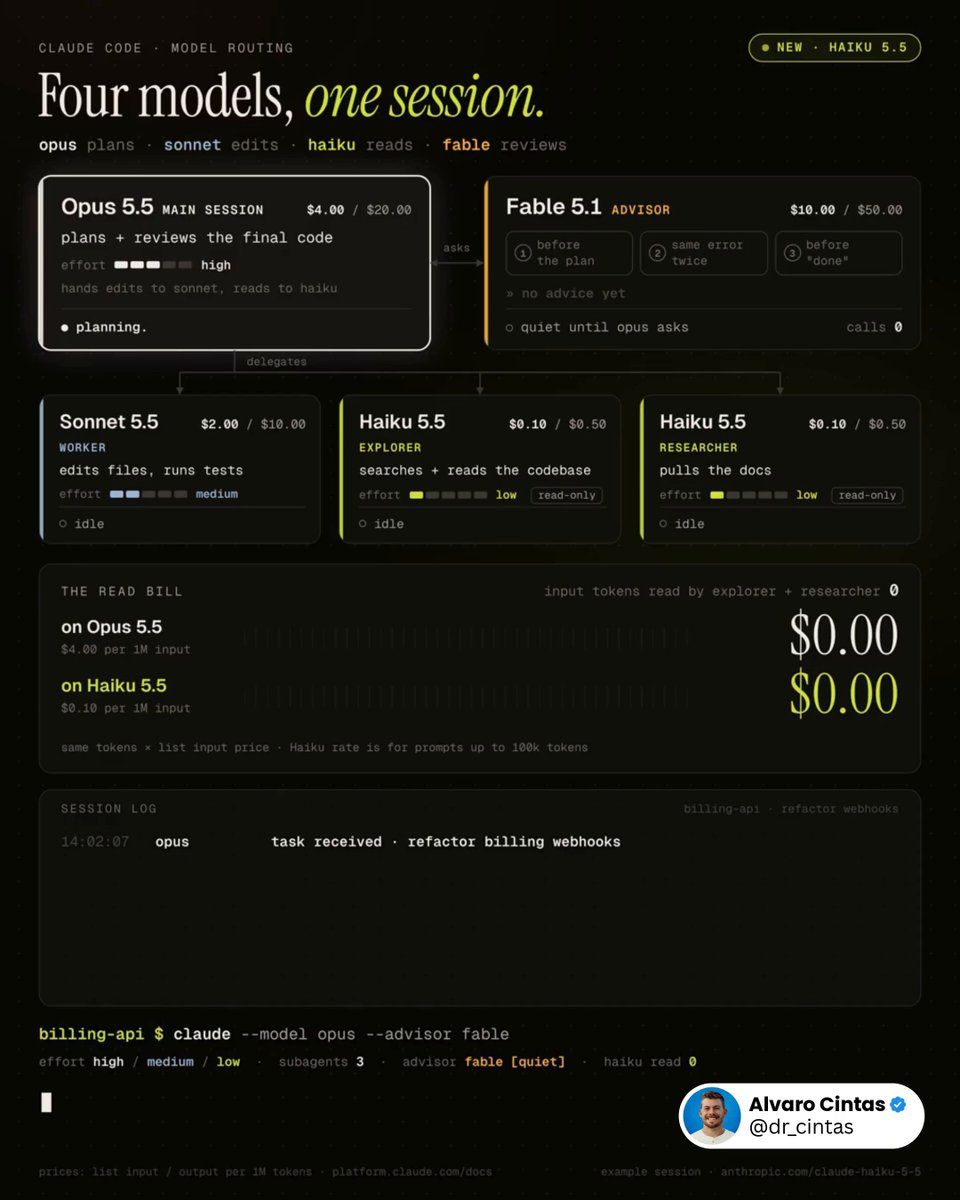
This workflow will save you thousands with Claude. Run Opus 5.5, Sonnet 5.5, Haiku 5.5, and Fable 5.1 together, and stop spending Opus tokens on work that doesn't need Opus. The entire idea in one line: Opus plans, Sonnet edits, Haiku reads, Fable reviews at decision points. Roles, broken down: - Opus 5.5, high effort, owns the plan and reviews the final code - Sonnet 5.5, medium effort, is the worker: edits files, runs tests - Haiku 5.5, low effort, splits into explorer (searches and reads the codebase) and researcher (pulls docs). it's the first Haiku with an effort setting - Fable 5.1, set with /advisor fable. Opus calls it at decision points, and it gets the full transcript each time Three moments Opus tends to call it: → before committing to a plan: is this the right approach? → the same error shows up again: is this going nowhere? → before marking the task done: did something get skipped? Why Haiku only reads: Anthropic's launch post says Sonnet 5.5 and Opus 5.5 are still the better choice for complex agentic coding (Terminal-Bench 4.0: 39.2% for Haiku 5.5, 70.6% for Sonnet 5.5) and that Haiku 5.5 fits narrowly scoped subagent work. so it gets the lookups, not the edits. Anyone still running one model for everything is paying $4 per million input tokens to check whether a file exists. Haiku 5.5 does it for $0.10. Drop this into Claude Code 👇 "Rebuild my Claude Code setup around this structure: Confirm Claude Code is v2.1.293 or later, so the haiku alias resolves to Haiku 5.5. If it isn't, stop and tell me to run claude update. Look through ~/.claude/agents and .claude/agents for subagents already covering explorer, worker, and researcher. Only create new ones for roles that are missing. Set model: haiku, effort: low on explorer and researcher, with no Edit or Write tools. Set model: sonnet, effort: medium on worker. If an existing subagent is locked to a different model, leave it as is and just list it. Name the explorer subagent Explore so it overrides the built-in one, which otherwise runs on my main model. In ~/.claude/settings.json, set advisorModel to fable, and set effortLevel to high for claude-opus-5-5 under modelSettings. A top-level effortLevel in user settings doesn't apply to Opus 5.5. Check for anything disabling the advisor: CLAUDE_CODE_DISABLE_ADVISOR_TOOL, DISABLE_TELEMETRY, or anything blocking feature-flag fetches. Also check CLAUDE_CODE_EFFORT_LEVEL, which overrides subagent effort settings, and CLAUDE_CODE_SUBAGENT_MODEL_FORCE, which makes Claude Code ignore subagent model fields. Report what you find. Don't change any of it yet. Add one line to ~/.claude/CLAUDE.md: consult the advisor before a big plan, when the same error shows up twice, and before marking a long task done. Show every change as a diff first. Wait for my go-ahead before touching anything."

Alvaro Cintas

56,940 просмотров • 16 дней назад

this is f*cking insane, Claude 5.5 agents turned an entire repository into an autonomous engineering harness you can run locally Andrej Karpathy gave 15 Claude 5.5 agents three frontier models and one assignment: build an autonomous software harness that writes, tests and verifies production PRs without human babysitting pick a broken codebase, trigger an issue and watch Haiku 5.5 intercept tool calls while Sonnet 5.5 fans out across 15 parallel branches switch between execution layers while keeping the same workspace. inspect AST file hashes, terminal traces and token savings beside the live river give each model a specific tier: -> Haiku 5.5 intercepts tool calls, hashes file states and filters tokens ( Sonnet 5.5 executes parallel graph routing across 15 sub-agents with 70.6% on Terminal-Bench 4.0 -> Opus 5.5 directs causal loop verification and attacks candidate patches with adversarial test suites -> sandbox runners execute isolated container checks to enforce zero cascading failures a generated code patch can look convincing while failing silent edge cases the loop rejects self-reported model confidence and requires deterministic evidence: passing pytest exit codes, zero linter warnings and strict schema validation before accepting the PR every candidate patch has to show: > the failing test reproduced cold > the exact AST diff generated > zero regression across the existing test suite > the adversarial trace proving the fix holds under stress the harness solved 32 complex terminal tasks across 15 sub-agents in 1.9 minutes. 99.2% passed on the first run within stated SLO budgets; token spend dropped by 88.4% compared to single-agent intern mode give Claude Code your repository, then ask: "Turn this repository into an autonomous production harness: 1. Deploy Haiku 5.5 as the harness interceptor: cache SHA-256 file hashes, strip AST context and filter tool calls before tokens hit the window 2. Assign parallel task branches to Sonnet 5.5 sub-agents using shared git checkpoints and terminal benchmarks 3. Have Opus 5.5 run causal loop verification on every patch. Attack candidate fixes with adversarial edge cases and require passing pytest exit codes 4. Enforce deterministic sandbox containers for all tool calls and log verified telemetry before opening the production PR" start with one subsystem and enforce deterministic test loops before adding more agents include file state hashes and sandbox constraints so the next run reproduces from a clean checkout watch the agents at work below

marfin

24,182 просмотров • 10 дней назад

kimi k3 vs gpt 5.6 sol vs fable 5 vs grok 4.5 Kimi.ai just dropped kimi k3 – a 2.8t param native multimodal model, the first open 3t-class release. key facts: • 1m token context. stable latentmoe activating 16 of 896 experts, built on kimi delta attention (kda) and attention residuals • quantization-aware training from the sft stage onward – mxfp4 weights, mxfp8 activations. moonshot claims ~2.5x scaling efficiency over k2 • max thinking effort by default. low- and high-effort modes are "coming in updates" – there is no way to turn the thinking down today, and you feel it in every run • pricing: $0.30/mtok cache-hit input, $3.00/mtok cache-miss, $15.00/mtok output. claims >90% cache hit rate on coding workloads • benchmarks: swe marathon 42.0 (1st – fable 5: 35.0, sol: 39.0, opus 4.8: 40.0), terminal bench 2.1 88.3, browsecomp 91.2 (1st), program bench 77.8 (1st), gpqa-diamond 93.5. loses frontierswe 81.2 vs fable's 86.6, and deepswe 67.5 vs sol's 73.0 our test – 3 prompts, single-file html, Three.js, fully procedural, no assets: 1. photorealistic european roulette wheel – 37 pockets in the real sequence, mahogany clearcoat bowl, chrome turret, diamond deflectors, flick-to-spin, ball that spirals inward and settles on a mathematically real number 2. las vegas slot machine – 3 reels behind transmissive glass, drag the chrome lever to play, mechanical odometer counters modelled in 3d, coin physics on win 3. full pinball table – 6.5° tilted playfield, flipper impulse physics, spline ramps, drop targets, 6 bumpers, mechanical score reels in the backbox we ran the test on AI/ML API platform results: - cost #1 grok 4.5 – $0.30 #2 kimi k3 – $0.71 #3 gpt 5.6 sol – $2.05 #4 fable 5 – $7.69 - tokens #1 grok 4.5 – 34,241 #2 gpt 5.6 sol – 51,748 #3 fable 5 – 144,126 #4 kimi k3 – 157,999 - lines of code #1 gpt 5.6 sol – 3,054 #2 grok 4.5 – 3,047 #3 kimi k3 – 2,255 #4 fable 5 – 1,950 - generation time #1 grok 4.5 – 5.1 min #2 gpt 5.6 sol – 22.0 min #3 fable 5 – 31.5 min #4 kimi k3 – 75.6 min observations: • kimi k3 is cheap and it is slow. 75.6 minutes across three prompts against grok's 5.1. it is 2.4x grok's price and 15x grok's wall clock. the roulette took 15 min, the slot 18, the pinball 42 • it failed 2 of 3. only the roulette works. the slot machine has reel cutouts on both faces of the cabinet and the symbols face backwards – you can only read your spin by walking around to the rear of the machine. the pinball table stands vertically on its edge with the legs floating detached beside it. • 81% of kimi's output tokens are reasoning, not code. grok: 22%. you are not paying for a bigger answer, you are paying for a longer argument with itself • price per 100 shipped lines – grok $0.010, kimi $0.031, sol $0.067, fable $0.394. a 39x spread for the same three files kimi k3's code quality: upsides: • the roulette is genuinely good – procedural wood grain with real specular breakup, correct european sequence (0-32-15-19-4...), chrome turret, diamond deflectors, clean console • the pinball artwork is the best in the test – a synthwave "nova strike / deep space" field with six individually coloured neon bumper rings, a retro sun on a grid horizon, a nova burst, and a scoring legend printed on the apron. no other model printed the rules on the machine. it is a beautiful texture on a broken object • physics reasoning is real – it derived a 480hz substep for the collider, worked out ball settle conditions and termination guarantees, and checked every ramp exit vector by hand before writing any of it • it is the only model that saw the importmap trap coming. sol shipped a blank white page twice because three.js addons import the bare specifier 'three' and die without an import map downsides: • it dodged that trap on the slot by loading three.js r128 through classic script tags – a 2021 build with no working transmission. its slot glass rendered fully opaque and buried all three reels behind a white pane. the code asks for transmission: 0.93, ior: 1.5 – correct, and silently ignored by a renderer that predates the feature • after 42 minutes and 212k characters of reasoning, the pinball cabinet is not assembled. the table stands vertically on its edge like a wardrobe – the prompt asked for 6.5° from horizontal, it delivered 90°. the legs float detached in the void beside it. head-on it photographs beautifully; orbit ten degrees and it is a painted slab with four chrome rods hovering nearby • the playfield z-fights with the glass – hard black banding across the whole field as soon as you pull the camera back a note on the pinball, in fairness to kimi: nobody passed it. every model shipped broken ball physics and controls you cannot trust. it is the hardest prompt we have run and the whole field failed it, each in its own way kimi k3 reasons better than anything else here and it shows exactly where reasoning pays – physics constants, sequences, edge cases, traps the others walked into follow thehype. for 24/7 ai news, analysis and breakdowns

thehype.

2,190,989 просмотров • 3 месяцев назад

I’ve been testing Hy4 preview in WorkBuddy, and the most interesting part is not simply the model size, it’s how much practical work it can handle with a relatively focused active parameter count. Hy4 preview brings together stronger code understanding, generation, and editing; improved document and information processing; workflow automation; web and game development; cross-tool collaboration; and more reliable completion of complex, multi-step tasks. In other words, it is designed for work that requires planning, tool use, iteration, and follow-through, not just a quick answer in a chat window. Compared with its initial release, the current Hy4 preview is noticeably faster and better-performing in practical workflows. Following an upgrade released yesterday, it can complete tasks with fewer conversation rounds and lower token usage, while reasoning more quickly and making the overall user experience feel smoother from the first instruction to the final result. For my test, I gave it a demanding Three.js game-prototyping task with a 770B-parameter model and 49B active parameters. The result was more revealing than a simple first-look demo: Hy4 preview handled the core logic, edge cases, and follow-up changes while maintaining the broader context of the project. That combination of capability, speed, context, and active compute is what makes its cost-effectiveness worth examining. A fair evaluation should use the same prompt and environment configuration across models, changing only the model itself. That makes it easier to assess task completion, planning quality, tool-calling stability, reasoning speed, token efficiency, and performance over longer workflows without confusing the result with different settings. If you want to test the model yourself, access Hy4 preview through WorkBuddy and see how it performs on a real coding, document, automation, or creative task: Tencent Hy Tencent AI WorkBuddy

Tyler Wayne

56,152 просмотров • 1 месяц назад

HERMES AGENT BECOMES 10X MORE USEFUL WHEN YOU CONFIGURE THESE 5 THINGS. EACH ONE TAKES 5 MINUTES. MOST USERS NEVER TOUCH THEM. 1. THE RIGHT MODELS one model for everything = wrong model for most things. GPT-5.6 Sol: strongest reasoning. daily driver. access through your ChatGPT subscription (Plus or higher). Max plan unlocks higher reasoning effort. Grok 4.5: live X search. fastest responses. access through your X Premium+ subscription. "find me 3 high-engagement Hermes posts from the last 5 days." Grok pulls directly from X. no scraping. real-time. Kimi K3: design powerhouse. comparable quality to Claude Fable 5 at roughly 30% of the price. takes longer to generate. the quality justifies the wait. connect via Desktop app / Dashboard: Models → add provider. GPT-5.6: ChatGPT subscription → OAuth. Grok 4.5: X subscription → OAuth. Kimi K3: OpenRouter or Nous Portal. switch between them mid-session: /model [name] 2. PARALLEL TOOL CALLS Hermes used to call tools one at a time. Gmail, then calendar, then web search. sequential. now: multiple tool calls run simultaneously. "check my emails, check my calendar, tell me the weather in Dubai, and find the latest Hermes updates." four tools at once. results merge when all finish. what used to take 3 minutes takes 30 seconds. automatic after update. no config needed. hermes update 3. FASTER AND CHEAPER WEB SEARCH two improvements. one automatic, one you configure. AUTOMATIC (update only): v0.19.0 processes web pages differently. clean content straight to the agent without redundant processing steps. 60x faster. 49x cheaper. no config needed. CONFIGURE (Firecrawl): Firecrawl is the default scraping backend. strips HTML, ads, navigation, scripts. returns only the text your agent needs. 500 free credits per month on free tier. get your key from firecrawl .dev. add to .env: FIRECRAWL_API_KEY=your_key Nous Portal subscribers: Firecrawl is included through Tool Gateway. no separate key needed. SAVE MORE (auxiliary model): web summarization defaults to your main model. route it to a cheap model: auxiliary: web_extract: model: google/gemini-3-flash-preview cheap model reads the page. premium model reasons about the content. 4. MORNING BRIEF WITH EMAIL + CALENDAR connect Gmail and Google Calendar via MCP: 1. go to mcp .zapier.com 2. add Gmail: enable read and draft only. never enable send. one automated email from the wrong context can cost a relationship. 3. add Google Calendar: read access. 4. click connect → sign in → regenerate token 5. paste the token into Hermes chat tell your agent: "create a

YanXbt

29,620 просмотров • 3 месяцев назад

I just compared Claude Code vs Codex vs Cursor CLI The task was to build a Next.js app with Tailwind 4 and shadcn components to collect customer feedback and showcase it with a widget. I gave all three the same prompt and let them go for 30 minutes to see what they came up with. Claude Code with Opus 4.1 Even though I told it to set up the app in the existing project folder, it tried to create a directory for it. After I interrupted and told it not to do that, it built a demo form and landing page with no errors. I had to ask it to make the demo interactive so users could submit a testimonial and preview it. The landing page looked like AI and was pretty basic, but it worked and it was done in a fraction of the time of the others. Total tokens used: 33k Codex with GPT-5 At the end of the 30 minutes I just could not get Codex to produce a working app. It got stuck in a loop of not being able to set up Tailwind 4 and despite many, MANY, attempts, I ended up with a "failed to compile" error. Total tokens used: 102k Cursor Agent with GPT-5 This was the slowest agent by far and a couple of times I actually thought it got stuck in a loop and was close to Ctrl+C'ing to cancel it. The TUI is really nice though, especially how it shows diffs and it did eventually build a working app (after one or two slight errors that needed fixing) The demo was interactive and it had a very minimal design that looked bare but also a lot less like an "AI generated" app than the Opus 4.1 design. It also wasn't too chatty and just did what it needed to do! Code quality was on a par with Opus 4.1, but it did use 5.5x as many tokens to get there. Still cheaper than Opus on a direct comparison but not when you factor in a Claude Code Max subscription. Total tokens: 188k I'll be able to do a proper comparison and record some videos when I'm back from holiday but for now, Opus is still the more capable model out of the box and Claude Code is the more complete CLI product. It will be interesting to see how Cursor evolve their CLI though with commands and subagents because I think with GPT-5 they have a real shot at providing competition for Claude Code if they can optimise output to get similar quality with less tokens. Jump to 0:40 in the video to see the two apps. Which do you think is which? ;)

Ian Nuttall

195,173 просмотров • 1 год назад

HERMES AGENT LEARNS FROM ITS OWN MISTAKES. UPDATES ITS MEMORY. CREATES ITS OWN SKILLS. NO CLOUD. EVERYTHING STORED LOCALLY. THIS IS HOW THE SELF-IMPROVING LOOP WORKS. most agents start from zero every session. Hermes carries forward what it learned. THREE MEMORY SYSTEMS: 1. PROCEDURAL MEMORY (how to act) stored in ~/.hermes/skills/ as SKILL.md files. when the agent repeats a complex workflow, it saves the procedure as a reusable skill. next time the same task comes up, it follows the skill instead of figuring it out again. you can also create skills explicitly: "create a skill called video-prep that captures how I format my video scripts. spoken english, define jargon inline, no em-dashes, close with a catchphrase." the agent writes the SKILL.md. available as a slash command from that moment. Hermes ships with 90+ skills. the number grows the longer you use it. 2. SEMANTIC MEMORY (durable facts about you) stored in ~/.hermes/memory/memory.md the agent scans conversations for facts worth remembering. preferences, habits, corrections, project details. real example from the video: agent tried to scrape a YouTube channel. URL was wrong. it failed. it updated memory.md with the correct URL pattern so it never makes the same mistake again. you can also save explicitly: "save to memory that my favorite testing framework is pytest" the agent updates memory.md immediately. this file loads into context on every session. the agent knows you better every week. 3. EPISODIC MEMORY (chat history) stored in ~/.hermes/state.db (local SQLite). every conversation. every tool call. every result. searchable with FTS5 full-text search. "search our past sessions. what was the first thing I ever said to you?" the agent queries state.db and finds it. over time, auxiliary models consolidate episodic memory into semantic memory. distilling recurring patterns into durable facts. THE SELF-IMPROVING LOOP: every agent run follows this cycle: → you send a prompt → working memory loads: SOUL.md + memory.md + relevant skills + chat history → agent calls tools (terminal, browser, delegate_task) → agent completes the task, replies to you → AFTER the reply: agent checks "did I learn something worth saving?" → if yes: updates memory.md or creates a new skill → next session starts smarter than the last this happens automatically. you don't ask the agent to learn. it decides what to remember on its own. WHAT MAKES THIS DIFFERENT FROM CLAUDE CODE: Claude Code has memory too. but Hermes stores everything locally. no cloud. your data never leaves your machine. Claude Code doesn't auto-create skills from experience. Hermes turns repeated workflows into reusable procedures. Claude Code memory is instruction-based. Hermes memory is conversational and self-updating. over months of usage, Hermes builds a knowledge base of your preferences, your projects, your mistakes, and the procedures that work for your specific workflow. the agent that remembers your birthday also remembers why your last deploy failed. NO EMBEDDINGS. PLAIN TEXT. Hermes does not use embeddings or RAG for memory. skill and memory search runs on plain text keyword matching. simpler. faster. no vector database to maintain. works entirely offline on your local machine. DELEGATE TO CLAUDE CODE: Hermes can spawn a sub-agent that runs Claude Code in headless mode: "spawn a sub-agent using Claude CLI to build a Python script that fetches the top 5 Hacker News stories to markdown." Hermes delegates. Claude Code writes the code. result returns to Hermes. Hermes runs the script and delivers the output. use Hermes for orchestration. use Claude Code for heavy coding. both tools. not competitors. WHAT HERMES DOES NOT HAVE: no built-in eval or LMOps system. no LangSmith, no LangFuse integration out of the box. trajectory export and logs exist but there is no automated quality tracking. if you need eval, build it yourself or connect external tools. the loop is self-improving. measuring how well it improves is on you. comment LOOP and I'll send you the configs that control how fast Hermes learns and what it remembers. memory limits, skill auto-creation triggers, and the auxiliary model that runs the learning. Replace your entire team with 8 hermes agents👇

YanXbt

23,088 просмотров • 3 месяцев назад

In 2025, it was rational to be skeptical about whether AI would change the future of software development. In 2026, it's not, anymore. With Charity Majors: Timestamps: 00:00 Intro 02:56 How Parse led to Honeycomb 06:00 The limits of individual productivity metrics 09:08 How Charity’s perspective on AI has evolved 13:50 Rewriting code vs. editing code 19:20 Production as a stage of development 22:14 Code reviews 26:56 Non-deterministic systems 31:11 Sensible uses of AI 37:41 The two AI camps 44:40 Why AI works so well for building software 49:42 DevOps 55:13 Modern observability 1:00:40 Handling context overload 1:01:56 What’s new in Observability Engineering’s 2nd edition 1:07:45 What effective leadership looks like 1:10:25 Engineering management: what is changing? 1:16:31 Junior engineers 1:18:01 AI fatigue 1:21:39 Book recommendations Brought to you by: • Antithesis — turbocharge testing of your systems by running your whole system under aggressive fault injection. Teams like Jane Street, and the etcd community rely on Antithesis. • Buildkite — the CI platform trusted by OpenAI, Anthropic, Cursor, Meta, Uber, NVIDIA, Airbnb and many more. Engineered to absorb whatever your coding agents throw at the build queue. • WorkOS — make your app and agents Enterprise Ready, with SSO, SCIM, RBAC, and more. 1. The question engineers need to answer: what would it take for you to be fully comfortable shipping code you have not read? Charity believes it is a “when” and not an “if” that professional software engineers will ship code they never looked at – and thus do not understand – to production. Engineering is building the systems that validate this code, and allow shipping with full confidence. 2. AI could have the software industry go through the “pets” to “cattle” change that compute infra went through in the 2010s. Up to now, writing software from scratch was far more expensive than editing existing software. But now, generating hundreds of variants of a function can be done faster than how long it would take you to hand-write it once. Charity believes that we might be at the beginning of the transition from “pets” to “cattle” that happened at the hardware infrastructure layer. Before the 2010s, configuring and repairing individual servers was commonly done. But with tools like Terraform and Kubernetes, individual servers having issues are no longer fixed up: they are re-created instead. Charity thinks the same might happen with code, sooner rather than later. When there’s an issue with the code, generate new code that solves it, and is verifyably correct.​ 3. Non-deterministic systems require more engineering discipline versus before. With code written by AI, we’re reducing the trust in the code (because we no longer wrote it), so we need to increase trust at the other part of the development process. Specifically, at validation: with things like tests, evals, and conformance testing.

Gergely Orosz

33,849 просмотров • 2 месяцев назад

Matthew Gallagher Built a $401M Company in Year One with 2 People. And the tool behind it? Claude Code. This year he's on track for $1.8B. Sam Altman predicted this. It's happening now. The problem? It costs money. API credits stack up. Monthly bills keep growing. Every prompt eats your budget. Every project drains your wallet faster. Until now. Two methods. 99% cheaper. One is completely free. Forever. $0. Not a trial. This video breaks down both step by step. ↓ Let me put this in perspective. $100-$500. That's monthly. That's what you spend. That's $6,000/year on API credits. Just to use a tool you haven't shipped anything with. The $401M guy? Spending $0. Same capability. Shipping weekly. Different cost structure. Different results. Different life. I'm about to hand you his cost structure for free. ↓ Open source vs closed source. Pay attention. Closed source: Claude. GPT-4. Pay per token. Meter always running. Open source: Qwen. Llama. Mistral. Free to download. Free to run. Free forever. No meter. No tokens. No bill. Here's what nobody tells you: 80% of coding tasks? Open source handles them. More than handles them. Writes clean code. Debugs errors. Generates boilerplate. Handles routine work perfectly. You're paying premium prices for tasks that don't need premium intelligence. That's hiring a brain surgeon to put on a bandaid. Smart play: Free models for the 80%. Paid credits for the 20%. That's what the $401M guy does. That's what this video teaches you. Follow Himanshu Kumar for more breakdowns that turn free tools into real businesses. ↓ Method 1: Ollama. Local. Free. Forever. Download it. Pull a model. Point Claude Code at it. Done. No internet needed. No API keys required. No monthly subscription. No token counting ever. No bill. Today. Tomorrow. Ever. Your data never leaves your computer. Complete privacy. Complete freedom. Claude Code thinks it's talking to the cloud. It's talking to your laptop. For $0. The video walks through every step: Every config file. Every variable. Every command. Every click. If you can follow a recipe, you can do this. People who set this up 3 months ago? Saved $300-$1,500 since then. Workflow didn't change one bit. ↓ Hardware you need: 16GB RAM: 7B models run smooth. 32GB RAM: 32B models run comfortable. 64GB + GPU: biggest models available. No GPU? Still works. Just slower. Few extra seconds. That's it. Your $1,500 laptop is sitting there running Chrome and Spotify. Put it to work saving you $200/month instead. Follow Himanshu Kumar for more breakdowns that turn free tools into real businesses. ↓ Method 2: Open Router. Free Cloud. No Hardware. Weak machine? Don't want local setup? This method is for you. Free AI models in the cloud. No download. No hardware. Configure Claude Code to route through Open Router. The config: Base URL: Open Router API. API key: free Open Router key. Default Sonnet: free. Default Opus: free. Default Haiku: free. Small fast model: free. Subagent model: free. Free. Free. Free. Free. Free across the board. Same interface. Same commands. Same workflow. Zero cost. Copy the config from the video. Paste it. Save $200/month. Starting today. Right now. ↓ When to use which: Ollama (local): Best for privacy. Best for offline work. Best for unlimited usage. Best if you have decent hardware. Open Router (cloud): Best for weak machines. Best for instant setup. Best for trying different models. Best if you don't want to manage anything. Both methods: Best for 80% of your daily work. Still use paid Claude for: Complex architecture. Multi-file refactoring. Deep reasoning tasks. The 20% that actually needs it. $20/month instead of $200/month. Same output. 90% less cost. ↓ The math that should make you angry. You (current): $200-$500/month. $2,400-$6,000/year. $7,200-$18,000 over 3 years. You (after this video): $20-$50/month. $240-$600/year. $720-$1,800 over 3 years. Savings over 3 years: $6,480-$16,200. That's a used car. That's seed money. That's 6 months of rent. All from one 25-minute video. All from 15 minutes of configuration. Highest ROI 25 minutes you'll spend this year. ↓ The limitations. I won't lie to you. Open source is not Opus. Not as smart on complex reasoning. Not as good at long-context tasks. Makes more mistakes on nuanced problems. But they are: Free. Capable. Getting better monthly. Good enough for 80% of daily work. Smart cost management isn't being cheap. It's being strategic. Expensive tool when it matters. Free tool when it doesn't. ↓ The one-person billion-dollar company is coming. $401M in year one proved it's possible. The building blocks: AI that codes: Claude Code. Way to run it free: this video. Distribution: the internet. Customers: everyone. Only missing ingredient? Someone who builds. Not reads about building. Not saves posts about building. Not bookmarks videos about building. Builds. Tools are free. Knowledge is free. Opportunity is screaming. You're still "thinking about it." ↓ Your action plan: Tonight: Watch the video. Tomorrow morning: Set up Ollama or Open Router. Tomorrow afternoon: Build something. Anything. This week: Build a second thing. Faster. This month: Charge someone for it. One video. One setup. One weekend. $0 cost. Unlimited potential. Or keep paying $200/month for something you could get free. Keep consuming instead of building. Keep planning instead of shipping. Matthew Gallagher didn't plan a $401M company. He built it. Full video attached. Every method. Every config. Every tradeoff. 25 minutes. Your move. Follow Himanshu Kumar for more breakdowns that turn free tools into real businesses.

Himanshu Kumar

13,799 просмотров • 6 месяцев назад

Cerebras inference is very fast. So fast that it changes how we think about configuring our LLMs for voice agent use cases. Kimi K2.6 is a 1T parameter reasoning model that Cerebras serves at 650 - 1,000 tokens per second (end-to-end throughput), with time to first token metrics as low as 150ms (latency). These numbers are two to three times faster than other similarly capable models. The biggest lever we get from this kind of speed is that we can use the model in reasoning mode, and still have excellent "time to first non-thinking token." This solves a big pain point we have in 2026 for voice agent use cases. Almost all recent innovation in post-training has focused on making models good at reasoning ("test time compute"). This is great, but it makes the user-facing model latency much, much slower. Which is a problem for conversational voice agents. We can run Kimi K2.6 with reasoning turned on, and get responses faster than other models produce with reasoning disabled. On my 30-turn voice agent benchmark, Kimi K2.6 with reasoning enabled ties GPT 5.1 and Haiku 4.5 with reasoning disabled, and is still about 200ms seconds faster! On my primary task agent benchmark, Kimi K2.6 is now the #2 model. It ranks just behind Gemini 3.5 Flash in "high" reasoning mode, and tied with GLM 5, Sonnet 4.6, and GPT 5.4 with reasoning set to "low." But Kimi K2.6 completes each turn in the agent loop in under 500ms. The other four models are all at least 3x slower. (Models only qualify for this benchmark if they can complete task turns at a P50 <4s.) A couple of other things that this speed buys us, for production voice agents: - Tool calls happen fast enough that we don't have to work around tool call latency in our pipeline design. - We can prompt the model to output structured data at the beginning of a response, followed by plain text for voice generation. This opens up possibilities like asking the model to do complex classification/generation tasks that influence the rest of the pipeline. For example, the model could create a detailed style prompt for a steerable TTS model, for each individual conversation turn. And, of course, you can use Kimi K2.6 with reasoning turned off. Cerebras calls this "instant" mode. Here's a video of a Cerebras Kimi K2.6 voice agent with voice-to-voice response time, measured at the client, under 500ms. This is the true response latency as perceived by the user, including all network and audio codec overhead, transcription and turn detection, Kimi K2.6 token generation, and voice generation. 500ms is, effectively, instant. So the Cerebras naming for this mode is a propos. :-)

kwindla

40,593 просмотров • 5 месяцев назад

Why is the creator of OpenCode pretty skeptical about AI productivity gains, and the hype around AI? A very conversation dax (and lots of truth bombs:) Timestamps: 00:00 Intro 07:03 Dax’s path into tech 09:04 Early startup experience 13:16 Getting involved with open source 16:13 OpenCode 23:17 Anthropic banning OpenCode 30:34 From terminal to GUI 32:34 OpenCode’s business model 36:33 Why inference is profitable 39:11 GPU bottlenecks 40:54 AI hype 45:50 AI spending 48:47 Dax’s memo 55:41 Dax’s skepticism of predictions 58:58 Engineering culture at OpenCode 1:02:38 How building works at OpenCode 1:05:36 Taste and quality 1:11:32 Dax’s work setup 1:12:35 The role of engineers and EMs 1:15:50 Advice for engineers 1:18:12 Book recommendation Brought to you by: • Antithesis – verify your system’s correctness without human review or traditional integration tests – and avoid bugs or outages • WorkOS – everything you need to make your app enterprise ready • turbopuffer – a vector and full-text search engine built on object storage. It’s fast, cheap, and extremely scalable Three interesting thoughts from Dax: 1. No AI-native coding agent company is “winning” by being better with AI. Dax says that none of OpenCode’s competitors are crushing them, and that nobody is using AI so well that others cannot compete. 2. Most software engineers profit from AI as time gained, not increased output — unless you change incentives! Dax says the natural way for software engineers to “cash out” their AI tooling gains is with time savings, by doing the same work as before, but faster. Until compensation and motivation structures change, most teams should expect output to stay flat while engineers go home earlier. There’s nothing wrong with this, but AI vendors sell a different outcome to CFOs: increased output. 3. AI code generation mutes the “guilt” of doing the wrong thing, but this builds up tech debt. Pre-AI, writing a hack felt bad, the second time it felt really bad, and by the third time you’d often just refactor in order to fix up the code. Now, the agent hides the hack, which skews devs’ judgment and results in less tech debt being cleaned up.

Gergely Orosz

232,386 просмотров • 4 месяцев назад

This is one of the craziest AI launches of 2026 and it came out of basically nowhere (Save this). A company called Subquadratic just shipped SubQ, and the benchmarks are almost hard to believe. To understand why this is such a big deal, you have to understand the fundamental problem that has defined AI for the last decade. Every large language model in existence is built on transformer architecture, and transformers use a mechanism called standard attention that checks every single word in a sequence against every other word. Double the context length and compute doesn't double, it quadruples, triple it and compute goes up nine times. This quadratic scaling is why frontier models have been stuck at roughly 1 million tokens, why running them at those lengths gets expensive fast, and why the AI labs have essentially been printing money charging you more the longer you need the model to think. The industry has known this problem existed since 2017 but they scaled it anyway. SubQ is built from the ground up to solve it. Instead of processing every possible token relationship, SubQ's sparse attention architecture identifies which relationships actually matter and ignores the rest meaning compute is used where it counts and wasted nowhere else. The result is that compute scales linearly with context length instead of exponentially, and the implications of that one architectural shift are enormous. At 12 million tokens, SubQ reduces attention compute by nearly 1,000x compared to standard frontier models and at 1 million tokens, it runs 52x faster than FlashAttention. And it does all of this while posting frontier level accuracy, scoring 95% on the RULER 128K long-context benchmark versus Claude Opus 4.6's 94.8%, and an 81.8 on SWE-Bench Verified coding tasks, besting Opus 4.6 (80.8) and DeepSeek 4.0 Pro. The cost comparison is where it gets genuinely insane. SubQ runs at under $1.50 per million tokens less than 5% of what Claude Opus charges. On the RULER benchmark, running the test with SubQ cost $8, running the same test with Claude Opus cost $2,600 and that's a 300x cost reduction at equivalent or better accuracy.. Subquadratic launched with $29 million in funding, SubQ is available today for early access via API, and SubQ Code, a coding agent built on the architecture ships alongside it. The transformer has been the unchallenged foundation of every major AI system since 2017. SubQ is the first serious evidence that something structurally better might have just arrived.

Milk Road AI

278,709 просмотров • 5 месяцев назад