Загрузка видео...

Не удалось загрузить видео

На главную

⛳️ Tiny Golf - A Very Cool Meta Horizon Start Developer Competition Submission! Mixed Reality games are challenging because they must adapt to real-world spaces with dynamic content, but they don’t have to be complex. Tiny Golf is a great example, using a minimalistic aesthetic and 🙌 hand-tracking pinch-and-pull...

31,749 просмотров • 8 месяцев назад •via X (Twitter)

Комментарии: 0

Нет доступных комментариев

Здесь появятся комментарии из оригинального поста

Похожие видео

📣 I talk a lot about Meta SDKs because I spend a lot of time with these tools. But also when someone asks me what VR/MR tools they can use for cross platform support, I recommend 𝗨𝗻𝗶𝘁𝘆’𝘀 𝗫𝗥 𝗧𝗼𝗼𝗹𝗸𝗶𝘁 which provides: - 𝗖𝗿𝗼𝘀𝘀-𝗽𝗹𝗮𝘁𝗳𝗼𝗿𝗺 𝘀𝘂𝗽𝗽𝗼𝗿𝘁: Meta Quest, OpenXR, Windows Mixed Reality, + more - 𝗜𝗻𝘁𝗲𝗿𝗮𝗰𝘁𝗶𝗼𝗻𝘀: Hover, select, grab - 𝗙𝗲𝗲𝗱𝗯𝗮𝗰𝗸: Haptic + visual tint/line for possible & active interactions - 𝗨𝗜: Canvas interaction via XR controllers - 𝗨𝘁𝗶𝗹𝗶𝘁𝗶𝗲𝘀: XR Origin support for stationary & room-scale VR - 𝗫𝗥 𝗛𝗮𝗻𝗱𝘀: this is an extended package to support more advanced hand tracking interactions 👉 Also, it supports 𝗔𝗥 𝗳𝗼𝗿 𝗺𝗼𝗯𝗶𝗹𝗲 𝗳𝗲𝗮𝘁𝘂𝗿𝗲𝘀 𝘁𝗵𝗿𝗼𝘂𝗴𝗵 𝗔𝗥 𝗙𝗼𝘂𝗻𝗱𝗮𝘁𝗶𝗼𝗻, the features are: - 𝗔𝗥 𝗴𝗲𝘀𝘁𝘂𝗿𝗲 𝘀𝘆𝘀𝘁𝗲𝗺: Maps screen touches to Input System gesture events via TouchscreenGestureInputController - 𝗦𝗰𝗿𝗲𝗲𝗻-𝘀𝗽𝗮𝗰𝗲 𝗶𝗻𝗽𝘂𝘁: Feeds touch data into XRRayInteractor for AR interaction - 𝗔𝗥𝗧𝗿𝗮𝗻𝘀𝗳𝗼𝗿𝗺𝗲𝗿: Converts place, select, translate, rotate, scale gestures into object manipulation 👨‍💻 And to emulate your apps/games without physical devices I recommend the following: - 𝗫𝗥 𝗗𝗲𝘃𝗶𝗰𝗲 𝗦𝗶𝗺𝘂𝗹𝗮𝘁𝗼𝗿 for VR/MR to test your interactions - 𝗔𝗥 𝗙𝗼𝘂𝗻𝗱𝗮𝘁𝗶𝗼𝗻 𝗥𝗲𝗺𝗼𝘁𝗲 𝟮.𝟬 for AR Foundation testing, this allows you to remotely test all the AR features by connecting the Unity editor to your physical device (iOS or Android) 💡 Are you using Unity’s XR Toolkit? ISDK? any other toolkit?

Dilmer 👓

12,943 просмотров • 4 месяцев назад

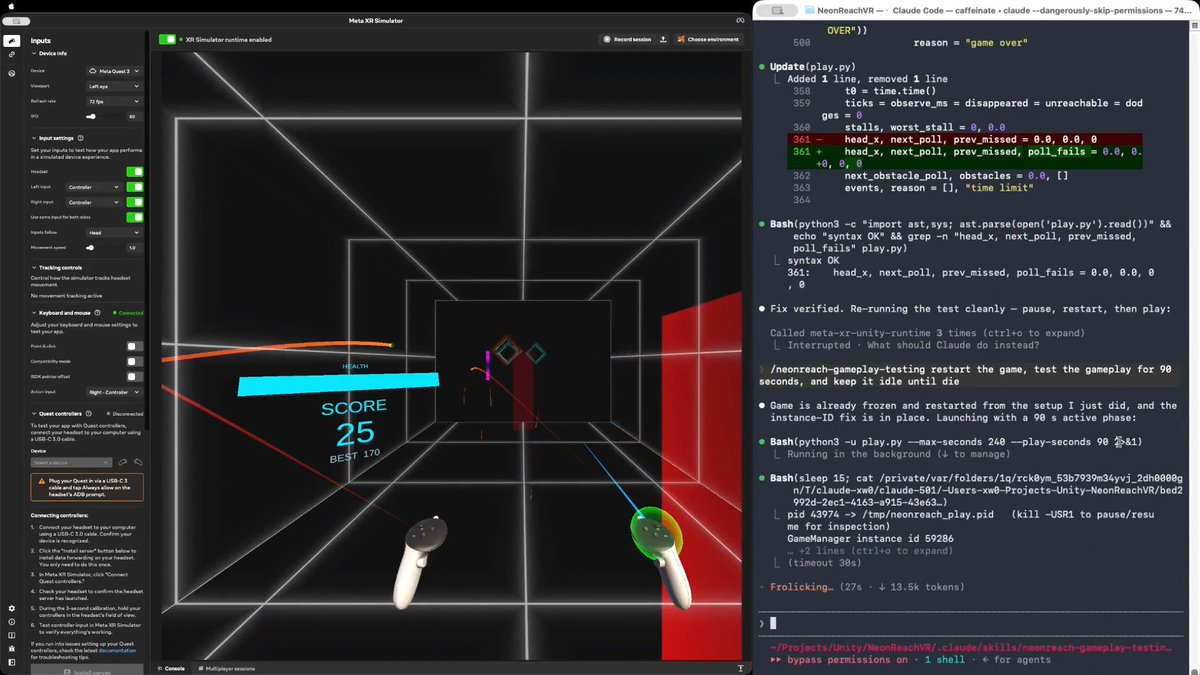
Would you believe an AI agent can test a real VR action game in real time, the way a person plays it? Meta XR Operator makes it possible. As far as I know, this is the first time. I am not talking about tapping a menu or replaying a recorded click path, but genuinely moving, shooting, and using the same game mechanics a human player does. In NeonReach VR, which is a real (and open source) action game, rings spawn 12m out and come at you somewhere between 1.5 and 5.5 m/s, getting faster over a 90 second ramp. There are three kinds: straight, weaving side to side, and spinning. Every shot is a full slingshot cycle, so you press, pull back, aim, then release. Obstacles arrive at head height and cost you a life if you don't get out of the way. You have ten lives. Here is why the game is hard for an AI agent. Even though Meta XR Operator gives the agent everything it needs to observe the app and act inside it, the agent still cannot play. One agent turn takes 10 to 15 seconds. One throw is four steps that have to happen in order, because the press has to latch before the pull, and they cannot be batched into a single call. So a throw costs about 45 seconds. A fast ring only exists for 2.3 seconds. One action takes 20x longer than the target is alive. Prompt tuning does not close a gap that size. What works is a three stage path: EXPLORATION, then SKILL, then SCRIPT. 1/ EXPLORATION. The agent drives the live app and works the game out on its own. It verified the coordinate mapping by setting a pose and reading it back, then derived the launch model. The more useful output was the traps it found. For example, the player's own body collider silently deflects a ball released inside it, with no error and no log line. That produced two confident wrong conclusions before anyone caught them. 2/ SKILL. All of that gets written down as a reusable SKILL.md plus an aim solver. There is a section that separates what was actually verified from what was assumed, so a wrong conclusion cannot quietly turn into doctrine. This stage also produced the trick that mattered. Set timeScale to 0 and a throw becomes atomic in game time, so however long the agent spends thinking never shows up in the shot. 3/ SCRIPT. The agent then compiles everything into a player script, a loop that observes, decides, and throws, calling the MCP servers directly from Python with no model in the hot path. Round trips drop from 10 to 15 seconds down to something between 1 and 16 milliseconds. The loop runs at 23 Hz, about 0.75 seconds per throw, roughly 60x faster than the agent doing it turn by turn. The result is that it plays like a person, which you can see from the attached video. It tracks the rings, works out where each one is going, throws with whichever hand is free, moves out of the way of the obstacles, and does not wait around to see whether the last throw landed. Shipping settings, no difficulty edits, no health locks, no slow motion. It plays until it actually loses. The takeaway generalizes beyond games: an agent does not have to be the player. Even following the same rules as a player, it has too much latency between moves. Having the agent write the thing that acts bypasses that constraint entirely. Try it yourself: or explore the agent-created skill and scripts: Based on NeonReach VR by Dilmer, with no code changes. I only upgraded its Meta XR Core SDK to v205, which ships Meta XR Operator. Our blog post, Introducing Meta XR Operator: Close the Build-Test-Verify Loop for VR: Disclosure: I work at Meta. And this represents my own opinion. #XR #VR #AI #MetaQuest #Unity #GameDev

Xiang Wei

52,877 просмотров • 23 дней назад

Hello everyone 👋 It is pretty excited to know that Unity released a new VR Multiplayer template 🚀🥳! This template integrates Unity Gaming Services, Netcode for GameObjects, and the XR Interaction Toolkit, enabling you to quickly launch your next social VR game. 📌 Key features include: 👉 XR Hands 1.4.1: Access hand tracking data from devices that support it. 👉 XR Interaction Toolkit v3.0.1: A high-level, component-based system for creating XR experiences, facilitating 3D and UI interactions from Unity input events. 👉 XR Plugin Management 4.4.1: Streamlines XR plug-in lifecycle management and offers a build-time UI through Unity Unified Settings. 👉 Netcode for GameObjects 1.8.1: Provides networking capabilities for GameObject and MonoBehaviour workflows. 👉 OpenXR 1.10.0: An open standard by Khronos that simplifies AR/VR development across various devices. ☁️ Unity Cloud Multiplayer Services: - Authentication 3.3.1: Offers anonymous and platform-specific authentication solutions. - Lobby 1.2.0: Facilitates player discovery and connection for various multiplayer scenarios. - Relay 1.6.0: Ensures secure player connectivity via a join code system, eliminating the need for third-party solutions or dedicated servers. - Vivox 16.0.0: Enhances multiplayer experiences with in-game voice and text chat capabilities. ℹ️ To access the template and additional documentation check out: #unity #multiplayer #xr

Dilmer

12,048 просмотров • 2 лет назад