

Oleg Frolov
@Volorf • 7,122 subscribers
Design and Engineering @EvenRealities. Experiment with #spatialcomputing. Build creative tools.
Shorts


Videos

Started experimenting with hand-tracking-based interactions for my little voxel editor – BoxelXR. There are a lot of things to tune, but overall it feels good. Though it would require some decent work in sound design to compensate for the lack of haptic feedback.
Oleg Frolov917,111 просмотров • 11 месяцев назад


Finally got a Vision Pro, and now I can test all the prototypes that I made for VisionOS last year 🥳 My overall impression of Vision Pro: a piece of art. The user experience is very smooth and solid. Developing for VisionOS is a pure joy. No glitches and bugs so far. The real-time interactive updates in the preview are *chef kiss*. People who have been in XR for a while are not really spoiled by things that just work. In this regard, the Vision Pro experience feels magical. We are always happy when a system's behaviour matches our expectations (a little dopamine reward to celebrate the accuracy of our predictions). The greatest features for Spatial Designers: UI panel material highlights, UI panel shadow, and UI panel translucency. It finally makes spatial transformations meaningful (for free!). You see how your UI engages with the environment using visual affordances that people get used to. And yeah, as you can see, I recorded this video at night, and it worked great. So it's excellent news for all-night hackers 😁 #handtracking #directmanipulation #spatialcomputing #spatialdesign #visionpro #visionos #swiftui #mixedreality
Oleg Frolov156,698 просмотров • 2 лет назад

Made another prototype to explore how you can create a voxel with hand-tracking. When you push the main voxel, it generates “wireframe” voxels along its path. The interaction itself feels fun and effortless, but it requires generated voxels to be in a wireframe or ghost mode to avoid overlapping with your hand. Tools: XCode + RealityKit + SwiftUI Device: Apple Vision Pro
Oleg Frolov51,552 просмотров • 8 месяцев назад

Here is another haptic feedback experiment with hand tracking. This time there are more boxes! Or cuboids, for greater scientific rigor. I tried using different haptic patterns for different hover effects — it worked very well. Really, haptics are a missing piece in the hand-tracking experience to make it feel solid. Tools: Unity3D + C# MR Device: Quest3 Haptic device: HapticLabs's Prototyping Kit Music: PO-12 and Orchid
Oleg Frolov50,392 просмотров • 10 месяцев назад

Played with the 3 Newton's motion laws in RealityKit. ECS is fun!
Oleg Frolov37,958 просмотров • 8 месяцев назад

If you take a moment to observe the real-world interaction systems around us that have been used for some time, you'll notice they tell a story of past interactions. You can see the physical evidence of how users have interacted with them – like scratches and fingerprints. While some might view this wear and tear as a drawback, I believe it has several components that help make the UX better: Memory: Collective and Personal. These artifacts store the history of interactions. This storage system has a practical impact: it optimizes our cognitive load. When interacting with a system, it subtly guides you based on your past interactions. For instance, the most worn button on a dashboard often indicates the starting point of interaction. Insights: Pattern Recognition. Even with a system you've never used before, these signs of aging can offer valuable clues. They reveal interaction patterns through their imperfections. Take a beat-making machine as an example. The most worn pads – maybe those labeled "Kick," "Hits," and "Share" – not only show their frequent use but also guide you on how to interact with the device and which aspects of it deserve your attention. I made a prototype to understand how the idea might work on touch devices. I slightly exaggerated the "aging" effect. But it felt good. I think this approach would benefit spatial interaction systems more since it resembled real-world objects' behavior the most. #ux #uxdesign #interactiondesign #uidesign #ui #swiftui #prototyping
Oleg Frolov99,194 просмотров • 2 лет назад

After I shared my prototype with an AR Camera Portal, a few people asked me what would happen if it was not a camera stream, but the scene itself was attached to the portal with all the physics affected. Good question! I made a quick prototype to test it. And the answer... You can see it! It's FUN. Of course, the behavior might seem wholly messed up, but when one sees a failure, another sees an opportunity. You might be able to leverage these two modes to activate some game mechanics, like solving puzzles or repurposing your weaponry. #mixedreality #prototyping #spatialcomputing #3dmath #xr #xrdesign #xrdevelopment
Oleg Frolov54,355 просмотров • 1 год назад
It was a fun year: 🕹️ Made a ton of prototypes to explore the blend between physical and virtual. 📐 Gave a talk about math for XR at the Design Engineering Nights. Thank you, Tikhon Belousko , for inviting me! 🖌️ Wrote an article based on the talk. 🏁 Had an unforgettable Miata trip around the Lake District. ⭐️ Became a finalist of #XRCC. 🧑🎓 Got comfortable with ECS and RealityKit. 🎙️ Had an amazing conversation about XR and all this stuff in the Blueprint of Designer podcast. Thank you, Dean Heasman , for having me! 📸 Designed a camera tablet device and was a part of the development forces of the coolest Camera Experience solution for VR — LIV's LCK. 🔬Delved into designing and programming 3D UI frameworks. Happy New Year 🥳
Oleg Frolov29,096 просмотров • 9 месяцев назад

It was a lovely year. Implemented all planned features for BoxelXR and started developing a version for VisionOS with the hand-tracking first approach. Prototyped a ton of spatial experiences. Gave a few talks about Spatial Design and, most importantly, met many great and inspiring folks. Thank you all ❤️ Happy New Year 🥳
Oleg Frolov44,415 просмотров • 1 год назад

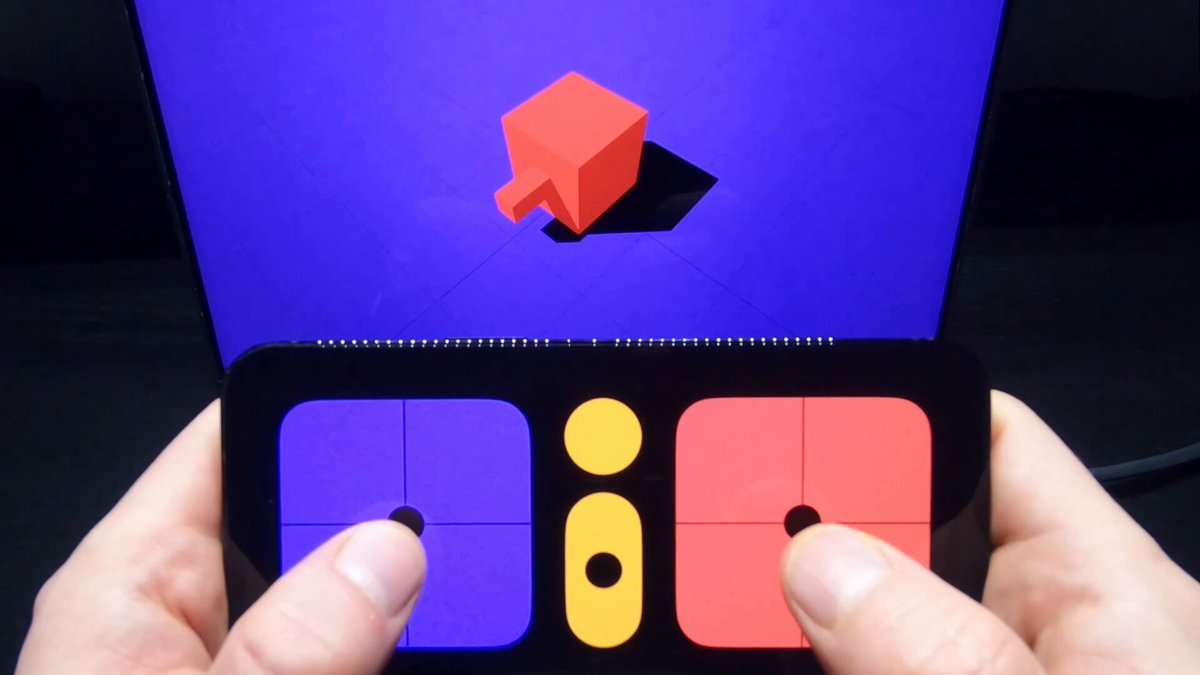
Added an AR Display to my phone joystick. It smoothly follows your hand's position. You can also switch to a big screen view. It will move along your sight direction and stay static. In future iterations, I will add a dedicated section in the phone app to control it (distance, size, surface snapping, anchoring, etc.). Another thing to try is to replace a video stream with a portal of the game itself. Originally, I started developing this prototype for the Quest platform, but now I realize that it makes more sense in Apple's ecosystem since they already have cross-device mirroring functionality, and what I showed would be a logical extension of their approach. I probably need to rewrite it for Vision Pro 😊
Oleg Frolov35,838 просмотров • 1 год назад

Redesigned the previous prototype with visual mechanics inspired by Blender. The circular selection interaction pattern is a great way to enhance accessibility and improve accuracy by restricting item selection to a single dimension and, therefore, reducing noise in user input. For a circular menu, one may describe spatial transformations using polar coordinates components: Radius and Angle. I used Radius to set selection availability and Angle to define the selected item. Plus, this particular pattern allows you to expose the names of the items, which might be helpful in cases when the functions of the items are not self-obvious. Feel free to test the prototype on your own and share your thoughts :) #handtracking #xrinteraction #xri #xr #virtualreality #unity3d #prototyping #spatialcomputing #spatialdesign #spatialui #ux #ui #xrdevelopment #spatialprototype #interactiondesign
Oleg Frolov38,202 просмотров • 2 лет назад

Hand Menu Interaction. The simplest trick to improve the accessibility of floating hand-attached UI panels for spatial interactions is to smooth their movement. It allows us to stabilize them and mitigate a hand tremor due to hand-tracking imperfection and/or physiological condition. (Interestingly, the visual stabilization helps reduce the physical tremor itself. I guess it normalizes the hand muscles/brain feedback loop when you target the interactables). By the way, if you are curious about how to design and prototype spatial hand-tracking-based interactions like this — join my little workshop at Hatch Conference. #handtracking #prototyping #menuinteraction #interactiondesign #spatialdesign #spatialcomputing #mixedreality #vr #virtualreality #xr #metaquest #uxdesign #uidesign #spatialui
Oleg Frolov27,218 просмотров • 3 лет назад

![Explored the finger menu with a depth-based layout. Felt fun. Microinteractions/UI motion helped to compensate for the lack of haptic feedback by providing rich visual clues and reinforcing the user's intentions (all these subtle micro-movements). Based on the prototype, here are a few things to consider when you use this interaction pattern: 1) Perspective visual distortion. It might take more time to recognize visually distorted signs when they are arranged by depth. It's a good idea to use well-known sign sequences where the current selected element gives you a hint about the previous and next ones. A user should have an embedded knowledge of how the elements in the menu are sorted. A number selector might work well with it 2) Low range of hand movement in stationary mode. Because you need to keep visual contact with the UI, the useful range of possible hand movement is very limited. You must position your hand in front of your eyes, maintaining a comfortable distance. It restricts the number of items you can have on the menu. Plus, the trigger distance (30-40mm) also reduces the amount of menu elements you can use. Two or three items work the best (four is max). Download APK [Meta Quest] — #spatialdesign #spatialui #spatialux #vr #unity3d #prototyping #handtracking #interactiondesign #virtualreality #productdesign #xr #xrdesign #xrinteractiontoolkit #xrdevelopment #spatialcomputing](https://image.24vids.com/tw-1764565204350775468/ext_tw_video_thumb/1764564072459071490/pu/img/Ga_Yf8Wd_lxQlHe1.jpg)
Explored the finger menu with a depth-based layout. Felt fun. Microinteractions/UI motion helped to compensate for the lack of haptic feedback by providing rich visual clues and reinforcing the user's intentions (all these subtle micro-movements). Based on the prototype, here are a few things to consider when you use this interaction pattern: 1) Perspective visual distortion. It might take more time to recognize visually distorted signs when they are arranged by depth. It's a good idea to use well-known sign sequences where the current selected element gives you a hint about the previous and next ones. A user should have an embedded knowledge of how the elements in the menu are sorted. A number selector might work well with it 2) Low range of hand movement in stationary mode. Because you need to keep visual contact with the UI, the useful range of possible hand movement is very limited. You must position your hand in front of your eyes, maintaining a comfortable distance. It restricts the number of items you can have on the menu. Plus, the trigger distance (30-40mm) also reduces the amount of menu elements you can use. Two or three items work the best (four is max). Download APK [Meta Quest] — #spatialdesign #spatialui #spatialux #vr #unity3d #prototyping #handtracking #interactiondesign #virtualreality #productdesign #xr #xrdesign #xrinteractiontoolkit #xrdevelopment #spatialcomputing
Oleg Frolov22,202 просмотров • 2 лет назад

Integrated an iOS controller I made earlier with an AR scene. Recorded on Meta Quest in the Passthrough mode. Meta Quest App: Unity + XR Integration Toolkit. iOS App: XCode + SwiftUI Communication protocol: WebSocket #ar #augmentedreality #xr #prototyping #unity3d #swiftui #metahorizon #ios #xrdevelopment #xrdesign #mixedreality #metaquest
Oleg Frolov11,189 просмотров • 1 год назад

Prototyped another iteration of a hand-tracking-based BoxelXR toolbar. This time, it's a circular menu spawned in front of a user once the index pinch is triggered. Notes: 1) It works great with four elements, but it's hard to scale for a higher number; 2) The selection interaction is forgiving for spatial positioning errors. This is because a 3D hand span is interpreted through a 1D angle range (a 1D subspace in the polar coordinate system of 2D projection space, which is a subspace of the 3D space of the experience, respectively). This prevents false positives and makes it easy for users to execute. Precise muscle coordination is not required, either. Design tip: Lower the dimensionality of your interaction to reduce cognitive loads and make it more accessible. 3) Using depth-based animations to show different UI states is a great way to leverage the third dimension and add something interesting to the experience. But be careful. When the UI faces a user's face, the contrast in the motion might be low, so use it only as an additional layer. In this prototype, color coding is the primary way to mark changes in a UI state. ⬇️🐙🐱 Download the prototype — #handtracking #xrinteraction #xri #xr #virtualreality #csharp #unity3d #prototyping #spatialcomputing #spatialdesign #spatialui #ux #ui #xrdevelopment
Oleg Frolov11,777 просмотров • 2 лет назад
Больше нет контента для загрузки